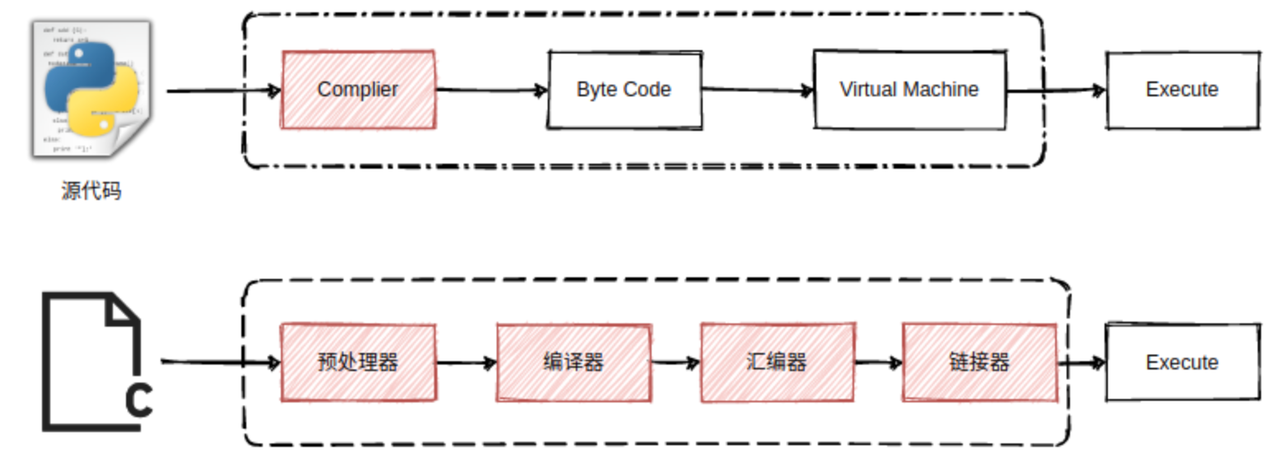
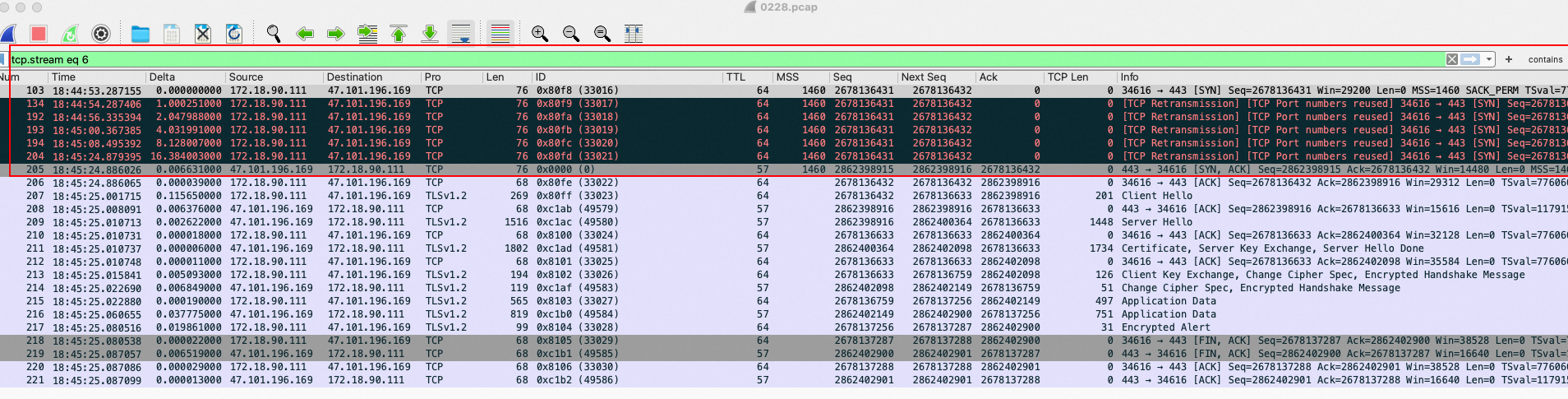
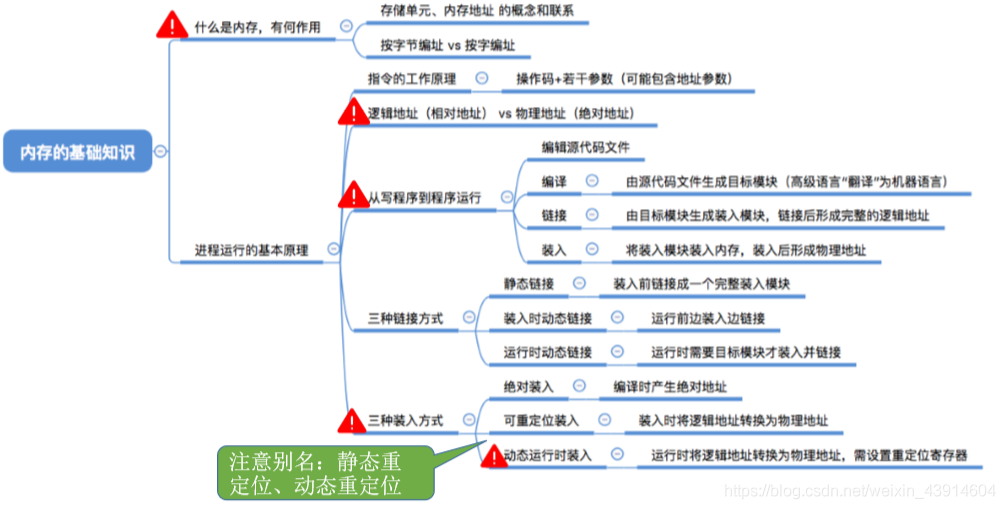
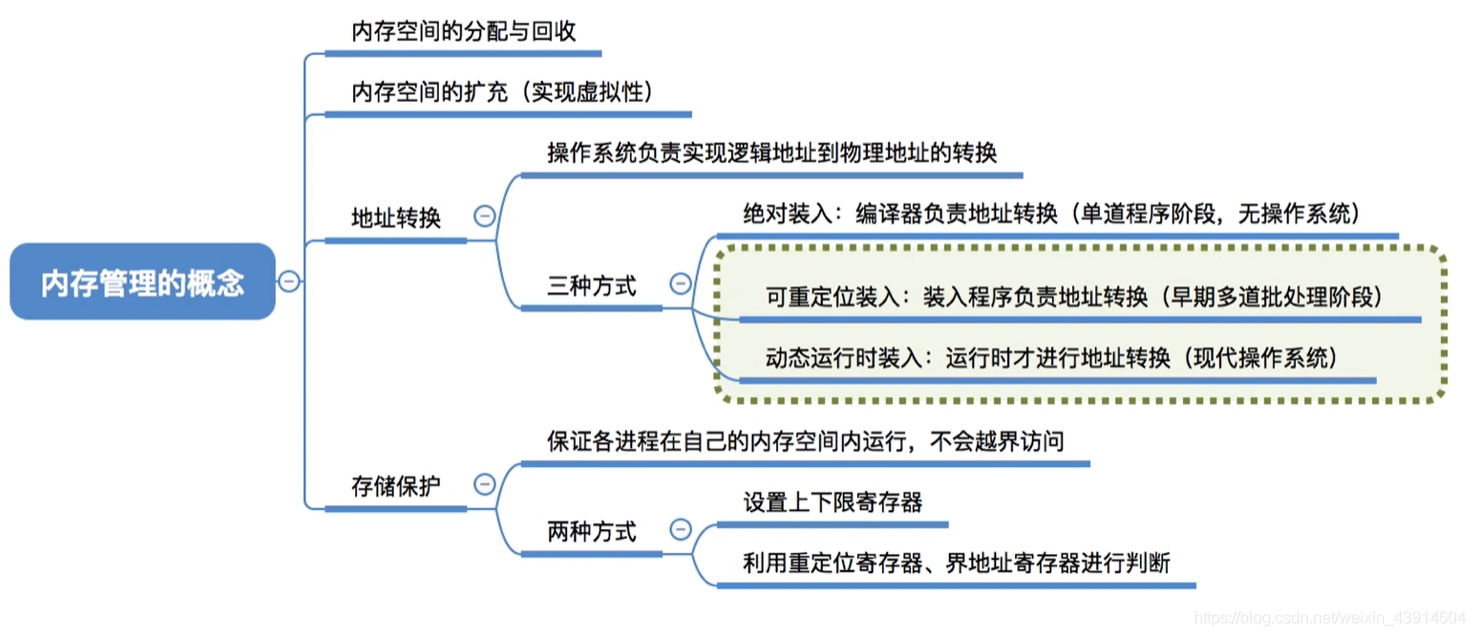
<?xml version="1.0" encoding="utf-8"?>
<feed xmlns="http://www.w3.org/2005/Atom">
            <title type="text">Zhangshun Blog👌</title>
    <updated>2025-10-28T15:36:19+08:00</updated>
        <id>https://blog.zs-fighting.cn</id>
        <link rel="alternate" type="text/html" href="https://blog.zs-fighting.cn" />
        <link rel="self" type="application/atom+xml" href="https://blog.zs-fighting.cn/atom.xml" />
    <rights>Copyright © 2026, Zhangshun Blog👌</rights>
    <generator uri="https://halo.run/" version="1.4.8">Halo</generator>
            <entry>
                <title><![CDATA[操作系统基础知识]]></title>
                <link rel="alternate" type="text/html" href="https://blog.zs-fighting.cn/archives/basic-knowledge-of-operating-system" />
                <id>tag:https://blog.zs-fighting.cn,2025-07-09:basic-knowledge-of-operating-system</id>
                <published>2025-07-09T17:30:56+08:00</published>
                <updated>2025-08-21T15:44:37+08:00</updated>
                <author>
                    <name>张顺</name>
                    <uri>https://blog.zs-fighting.cn</uri>
                </author>
                <content type="html">
                        <![CDATA[<h1 id="cpu">Cpu</h1><hr /><h1 id="mem">Mem</h1><hr /><h2 id="常见的内核参数">常见的内核参数</h2><pre><code class="language-bash"># 关闭swapvm.swappiness = 0# vm.watermark_scale_factor 用于动态调整内存水位线（watermarks）的缩放比例。分为三个关键阈值（min、low、high），用于管理物理内存的回收：# - min: 系统保留的最低空闲内存，触发Direct Reclaim, 会加剧磁盘 IO 压力。# - low: 当空闲内存低于此值时，内核启动后台回收（kswapd）。# - high: 当空闲内存达到此值时，停止后台回收。# 决定min水位线，low = min * 1.5，high = min * 3, 有效范围：0 到 1000（对应 0% 到 10% 的总内存比例）# 在/proc/zoneinfo中有min、low、high的对应值vm.watermark_scale_factor = 500# 可以通过&quot;/proc/vmstat&quot;中的&quot;pageoutrun&quot;和&quot;allocstall&quot;来查看，两者分别代表了kswapd和direct reclaim启动的次数。(base) [root@zzzz ~]# grep -E &quot;pageoutrun|allocstall&quot; /proc/vmstatallocstall_dma 0allocstall_dma32 0allocstall_normal 28729166allocstall_movable 10533pageoutrun 6241380# 当系统经历高内存压力（如直接内存回收）后，内核会临时提高内存区域（zone）的 min、low、high 水位值。vm.watermark_boost_factor 决定了提升的幅度。# 预防内存压力：通过更早触发内存回收（kswapd），避免频繁进入直接回收或 OOM（Out-Of-Memory）状态，提高系统稳定性。vm.watermark_boost_factor = 15000# 用于查看 物理内存中各个 zone 的空闲页分布的重要命令，尤其在内存碎片化、内存分配失败（如 order 高的分配失败）时非常有用。# Node: NUMA 节点号# zone: 内存区域（DMA、DMA32、Normal、Movable 等）# 接下来的 11 个数字: 分别表示 order=0 到 order=10 的空闲页块数量# order=0 表示 1 页（4KB）, order=1 表示 2 页（8KB）......, order=10 表示 1024 页（4MB）# 每一个数字表示当前有多少个对应大小的 连续物理内存块 可分配# 多用于判断内存碎片化, 比如: order=0 有很多,高 order 的数量是 0(base) [root@zzzz ~]# cat /proc/buddyinfoNode 0, zone      DMA      1      0      0      0      0      0      0      0      1      1      3Node 0, zone    DMA32      6      8      9      6      7      5      3      5      2      5    455Node 0, zone   Normal  13630  18308  90520 123480 213137 198410 152556 107402  64820  56306      0Node 1, zone   Normal   5156   5187  47534  51478 237809 232256 179879 126473  74265  44027    184# 手动触发内存压缩,将分散的空闲页面整理成连续页面# compact_memory 不会释放内存，只是重新整理空闲内存页的位置。echo 1 &gt; /proc/sys/vm/compact_memory# 后台自动压缩,开启持续性压缩行为# 1-100：数值越大越“积极压缩”vm.compaction_proactiveness = 50# 设置触发后台脏页回写的绝对内存阈值（字节单位）# 0：禁用绝对值模式，改用 dirty_background_ratio（比例模式）。# ≥1：指定具体字节数（如 1048576 = 1MB）。vm.dirty_background_bytes = 0# 当系统内存中脏页占比 ≥ 设定比例时，触发 异步后台回写（不阻塞应用）# 配置范围：0 ~ 100（百分比）# 低值（如 5）：频繁小批量回写，减少数据丢失风险，但增加I/O负载# 高值（如 20）：延迟回写，提升写入吞吐，但内存不足时可能突发高I/Ovm.dirty_background_ratio = 10# 设置触发同步脏页回写的绝对内存阈值（字节单位）# 0：禁用绝对值模式，改用 dirty_ratio（比例模式）# ≥1：指定具体字节数vm.dirty_bytes = 0# 脏页在内存中驻留的最长时间（单位：1/100秒），超时后强制回写# 短时间（如 1000=10秒）：频繁回写，减少数据丢失，但增加I/O压力# 长时间（如 3000=30秒）：适合批量写入场景（如日志服务器），但崩溃时可能丢失更多数据vm.dirty_expire_centisecs = 3000# 当系统内存中脏页占比 ≥ 设定比例时，触发 同步阻塞回写（应用写入被暂停）# 低值（如 10）：快速回写，减少阻塞，但限制写入吞吐# 高值（如 30）：允许更多脏页累积，提升突发写入性能，但可能导致应用卡顿vm.dirty_ratio = 20# 内核周期性唤醒回写线程的时间间隔（单位：1/100秒）# 短间隔（如 100=1秒）：实时回写，减少数据驻留时间，适合低延迟存储（如SSD）# 长间隔（如 500=5秒）：降低CPU开销，但可能延迟回写vm.dirty_writeback_centisecs = 500# 标记为“脏页”的最长保留时间（秒），超时后可能被优先回收# 短时间（如 3600=1小时）：加速回收长期未访问的脏页，节省内存# 长时间（如 43200=12小时）：减少频繁回收，适合内存充足且需要缓存持久化的场景vm.dirtytime_expire_seconds = 43200# kernel 最小保留内存。# 防止系统完全耗尽内存，给 kernel buffer 留空间，降低 direct reclaim 压力。避免突然卡死。sysctl -w vm.min_free_kbytes=524288</code></pre><p><img src="https://blog.zs-fighting.cn/upload/2025/07/image-615dbc575d7446d7bbef72e1950b42ba.png" alt="image.png" /></p><p>Linux中的内存回收 [一]: <a href="https://zhuanlan.zhihu.com/p/70964195">https://zhuanlan.zhihu.com/p/70964195</a></p><p>Linux中的内存回收[二]: <a href="https://zhuanlan.zhihu.com/p/72998605">https://zhuanlan.zhihu.com/p/72998605</a></p><p>Linux内存调节之zone watermark: <a href="https://zhuanlan.zhihu.com/p/73539328">https://zhuanlan.zhihu.com/p/73539328</a></p><p>内存相关的内核参数: <a href="https://www.cnblogs.com/arnoldlu/p/18782680">https://www.cnblogs.com/arnoldlu/p/18782680</a></p><h1 id="disk">Disk</h1><hr /><h1 id="network">Network</h1><hr /><h2 id="网卡队列绑核">网卡队列绑核</h2><h3 id="概念">概念</h3><p>网卡队列绑核（也称为 <strong>中断亲和性设置</strong> 或 <strong>IRQ Affinity</strong>）是一种优化服务器网络性能的技术，通过将<strong>网卡的不同接收队列（RX Queues）绑定到特定的 CPU 核心</strong>，减少 CPU 缓存失效、提升数据本地性，从而显著提高网络吞吐量并降低延迟</p><p><code>只针对TCP网卡, RDMA网卡不用, RDMA网卡的处理不经过内核协议栈</code></p><ol><li><p><strong>多队列网卡</strong>：现代高性能网卡（尤其是千兆、万兆及以上）通常支持多个硬件队列（通常称为接收侧缩放 - Receive Side Scaling, RSS）。当网卡收到数据包时，会根据数据包的元信息（如源/目的 IP、端口、协议等）通过哈希算法，将不同的数据流分配到不同的硬件队列中。这样做的核心目的是实现<strong>并行处理</strong>，避免单个队列成为瓶颈。</p></li><li><p><strong>中断（IRQ）</strong>：当网卡的某个硬件队列收到数据包后，它需要通知操作系统内核来处理这些数据包。这种通知机制就是硬件中断（IRQ）。每个硬件队列通常对应一个独立的中断号（IRQ number）。</p></li><li><p><strong>中断处理与软中断</strong>：当 CPU 收到硬件中断信号时，它会暂停当前工作，执行一个简短的<strong>硬中断处理程序</strong>（主要工作是确认中断、做一些必要标记）。硬中断处理程序通常会调度一个<strong>软中断</strong>（SoftIRQ，如 NET_RX_SOFTIRQ）来执行实际的、耗时较长的网络数据处理工作（如协议栈处理、将数据包传递给应用程序的 socket 缓冲区）。<strong>软中断的执行最终是由特定的 CPU 核心来完成的。</strong></p></li><li><p><strong>绑核（CPU Affinity）</strong>：“绑核”指的是将一个特定的任务（在这里，是指定网卡队列的软中断处理任务）<strong>固定分配</strong>给一个或一组特定的 CPU 核心去执行。</p></li></ol><h3 id="绑核策略">绑核策略</h3><p><strong>NUMA优化</strong>: 在 NUMA 架构的服务器上，将网卡队列绑定到与其物理位置相近（在同一 NUMA 节点内）的 CPU 核心，可以避免跨 NUMA 节点访问内存的巨大延迟开销。通常将网卡队列绑定到与网卡所在 PCIe 插槽相同 NUMA 节点的核心上，并确保处理该队列流量的应用程序线程也运行在同一个 NUMA 节点上。</p><p><strong>自动绑定：中断绑定随机，出现跨NUMA访问内存</strong></p><p><img src="https://blog.zs-fighting.cn/upload/2025/07/image-cdab7c7be11149c9960f9be8d3fa9070.png" alt="image.png" /></p><p><strong>NUMA绑定：中断绑定到指定核，避免跨NUMA访问内存</strong></p><p><img src="https://blog.zs-fighting.cn/upload/2025/07/image-ecdd5dc21ec94e5cbe7f3e97799efc75.png" alt="image.png" /></p><h3 id="网卡队列绑核记录">网卡队列绑核记录</h3><pre><code class="language-bash"># 关闭irqbalance服务systemctl stop irqbalance.servicesystemctl disable irqbalance.servicesystemctl status irqbalance.service# 查看网卡队列数量# 看 Combined 这一项的最大值 (max) 和当前设置值 (current)。root@zzzz:~# ethtool -l eth0Channel parameters for eth0:Pre-set maximums:RX:n/aTX:n/aOther:n/aCombined:31Current hardware settings:RX:n/aTX:n/aOther:n/aCombined:31# 查看网卡eth0 pci 设备号 bus-inforoot@zzzz:~# ethtool -i eth0driver: mlx5_coreversion: 23.10-1.1.9firmware-version: 28.39.3674 (MT_0000000833)expansion-rom-version:bus-info: 0000:00:02.0supports-statistics: yessupports-test: yessupports-eeprom-access: nosupports-register-dump: nosupports-priv-flags: yes# 查看网卡eth0 中断信号# 本例中eth0的中断号为657~688root@zzzz:~# cat /proc/interrupts |grep &quot;0000:00:02.0&quot;|awk '{print $1 $(NF)}'657:mlx5_comp0@pci:0000:00:02.0658:mlx5_comp1@pci:0000:00:02.0659:mlx5_comp2@pci:0000:00:02.0660:mlx5_comp3@pci:0000:00:02.0661:mlx5_comp4@pci:0000:00:02.0662:mlx5_comp5@pci:0000:00:02.0663:mlx5_comp6@pci:0000:00:02.0664:mlx5_comp7@pci:0000:00:02.0665:mlx5_comp8@pci:0000:00:02.0666:mlx5_comp9@pci:0000:00:02.0667:mlx5_comp10@pci:0000:00:02.0668:mlx5_comp11@pci:0000:00:02.0669:mlx5_comp12@pci:0000:00:02.0670:mlx5_comp13@pci:0000:00:02.0671:mlx5_comp14@pci:0000:00:02.0672:mlx5_comp15@pci:0000:00:02.0673:mlx5_comp16@pci:0000:00:02.0674:mlx5_comp17@pci:0000:00:02.0675:mlx5_comp18@pci:0000:00:02.0676:mlx5_comp19@pci:0000:00:02.0677:mlx5_comp20@pci:0000:00:02.0678:mlx5_comp21@pci:0000:00:02.0679:mlx5_comp22@pci:0000:00:02.0680:mlx5_comp23@pci:0000:00:02.0681:mlx5_comp24@pci:0000:00:02.0682:mlx5_comp25@pci:0000:00:02.0683:mlx5_comp26@pci:0000:00:02.0684:mlx5_comp27@pci:0000:00:02.0685:mlx5_comp28@pci:0000:00:02.0686:mlx5_comp29@pci:0000:00:02.0687:mlx5_comp30@pci:0000:00:02.0688:mlx5_async31@pci:0000:00:02.0# 查看当前网卡中断绑定情况# 本例中 657~687 中断号分别绑定在 CPU0~CPU30 上：root@zzzz:~# for i in {657..688};do cat /proc/irq/$i/smp_affinity_list;done01234567891011121314151617181920212223242526272829300-179# 如果是虚拟设备, virtio网卡# driver: virtio_netroot@zzzz:~# ethtool -i eth0driver: virtio_netversion: 1.0.0firmware-version:expansion-rom-version:bus-info: 0000:24:00.0supports-statistics: yessupports-test: nosupports-eeprom-access: nosupports-register-dump: nosupports-priv-flags: no# 需要先找到对应的virtio name, 根据virtio name查看中断信号# 本例中virtio name: virtio1root@zzzz:~# readlink `ls -l /sys/class/net/eth0/device | awk '{print $9}'`../../../virtio1# 查看网卡virtio1 中断信号# 本例中eth0的中断号为757~819root@zzzz:~# cat /proc/interrupts | grep &quot;virtio1-input&quot;|awk '{print $1 $(NF)}'757:virtio1-input.0759:virtio1-input.1761:virtio1-input.2763:virtio1-input.3765:virtio1-input.4767:virtio1-input.5769:virtio1-input.6771:virtio1-input.7773:virtio1-input.8775:virtio1-input.9777:virtio1-input.10779:virtio1-input.11781:virtio1-input.12783:virtio1-input.13785:virtio1-input.14787:virtio1-input.15789:virtio1-input.16791:virtio1-input.17793:virtio1-input.18795:virtio1-input.19797:virtio1-input.20799:virtio1-input.21801:virtio1-input.22803:virtio1-input.23805:virtio1-input.24807:virtio1-input.25809:virtio1-input.26811:virtio1-input.27813:virtio1-input.28815:virtio1-input.29817:virtio1-input.30819:virtio1-input.31# 查看当前网卡中断绑定情况# 本例中 657~687 中断号分别绑定在 CPU0~CPU31 上：root@zzzz:~# for i in $(seq 757 2 819);do cat /proc/irq/$i/smp_affinity_list;done012345678910111213141516171819202122232425262728293031# 查看网卡所属 NUMA noderoot@zzzz:~# ifconfig|grep UPeth0: flags=4163&lt;UP,BROADCAST,RUNNING,MULTICAST&gt;  mtu 1500eth1: flags=4163&lt;UP,BROADCAST,RUNNING,MULTICAST&gt;  mtu 4200eth2: flags=4163&lt;UP,BROADCAST,RUNNING,MULTICAST&gt;  mtu 4200eth3: flags=4163&lt;UP,BROADCAST,RUNNING,MULTICAST&gt;  mtu 4200eth4: flags=4163&lt;UP,BROADCAST,RUNNING,MULTICAST&gt;  mtu 4200root@zzzz:~# for i in {0..4};do echo &quot;eth$i: $(ethtool -i &quot;eth$i&quot;|grep bus-info)&quot;;doneeth0: bus-info: 0000:00:02.0eth1: bus-info: 0000:65:01.0eth2: bus-info: 0000:67:01.0eth3: bus-info: 0000:69:01.0eth4: bus-info: 0000:6b:01.0root@zzzz:~# for i in &quot;0000:00:02.0&quot; &quot;0000:65:01.0&quot; &quot;0000:67:01.0&quot; &quot;0000:69:01.0&quot; &quot;0000:6b:01.0&quot;; do echo &quot;$i: $(lspci -vvv -s $i|grep NUMA)&quot;; done0000:00:02.0:0000:65:01.0: NUMA node: 00000:67:01.0: NUMA node: 00000:69:01.0: NUMA node: 10000:6b:01.0: NUMA node: 1# 查看 NUMA 节点分布root@zzzz:~# numactl -Havailable: 2 nodes (0-1)node 0 cpus: 0 1 2 3 4 5 6 7 8 9 10 11 12 13 14 15 16 17 18 19 20 21 22 23 24 25 26 27 28 29 30 31 32 33 34 35 36 37 38 39 40 41 42 43 44 45 46 47 48 49 50 51 52 53 54 55 56 57 58 59 60 61 62 63 64 65 66 67 68 69 70 71 72 73 74 75 76 77 78 79 80 81 82 83 84 85 86 87 88 89node 0 size: 1002742 MBnode 0 free: 825153 MBnode 1 cpus: 90 91 92 93 94 95 96 97 98 99 100 101 102 103 104 105 106 107 108 109 110 111 112 113 114 115 116 117 118 119 120 121 122 123 124 125 126 127 128 129 130 131 132 133 134 135 136 137 138 139 140 141 142 143 144 145 146 147 148 149 150 151 152 153 154 155 156 157 158 159 160 161 162 163 164 165 166 167 168 169 170 171 172 173 174 175 176 177 178 179node 1 size: 1002237 MBnode 1 free: 834099 MBnode distances:node   0   1  0:  10  20  1:  20  10# 修改CPU Affinityroot@zzzz:~# cat /proc/irq/657/smp_affinity_list0root@zzzz:~# echo 31 &gt; /proc/irq/657/smp_affinity_listroot@zzzz:~# cat /proc/irq/657/smp_affinity_list31# 观察每个核心的详细使用率（特别是软中断占比）是重要的辅助手段# 每1秒报告一次所有核心的详细使用率# 诊断信号：某个核心的 %soft 远高于其他核心（如 CPU0=80%，其他&lt;5%）# %soft 列：软中断占用率# %irq 列：硬中断占用率mpstat -P ALL 1# 输出示例Average:     CPU    %usr   %nice    %sys %iowait    %irq   %soft  %steal  %guest  %gnice   %idleAverage:     all   22.47    0.00   25.12    0.02    0.00   14.49    0.00    0.00    0.00   37.90Average:       0    2.04    0.03    3.61    0.00    0.00   25.89    0.00    0.00    0.00   68.42Average:       1   24.63    0.00   13.82    0.00    0.00   27.48    0.00    0.00    0.00   34.07Average:       2   26.01    0.00   12.67    0.00    0.00   27.17    0.00    0.00    0.00   34.15Average:       3   20.42    0.00    7.93    0.00    0.00   31.63    0.00    0.00    0.00   40.02......Average:     178   25.18    0.00   23.96    0.36    0.00    8.76    0.00    0.00    0.00   41.74Average:     179   29.36    0.00   19.62    0.30    0.00    9.28    0.00    0.00    0.00   41.45</code></pre>]]>
                </content>
            </entry>
            <entry>
                <title><![CDATA[Atop 监控工具]]></title>
                <link rel="alternate" type="text/html" href="https://blog.zs-fighting.cn/archives/atop" />
                <id>tag:https://blog.zs-fighting.cn,2025-07-08:atop</id>
                <published>2025-07-08T14:57:20+08:00</published>
                <updated>2025-10-28T15:36:19+08:00</updated>
                <author>
                    <name>张顺</name>
                    <uri>https://blog.zs-fighting.cn</uri>
                </author>
                <content type="html">
                        <![CDATA[<p>atop 是一款强大的系统监控工具，支持记录历史系统状态，非常适合排查过去某个时间点的 IO 写高问题。以下是使用 atop 查看历史监控数据的方法：</p><p>atop 是一款用于监控 Linux 系统资源和进程的工具，以一定的频率记录系统的运行状态，采集系统资源（CPU、内存、磁盘和网络）使用情况及进程运行情况数据，并以日志文件的方式保存在磁盘中。当实例出现问题时，可获取对应的 atop 日志文件用于分析。</p><p><strong>安装 atop</strong></p><pre><code class="language-bash">sudo apt updatesudo apt-get install atop# 配置并启动 atop# 参考以下步骤，配置 atop 监控周期及日志保留时间。# 1. 执行以下命令，使用 VIM 编辑器打开 atop 配置文件。vim  /usr/share/atop/atop.daily# 2. 修改以下配置：# - 将 LOGINTERVAL=600 修改为 LOGINTERVAL=30，表示将默认的600s监控周期修改为30s。建议修改为30s，您可结合实际情况进行修改。# - 将 LOGGENERATIONS=28 修改为 LOGGENERATIONS=7，表示将默认的日志保留时间28天修改为7天。为避免 atop 长时间运行占用太多磁盘空间，建议修改为7天，您可结合实际情况进行修改。# 3. 启动sudo systemctl restart atop</code></pre><p><strong>分析 atop</strong></p><p>atop 启动后，会将采集的数据记录在 /var/log/atop 目录的日志文件中。请获取实际的日志文件名，执行以下命令，查看日志文件并参见 atop 常用命令 及 系统资源监控字段说明 进行分析。</p><pre><code class="language-bash"># 查看历史记录文件列表ls -l /var/log/atop/# 例如：查看 2024年7月8日 15:00 的记录atop -r /var/log/atop/atop_20240708 -b 15:00</code></pre><p><strong>atop 常用命令</strong></p><p>您可在打开日志文件后，使用以下命令筛选所需数据：</p><ul><li><p>p：显示按 CPU 使用率排序的进程（默认）。</p></li><li><p>l(重要‼️): 在 atop 中，通过限制系统级 CPU、磁盘、网络接口的显示行数，可以在屏幕空间有限的环境中只展示最活跃、最关键的资源，提升监控可读性和效率。</p></li><li><p>Q(重要‼️)：筛选特定进程状态, 用于只显示某些状态（如 Z 僵尸、S 睡眠、R 运行中等）的进程。</p></li><li><p>c(重要‼️)：切换显示完整命令行（默认只显示程序名）。</p></li><li><p>m(重要‼️)：按照进程的内存使用率降序筛选。</p></li><li><p>d(重要‼️)：按照进程的磁盘使用率降序筛选。</p></li><li><p>n：按照进程的网络使用率进行降序筛选（使用此命令需安装额外的内核模块，默认不支持）。</p></li><li><p>t(重要‼️)：跳转到下一个监控采集点。</p></li><li><p>T(重要‼️)：跳转到上一个监控采集点。</p></li><li><p>b(重要‼️)：指定时间点，格式为 YYYYMMDDhhmm。</p></li><li><p>v(重要‼️)：显示进程的详细信息, ppid, user/group, date/time, status, exitcode...。</p></li></ul><p><strong>系统资源监控字段说明</strong></p><p>下图为部分监控字段以及数值，数值根据采样周期获取，仅作为参考。<br />﻿<br /><img src="https://blog.zs-fighting.cn/upload/2025/07/image-452e6d83b61a4b658f81449a30c7c202.png" alt="image.png" /></p><p>主要参数说明如下：</p><p>ATOP 行：主机名、信息采样日期和时间点。</p><p>PRC 行：进程整体运行情况。</p><ul><li><p>sys 及 user：CPU 被用于处理进程时，进程在内核态及用户态所占 CPU 的时间比例。</p></li><li><p>#proc：进程总数。</p></li><li><p>#zombie：僵死进程的数量。</p></li><li><p>#exit：Atop 采样周期期间退出的进程数量。</p></li></ul><p>CPU 行：CPU 整体（即多核 CPU 作为一个整体 CPU 资源）的使用情况。CPU 行的各字段数值相加结果为 100%，N 为 CPU 核数。</p><ul><li><p>sys 及 user：CPU 被用于处理进程时，进程在内核态及用户态所占 CPU 的时间比例。</p></li><li><p>irq：CPU 被用于处理中断的时间比例。</p></li><li><p>idle：CPU 处在完全空闲状态的时间比例。</p></li><li><p>wait：CPU 处在“进程等待磁盘 IO 导致 CPU 空闲”状态的时间比例。</p></li></ul><p>CPL 行：CPU 负载情况。</p><ul><li><p>avg1、avg5 和 avg15：过去1分钟、5分钟和15分钟内运行队列中的平均进程数量。</p></li><li><p>csw：指示上下文交换次数。</p></li><li><p>intr：指示中断发生次数。</p></li></ul><p>MEM 行：内存的使用情况。</p><ul><li><p>tot：物理内存总量。</p></li><li><p>cache ：用于页缓存的内存大小。</p></li><li><p>buff：用于文件缓存的内存大小。</p></li><li><p>slab：系统内核占用的内存大小。</p></li></ul><p>SWP 行：交换空间的使用情况。</p><ul><li><p>tot：交换区总量。</p></li><li><p>free：空闲交换空间大小。</p></li></ul><p>PAG 行：虚拟内存分页情况</p><ul><li>swin 及 swout：换入和换出内存页数。</li></ul><p>DSK 行：磁盘使用情况，每一个磁盘设备对应一列。如果有 sdb 设备，那么增加一行 DSK 信息。</p><ul><li><p>sda：磁盘设备标识。</p></li><li><p>busy：磁盘忙时比例。</p></li><li><p>read 及 write：读、写请求数量。</p></li></ul><p>NET 行：多列 NET 展示了网络状况，包括传输层（TCP 和 UDP）、IP 层以及各活动的网口信息。</p><ul><li><p>xxxxxi：各层或活动网口收包数目。</p></li><li><p>xxxxxo：各层或活动网口发包数目。</p></li></ul><p>补充说明</p><ul><li><p>如果系统未配置 atop 自动记录，需先通过 systemctl enable --now atop 启用服务</p></li><li><p>记录间隔可在 /etc/atop/atop.daily 中修改（默认 10 分钟）</p></li><li><p>结合你之前的监控脚本，可在 IO 突增时记录时间点，再用 atop 精准回溯</p></li></ul>]]>
                </content>
            </entry>
            <entry>
                <title><![CDATA[大模型的训练效率]]></title>
                <link rel="alternate" type="text/html" href="https://blog.zs-fighting.cn/archives/training-efficiency-of-large-models" />
                <id>tag:https://blog.zs-fighting.cn,2024-08-27:training-efficiency-of-large-models</id>
                <published>2024-08-27T23:08:40+08:00</published>
                <updated>2024-08-27T23:25:21+08:00</updated>
                <author>
                    <name>张顺</name>
                    <uri>https://blog.zs-fighting.cn</uri>
                </author>
                <content type="html">
                        <![CDATA[<h1 id="背景">背景</h1><hr /><p>随着AIGC领域的兴起，各大厂商都在训练和推出自研的大模型结构，并结合业务进行落地和推广。在大模型分布式训练场景中，主流的主要是基于英伟达GPU进行训练（如A100），如何有效地压榨GPU的计算能力，提升训练效率，降低训练成本，是一个非常重要的实践优化问题。</p><p><strong>直接目标</strong></p><p>最直接地目标就是提升GPU使用率，充分发挥GPU的计算潜力，以加快模型训练。包括调整 Batch 大小以提供更多并行任务给GPU，优化DataLoader以减少GPU的等待时间，以及选择或设计与GPU并行处理能力相匹配的模型架构。</p><p><strong>额外收益</strong></p><p>从正向思维来看，通过合理分配CPU、GPU、内存和存储资源，可以提高资源利用率，加速训练过程，以提高整体的成本效益；同时可减少因资源限制导致训练中断或者失败，保证训练流程的顺利进行，提高模型训练有效率；<br />从反向思维来看，通过高效的硬件利用，降低能源消耗（如电力），降低长期的训练费用，实现经济高效的模型训练，并减少训练成本。</p><h1 id="mfu">MFU</h1><hr /><p><strong>MFU(Model FLOPS Utilization）</strong></p><p><strong>定义</strong>: 即模型算力利用率，是指模型一次前反向计算消耗的矩阵算力与机器（如GPU）算力的比值。</p><p><strong>重要性</strong>: 它直接反映了模型在训练过程中对计算资源的有效利用程度。在大模型训练中，提高MFU是优化训练效率的关键手段之一。</p><p><img src="https://blog.zs-fighting.cn/upload/2024/08/image-28be3208099a4c729849efa51025d1d5.png" alt="image.png" /></p><p>MFU的值受到多种因素的影响，包括但不限于：</p><ul><li><p><strong>模型架构</strong>: 不同架构的模型在分布式训练中的算力利用率可能存在显著差异。例如，Transformer架构的模型由于其并行性和矩阵运算密集的特点，通常能够在分布式训练中实现较高的MFU。</p></li><li><p><strong>分布式训练策略</strong>: 包括数据并行、模型并行、流水线并行等不同的并行策略，以及这些策略的具体实现方式（如梯度累积、张量并行等），都会对MFU产生重要影响。</p></li><li><p><strong>硬件环境</strong>: GPU型号、数量、网络连接速度、显存大小等硬件因素都会限制分布式训练的性能和算力利用率。</p></li><li><p><strong>软件优化</strong>: 包括编译器优化、库函数优化、自动混合精度训练等软件层面的优化措施，也能在一定程度上提升MFU。</p></li><li><p><strong>数据集和批次大小</strong>: 数据集的大小和复杂性，以及训练时使用的批次大小，都会影响每次迭代中的计算量和算力利用率。</p></li></ul><p>由于上述因素的多样性和复杂性，各大开源模型在分布式训练上的MFU指标很难一概而论。不过，一般来说，经过良好优化和适配的开源模型，在高端GPU集群上进行分布式训练时，MFU值通常能够达到较高的水平（例如，接近或超过50%）。但请注意，这只是一个大致的估计，具体数值可能因模型、硬件和训练策略的不同而有所差异。</p><h1 id="tensorcore-利用率">TensorCore 利用率</h1><hr /><p><strong>定义</strong>: TensorCore利用率是指Tensor Core在处理深度学习任务时，其计算资源的实际使用效率。</p><p><strong>重要性</strong>: Tensor Core是NVIDIA GPU上用于加速矩阵乘法和卷积运算的特殊处理单元，对于提升深度学习模型的训练和推理速度至关重要。</p><p><img src="https://blog.zs-fighting.cn/upload/2024/08/image-c1d745e04a61466b86e86dd79de62c60.png" alt="image.png" /></p><p>使用如torch profiler等工具记录训练过程中各个函数的时间消耗，并在tensorboard等可视化工具上展示，从而可以直接查看到Tensor Core的利用率。</p><p><strong>优点</strong>: 这种方法能够提供更详细和准确的信息，包括Tensor Core的具体使用情况和潜在的性能瓶颈。</p><h1 id="ettr">ETTR</h1><hr /><p>ETTR(<strong>E</strong>ffective <strong>T</strong>raining <strong>T</strong>ime <strong>R</strong>atio)，机器学习任务训练中有效训练时长的占比，用于衡量训练稳定性的核心指标。</p><p>ETTR = (训练任务总时长-无效训练时间)/训练任务总时长</p><p><strong>业界的ETTR Status Quo</strong></p><p>Llama 3.1: 16k张卡，90+%</p><p><img src="https://blog.zs-fighting.cn/upload/2024/08/image-070986863de44e93b31922ded80597ab.png" alt="image.png" /></p><p>Google gemini: 97%</p><p><img src="https://blog.zs-fighting.cn/upload/2024/08/image-af1e68734cb54024846784dc144c7c83.png" alt="image.png" /></p><h1 id="瓶颈分析工具">瓶颈分析工具</h1><hr /><h2 id="nsight-system-工具">Nsight system 工具</h2><p>NVIDIA Nsight Systems是一个用于监测代码执行效率及分析性能的工具，它是NVIDIA Nsight系列的一部分。Nsight Systems可以收集和分析应用程序在CPU和GPU上的执行数据，帮助开发者识别性能瓶颈，优化程序性能。</p><ol><li>安装Nsight Systems：</li></ol><p>访问NVIDIA官方网站下载Nsight Systems的安装包。<br />按照安装向导完成安装过程。</p><ol start="2"><li>配置环境：</li></ol><p>确保CUDA环境变量已正确配置，以便Nsight Systems能够识别CUDA应用程序。</p><ol start="3"><li>生成Profile文件：</li></ol><p>使用Nsight Systems提供的命令行工具（如nsys）来生成Profile文件。例如，可以使用nsys profile -o profile_name.qdrep python test.py命令来生成Python脚本的Profile文件。</p><ol start="4"><li>分析Profile文件：</li></ol><p>打开Nsight Systems GUI，加载生成的Profile文件（.qdrep格式）。<br />使用Nsight Systems的图形界面来查看和分析应用程序的执行数据，包括CPU和GPU的使用情况、函数调用时间、内存访问等。</p><h2 id="torch-profile-工具">Torch profile 工具</h2><p>如果你是使用的Pytorch框架，可以使用其profile工具和tensorboard可视化界面来分析模型的性能瓶颈点，具体可以参考：PyTorch Profiler With TensorBoard。</p><ol><li><p>计算图概况 ：torch profile可以生成模型的计算图，并突出显示每个操作的时间消耗，这有助于识别潜在的瓶颈。</p></li><li><p>内存使用统计 ：实时监控模型训练过程中的GPU内存占用情况，便于调整参数以优化资源利用。</p></li><li><p>快速定位性能问题 ：通过可视化每个操作的执行时间，可以迅速找到导致模型训练速度慢的原因。</p></li><li><p>优化硬件资源利用 ：查看内存使用情况，以便确定合适的批量大小和其他内存管理策略。</p></li><li><p>详细的层析剖析 ：不仅仅提供总体性能分析，还可以对模型中的每一个单独层进行分析，展示每个层在CPU和CUDA上的执行时间。</p></li><li><p>事件列表 ：提供原始的PyTorch事件列表，以便开发者能够深入了解底层操作（如卷积、激活函数等）的执行时间。</p></li><li><p>选择性剖析 ：用户可以指定要分析的具体层，其余层将被忽略，这样可以更加聚焦于关键部分。</p></li><li><p>硬件资源管理 ：分析模型在不同硬件环境下的性能，比如CPU与GPU之间的切换。</p></li></ol><h2 id="tensorboard">Tensorboard</h2><p>[TODO]</p><h1 id="系统的优化方法论">系统的优化方法论</h1><hr /><p><strong>明确GPU空闲产生的原因</strong></p><p>借助可视化工具分析profile文件中，GPU 空闲产生的原因，判断属于是哪几类问题？</p><ul><li><p>数据读取瓶颈: 一般在timeline里每个Step的开始前面都会有固定的GPU空闲，数据读取无法与计算实现Overlap;</p></li><li><p>模型写法问题: 比如模型计算中间有Sync操作，可能是存在D2H的同步拷贝，比如存在Tensor.numpy()等类似操作;</p></li><li><p>通信存在瓶颈: 在分布式训练中，不同的并行策略可能会影响通信成本；一般张量并行放在同一个机器不同卡上，数据并行是不同机器之间;</p></li></ul><p><img src="https://blog.zs-fighting.cn/upload/2024/08/image-6179050227484f65939ec2cad49b87ed.png" alt="image.png" /></p><p>最终目的是最大化GPU利用率，前面章节已经根据各种场景针对性地阐述了对应的解决方案；</p><p>类似torch.profile在基于TensorBorad可视化后，会针对性提供一些优化的思路，本质是一个对各种监控指标和原生profile数据的建模问题。可以根据沉淀的经验，结合不同的指标特征给业务同学更多的优化经验准则。</p><p>从GPU资源管理平台而言，前期应该是尽可能是给出可置信的核心指标数据，以及辅助的层次化指标（如CPU负载、IO等）。大模型训练优化实施方仍然需要模型负责人接入，由于大模型一般变动的频率比较低，因为联动框架同学一同定制化优化。</p>]]>
                </content>
            </entry>
            <entry>
                <title><![CDATA[GPU 常见故障及排查方法]]></title>
                <link rel="alternate" type="text/html" href="https://blog.zs-fighting.cn/archives/gpu-chang-jian-gu-zhang-ji-pai-cha-fang-fa" />
                <id>tag:https://blog.zs-fighting.cn,2024-05-06:gpu-chang-jian-gu-zhang-ji-pai-cha-fang-fa</id>
                <published>2024-05-06T22:19:21+08:00</published>
                <updated>2025-07-28T02:19:08+08:00</updated>
                <author>
                    <name>张顺</name>
                    <uri>https://blog.zs-fighting.cn</uri>
                </author>
                <content type="html">
                        <![CDATA[<h1 id="各个厂商的显卡">各个厂商的显卡</h1><hr /><ol><li><p><strong>Nvidia GPU</strong></p></li><li><p><strong>Ascend NPU</strong></p></li><li><p><strong>Cambricon MLU</strong></p></li><li><p><strong>Habana Goya</strong></p></li></ol><p>Habana Goya 是由 Habana Labs（现在是英特尔的一部分）开发的人工智能推理处理器（AI inference processor）。Goya 是一种专为高效运行神经网络推理工作负载而设计的 AI 芯片，主要用于数据中心和云计算环境中的推理任务。</p><p>英特尔在 2019 年收购了 Habana Labs，并将其作为推动其数据中心 AI 业务的重要组成部分。自那时起，Habana 的 Goya 和 Gaudi 产品继续发展，并与英特尔的整体 AI 硬件生态系统（如至强处理器和 FPGA）紧密集成。</p><ol start="5"><li><strong>AWS Neuron</strong></li></ol><p>AWS Neuron 是 Amazon Web Services (AWS) 推出的专用软件开发工具链，旨在优化和加速在 AWS 基础设施上运行的机器学习（ML）模型，特别是在 AWS Inferentia 和 Trainium 芯片上。</p><h1 id="辅助定位工具">辅助定位工具</h1><hr /><p><code>nvidia-smi</code>: 它是一个随 NVIDIA 驱动一起安装的命令行程序。它会报告系统中每个 GPU 的基本监控数据和硬件参数、配置数据。 nvidia-smi 可以列出 ECC 错误计数 (Xid 48) 并指示电源线是否已拔出 (Xid 54) 等。同时运行“nvidia-smi –q”以获得全面输出。</p><p><code>DCGM</code>: nvidia data center gpu manager是一套用于在集群环境中管理和监控 NVIDIA 数据中心 GPU 的工具。它包括主动健康监控、全面诊断、系统警报和治理策略（包括电源和时钟管理）。 DCGM 诊断是一款运行状况检查工具，可以检查基本的 GPU 运行状况，包括是否存在 ECC 错误、PCIe 问题、带宽问题以及运行 CUDA 程序的常见问题。</p><p><code>nvidia-bug-report.sh</code>: 它是与 NVIDIA 驱动一起安装的脚本。它从系统收集调试日志和命令输出，包括内核日志和NVIDIA驱动程序本身收集的日志。该命令应以 root 身份运行。nvidia-bug-report.sh 通常会快速运行，但在极少数情况下可能会运行缓慢。最多需要一小时才能完成。如果命令仍然挂起，请使用附加参数运行命令，如下所示：nvidia-bug-report.sh --safe-mode --extra-system-data</p><h1 id="gpu-通信方式">GPU 通信方式</h1><hr /><h2 id="单机多卡">单机多卡</h2><p><strong>PCIe</strong></p><p>单机多卡的 GPU 通常通过 PCIe 总线与主板相连，数据传输经过主机内存（CPU 内存），再传送到另一块 GPU。</p><p>此类通信的主要瓶颈在于主机内存的带宽和延迟。</p><p><strong>NVLink</strong></p><p>多块支持 NVLink 的 GPU 可以通过 NVLink 直接连接，无需经过主机内存。这显著提高了带宽和降低了延迟。</p><p>NVLink 可以组建 GPU 拓扑结构，比如全互联网状拓扑，使多卡间通信更加高效。</p><p><strong>NVSwitch</strong></p><p>NVSwitch 是一种用于多 GPU 系统的大规模互连架构，扩展了 NVLink 的能力，类似于网络交换机。</p><p>NVSwitch 允许在单个服务器中连接多达 16 块 GPU，并支持每对 GPU 之间的全速通信。</p><p>实现了所有 GPU 之间的等效通信带宽，适合大规模的深度学习模型训练。</p><p><code>nvidia-smi topo -m</code></p><p><img src="https://blog.zs-fighting.cn/upload/2024/05/image-061c4e4afc0a449699ba460be1114f97.png" alt="image.png" /></p><ul><li><p>X： 自身</p></li><li><p>SYS：通过 PCIe 的连接以及 NUMA 节点之间的 SMP 互连（例如，QPI/UPI）</p></li><li><p>NODE：通过 PCIe 的连接以及 NUMA 节点内 PCIe 主机桥之间的互连</p></li><li><p>PHB：通过 PCIe 和 PCIe 主机桥（通常是 CPU）的连接</p></li><li><p>PXB：通过多个 PCIe 桥互连（不跨 PCIe 主机桥）</p></li><li><p>PIX：通过最多一个 PCIe 桥互连</p></li><li><p>NV# ：通过数量为n组的 NVLinks 互连</p></li></ul><h2 id="多机多卡">多机多卡</h2><p><strong>PCIe (通过网络)</strong></p><ul><li><p>简介: 在多机环境下，GPU 之间通常通过 CPU、网络接口卡（NIC）和 PCIe 进行间接通信。</p></li><li><p>通信方式: 数据需先从 GPU 通过 PCIe 传输到主机内存，再通过网络接口传输到另一台机器的主机内存，然后通过 PCIe 传到目标 GPU。<br />此类通信效率低，主要瓶颈在于网络带宽和延迟。</p></li></ul><p><strong>RDMA (Remote Direct Memory Access)</strong></p><ul><li><p>简介: RDMA 是一种网络通信技术，允许直接访问远程机器内存，从而避免 CPU 干预，降低延迟和 CPU 开销。</p></li><li><p>带宽和延迟: 使用 RDMA，网络延迟显著降低，带宽也可以达到网络接口的理论上限（如 100 Gbps）。</p></li><li><p>通信方式: RDMA 允许 GPU 之间直接交换数据，不需要通过主机内存，极大地加速了跨服务器的数据传输。通常结合 InfiniBand 网络和 NVIDIA 的 NCCL（NVIDIA Collective Communications Library）进行优化的多机多卡通信。</p></li></ul><p><strong>NVLink + NVSwitch (跨节点)</strong></p><ul><li><p>简介: 在有些大规模系统中，NVLink 和 NVSwitch 也可以跨节点使用，通过网络接口进行远程连接。</p></li><li><p>通信方式: 在多个节点间通过高速网络连接，例如使用 InfiniBand 和 NVLink 混合架构，使得不同服务器上的 GPU 可以通过高速链路互联。<br />这通常用于大型 HPC（高性能计算）集群或 AI 超级计算机。</p></li></ul><h1 id="故障检测方式">故障检测方式</h1><hr /><h2 id="单机多卡-1">单机多卡</h2><h3 id="p2p">P2P</h3><p>P2P 测试是指 Peer-to-Peer 通信测试，用于评估多块 GPU 之间的直接通信性能。P2P 通信允许 GPU 之间绕过 CPU，直接通过高速互联（如 NVLink 或 PCIe）传输数据，这种方式可以显著降低延迟并提高带宽。</p><p><strong>如何进行 P2P 测试</strong></p><p>在实际操作中，P2P 测试可以通过工具如 NVIDIA's NCCL (NVIDIA Collective Communications Library) 或 CUDA P2P 示例程序进行。</p><ul><li><ol><li>使用 CUDA 示例程序</li></ol></li></ul><pre><code class="language-bash"># 在 CUDA Toolkit 的安装路径下找到 samples/ 目录，进入 samples/ 目录下的 p2pBandwidthLatencyTest 文件夹。cd /usr/local/cuda/samples/1_Utilities/p2pBandwidthLatencyTestmake# 编译成功后，生成的可执行文件会在 p2pBandwidthLatencyTest 文件夹下。./p2pBandwidthLatencyTest# 该测试会输出不同 GPU 之间的 P2P 带宽和延迟。</code></pre><ul><li><ol start="2"><li>使用 NCCL (NVIDIA Collective Communications Library)</li></ol></li></ul><pre><code class="language-bash"># NCCL 提供了 all_reduce_perf 示例程序，可以测试 GPU 之间的 P2P 通信性能。nccl-tests/build/all_reduce_perf -b 8 -e 128M -f 2 -g 2</code></pre><p><img src="https://blog.zs-fighting.cn/upload/2024/08/image-74546115f0e64724a87e110d367d3641.png" alt="image.png" /></p><h3 id="nccl-tests">nccl-tests</h3><p><code>./build/all_reduce_perf -b 8 -e 128M -f 2 -g 4</code></p><h3 id="gemm">GEMM</h3><p>[TODO]</p><h2 id="多机多卡-1">多机多卡</h2><hr /><h3 id="nccl-tests-1">nccl-tests</h3><p><strong>(2机16卡)</strong></p><p><img src="https://blog.zs-fighting.cn/upload/2024/08/image-c1003b3877d8453a9b4d2bfc15e0b10c.png" alt="image.png" /></p><pre><code class="language-bash">mpirun -np 16 \ --prefix /usr/local/openmpi \ --allow-run-as-root -bind-to none -map-by slot \ -H NcclTestsSourceIp:8,NcclTestsDestIp:8 \ -x NCCL_SOCKET_IFNAME=eth0 \ -x NCCL_DEBUG=INFO \ -x NCCL_DEBUG_SUBSYS=ALL \ -x NCCL_IB_DISABLE=0 \ -x NCCL_NET_GDR_LEVEL=2 \ -x NCCL_IB_QPS_PER_CONNECTION=4 \ -x NCCL_IB_TC=0 \ -x NCCL_IB_SL=0 \ -x NCCL_PROTO=Simple \ -x NCCL_ALGO=Auto \ -x NCCL_IB_HCA=mlx5_0,mlx5_2 \ -x NCCL_DEBUG_FILE=/tmp/nccl_debug_single.log \ -x NCCL_CUMEM_ENABLE=0 \ -mca pml ob1 -mca btl_tcp_if_include eth0 -mca btl ^openib \ /usr/local/nccl-tests/build/all_reduce_perf -b 8M -e 2G -n 1000 -f 2 -g 1</code></pre><h2 id="配置项">配置项</h2><hr /><ul><li><strong>IOMMU</strong></li><li><strong>ACSCtrl</strong></li><li><strong>GPU_Manufacturer</strong></li><li><strong>GPU_Number</strong></li><li><strong>Driver_SDK</strong></li><li><strong>P2P_Bandwidth</strong></li><li><strong>Link_Width</strong></li><li><strong>NVLink</strong></li><li><strong>Fabric_Manager</strong></li><li><strong>Remap_Failure</strong></li><li><strong>SRAM_UE(ECC errors)</strong></li><li><strong>DBE</strong></li><li><strong>SBE</strong></li><li><strong>ECC_Pending_Mode</strong></li><li><strong>Power</strong></li><li><strong>Temperature</strong></li><li><strong>Frequency_Lock</strong></li><li><strong>Dmesg</strong></li></ul><h1 id="xid-errors">XID errors</h1><hr /><ul><li>什么是 Xid errors:</li></ul><p>XID消息是NVIDIA驱动程序向操作系统的内核日志或事件日志打印的错误报告。XID消息用于标识GPU错误事件，提供GPU硬件、NVIDIA软件或您应用程序中的错误类型、错误位置、错误代码等信息。</p><h2 id="根据xid状态排查问题">根据XID状态排查问题</h2><hr /><p>内核日志搜索: <code>dmesg -T |grep -i xid</code></p><p><img src="https://blog.zs-fighting.cn/upload/2024/05/image-1904dfda1d9f4172a4c50fc1f86012b5.png" alt="image.png" /></p><p><img src="https://blog.zs-fighting.cn/upload/2024/05/image-d4199feac23a42e5b7adb03f6aed68ee.png" alt="image.png" /></p><h1 id="dcgm">Dcgm</h1><hr /><h2 id="dcgmi-diag-命令支持的所有参数">dcgmi diag 命令支持的所有参数</h2><p><strong>参数说明</strong></p><ul><li>-r: 选择不同的测试级别，适合不同的诊断需求。</li><li>-p: 允许详细定制测试参数。</li><li>--fail-early: 当检测到第一个问题时立即停止测试，节省时间。</li><li>--statspath: 指定结果保存路径，便于后续分析。</li><li>-j: 以 JSON 格式获取输出，更方便程序化处理。</li><li>-f: 强制运行，即使在一些特殊情况下。</li><li>-v: 显示详细的执行信息，帮助调试。</li><li>-s: 静默模式输出，仅显示最终结果。</li><li>-t: 设置超时，防止测试时间过长。</li><li>-n: 隐藏主机名，在多主机环境中使用。</li><li>-h: 查看帮助信息，获取可用参数和用法。</li><li>--no-color: 禁用彩色输出，适合纯文本环境。</li><li>--force-reboot: 强制重启设备，以确保测试环境干净。</li><li>--retry: 指定重试次数，以应对偶发的测试失败。</li><li>--log-path: 设置日志文件路径，记录详细测试信息。</li><li>--gpu-index: 选择特定 GPU 进行诊断，适用于多 GPU 环境。</li></ul><h2 id="常用的命令">常用的命令</h2><p><code>dcgmi diag -r 4 --fail-early --statspath $work_dir 2&gt;&amp;1 | tee $log_file</code></p><p><img src="https://blog.zs-fighting.cn/upload/2024/08/image-19e16af1a2bb4e66b043cc7998b15985.png" alt="image.png" /></p><p>repo: <a href="https://github.com/NVIDIA/dcgm-exporter">https://github.com/NVIDIA/dcgm-exporter</a></p><p>官方文档: <a href="https://docs.nvidia.com/datacenter/cloud-native/gpu-telemetry/latest/dcgm-exporter.html">https://docs.nvidia.com/datacenter/cloud-native/gpu-telemetry/latest/dcgm-exporter.html</a></p><p>监控指标说明: <a href="https://docs.nvidia.com/datacenter/dcgm/latest/dcgm-api/dcgm-api-field-ids.html">https://docs.nvidia.com/datacenter/dcgm/latest/dcgm-api/dcgm-api-field-ids.html</a></p><p>aliyun 监控指标说明: <a href="https://help.aliyun.com/zh/ack/ack-managed-and-ack-dedicated/user-guide/introduction-to-metrics">https://help.aliyun.com/zh/ack/ack-managed-and-ack-dedicated/user-guide/introduction-to-metrics</a></p><h1 id="ecc-errors">ECC errors</h1><hr /><h2 id="ecc-的基本原理">ECC 的基本原理</h2><p>ECC 是一种内存保护技术，它通过增加冗余信息来检测和纠正数据中的单个位错误。内存或存储设备在存储数据时会生成一个额外的 ECC 校验码，当数据被读取时，这个校验码可以用来检测是否发生了错误。如果检测到错误，并且错误在 ECC 能纠正的范围内（如单个位错误），ECC 将自动纠正错误并返回正确的数据。</p><h2 id="ecc-错误的分类">ECC 错误的分类</h2><ul><li>可纠正的 ECC 错误：</li></ul><p><strong>Corrected ECC Error</strong>：这类错误是 ECC 检测到并成功纠正的错误。这种错误通常不会对系统的运行产生明显影响，因为它们被及时纠正。</p><ul><li>未纠正的 ECC 错误：</li></ul><p><strong>Uncorrected ECC Error</strong>：这类错误是 ECC 检测到但无法纠正的错误。这种错误通常会导致系统不稳定，可能会导致应用程序崩溃或系统挂起。如果累积到一定程度，未纠正的 ECC 错误可能表明硬件存在严重问题。</p><h2 id="为什么-ecc-错误重要">为什么 ECC 错误重要？</h2><p>ECC 错误的重要性在于它们是硬件健康状况的重要指标，特别是在高可靠性要求的计算环境中，如数据中心、科学计算、金融交易等场景。ECC 错误的检测和管理能够帮助提前发现潜在的硬件问题，从而采取相应措施，防止系统崩溃或数据损坏。</p><p>在 GPU 机器故障检测中，未纠正的 ECC 错误（Uncorrected ECC Errors）确实是非常关键的指标，因为它们可能导致计算错误、数据损坏，甚至使 GPU 崩溃。这些错误通常是硬件故障的标志，特别是内存问题。因此，在检测 GPU 故障时，未纠正的 ECC 错误应该是主要关注的对象。</p><h2 id="检测方式">检测方式</h2><p><strong>1)列出所有可用的 ECC 错误统计项</strong></p><p>你可以通过以下命令来查看 GPU 支持的所有 ECC 错误统计项：</p><pre><code class="language-bash">nvidia-smi --help-query-gpu</code></pre><p>在输出中，你会看到类似 ecc.errors.* 的条目。这些条目表示可以查询的 ECC 错误类型。</p><p><strong>2)查询所有 ECC 错误信息</strong></p><p>你可以使用 nvidia-smi 的 --query-gpu 选项来查询所有可能的 ECC 错误统计项。下面是一个例子，列出了所有常见的 ECC 错误项：</p><pre><code class="language-bash">nvidia-smi --query-gpu=ecc.errors.uncorrected.aggregate.total,ecc.errors.uncorrected.volatile.total --format=csv,noheader</code></pre><p>上面的命令会返回如下信息：</p><ul><li><strong>ecc.errors.uncorrected.aggregate.total</strong></li></ul><p>统计的是所有未纠正的 ECC 错误的总数，包括易失性和非易失性的错误。这也是一个累积的计数，不会在 GPU 重新启动后重置。</p><ul><li><strong>ecc.errors.uncorrected.volatile.total</strong></li></ul><p>统计的是自上次 GPU 重新启动以来，所有未纠正的易失性 ECC 错误的总数。</p><p><strong>在 GPU 中，存储器的层次结构从快速但容量较小的缓存到较慢但容量较大的设备内存（DRAM）。以下是这些不同类型存储器的顺序：</strong></p><blockquote><p>SRAM (Static Random-Access Memory):</p><p>位置: 通常用于存储小而频繁访问的数据，例如寄存器和某些缓存。</p><p>特点: 非常快，但容量较小。用于 CPU/GPU 的寄存器文件和一些缓存中。</p><p>L1 Cache:</p><p>位置: 紧邻 GPU 的计算核心。</p><p>特点: 最接近计算核心的缓存，速度最快，容量最小。用于存储最近访问的指令和数据，以加速处理。</p><p>L2 Cache:</p><p>位置: 通常位于 GPU 内存控制器和 L1 缓存之间。</p><p>特点: 比 L1 缓存稍慢，但容量更大。它作为 L1 缓存的后备存储，并在核心之间共享。</p><p>Device Memory (DRAM):</p><p>位置: 这是 GPU 的主要内存。</p><p>特点: 容量最大，但速度最慢。用于存储大量的数据和程序，是 L1 和 L2 缓存的最终后备存储。</p><p>顺序总结:</p><p>SRAM → L1 Cache → L2 Cache → Device Memory (DRAM)</p><p>这个顺序反映了从快速小容量存储器到较慢大容量存储器的存储层次结构。 ECC 错误的纠正也会依次在这些不同层次中发生。</p></blockquote><p><code>nvidia-smi -q</code> 可以查询每张卡的ecc error情况</p><p>nvidia 新给的xid处理手册中，xid48 要是DRAM ECC，就不需要处理；要是SRAM ECC，有相关的RMA阈值，达到阈值可以换卡</p><p><img src="https://blog.zs-fighting.cn/upload/2025/01/image-826ab9c20d3345e182cf83a9a22e785e.png" alt="image.png" /></p><p><strong>3)具体查询命令的结构</strong></p><p>你可以按需修改 --query-gpu 选项来查询特定的 ECC 错误统计项。以下是命令结构的例子：</p><pre><code class="language-bash">nvidia-smi --query-gpu=&lt;ecc.errors.type&gt; --format=csv,noheader</code></pre><p>例如，要查询所有已纠正和未纠正的 ECC 错误，可以使用：</p><pre><code class="language-bash">nvidia-smi --query-gpu=ecc.errors.corrected.aggregate.total,ecc.errors.uncorrected.aggregate.total --format=csv,noheader</code></pre><p><strong>4)检查是否启用 ECC 模式</strong></p><p>ECC 错误只有在 GPU 的 ECC 模式启用时才会被记录。你可以使用以下命令检查 ECC 模式是否启用：</p><pre><code class="language-bash">nvidia-smi --query-gpu=ecc.mode.current --format=csv,noheader</code></pre><p>通过这些方法，你可以查看并监控 GPU 上所有可能的 ECC 错误，帮助诊断和管理 GPU 的健康状态。</p><p>官方文档: <a href="https://docs.nvidia.com/deploy/a100-gpu-mem-error-mgmt/index.html">https://docs.nvidia.com/deploy/a100-gpu-mem-error-mgmt/index.html</a></p><h1 id="pcie">PCIe</h1><h2 id="acsaccess-control-services访问控制服务">ACS（Access Control Services，访问控制服务）</h2><p>PCIe ACS（Access Control Services，访问控制服务）是 PCI Express（PCIe）规范的一部分，它为多功能设备或多插槽系统中的数据路径控制提供了一组功能。ACS 的主要目标是确保设备之间的隔离，以增强安全性和提高系统的稳定性。</p><p><strong>主要功能</strong></p><ul><li><p>请求隔离：ACS 允许系统中的每个 PCIe 设备之间的请求（如读、写、配置访问等）进行隔离，防止未经授权的设备访问不该访问的内存或其他设备。这在虚拟化环境中特别重要，因为不同的虚拟机可能会共享同一台主机的硬件资源，确保它们之间的隔离非常关键。</p></li><li><p>错误隔离：当发生错误时，ACS 能够确保错误仅限于特定设备或路径，而不会影响整个系统。这有助于提高系统的可靠性。</p></li><li><p>基于地址的路由：ACS 允许设备根据目标地址来决定数据包的路由。这在多设备系统中尤为重要，可以确保数据包到达正确的目标设备。</p></li></ul><p><strong>使用场景</strong></p><ul><li><p>虚拟化：在虚拟化环境中，多个虚拟机可能会共享一个 PCIe 设备。ACS 确保这些虚拟机之间的数据隔离，防止它们相互干扰。</p></li><li><p>安全性：ACS 增强了系统的安全性，确保设备之间的通信不被其他设备窃听或篡改。</p></li><li><p>多 GPU 系统：在多 GPU 系统中，ACS 确保 GPU 之间的隔离，防止数据包被错误的 GPU 接收。</p></li></ul><p><strong>配置与控制</strong></p><p>ACS 通常通过系统 BIOS 或操作系统中的相关设置进行启用或配置。在某些高性能计算和虚拟化环境中，正确配置 ACS 是确保系统稳定性和安全性的重要步骤。</p><p><strong>ACS功能</strong></p><ul><li>ACS Source Validation (SV): 验证请求源的有效性。</li><li>ACS Translation Blocking (TB): 阻止对地址转换服务的访问。</li><li>ACS P2P Request Redirect (RR): 控制设备对等请求的转发。</li><li>ACS P2P Completion Redirect (CR): 控制设备对等完成操作的转发。</li><li>ACS Upstream Forwarding (UF): 控制请求是否仅被转发到上游端口。</li><li>ACS Direct Translated P2P (DT): 控制直接地址翻译的对等传输。</li></ul><p><strong>相关命令</strong></p><ul><li>查看开启了ACS哪些功能.</li></ul><p><code>lspci -vvv | grep -i ACSCtl</code></p><ul><li>关闭ACS</li></ul><pre><code class="language-bash">#!/bin/bash## Copyright (c) 2018, NVIDIA CORPORATION.  All rights reserved.## NVIDIA CORPORATION and its licensors retain all intellectual property# and proprietary rights in and to this software, related documentation# and any modifications thereto.  Any use, reproduction, disclosure or# distribution of this software and related documentation without an express# license agreement from NVIDIA CORPORATION is strictly prohibited.## Disable ACS on every device that supports it# Don't do anything on DGX-2 platforms, they are fine the way they are.PLATFORM=$(dmidecode --string system-product-name)logger &quot;PLATFORM=${PLATFORM}&quot;# Enforce platform check here. case &quot;${PLATFORM}&quot; in    &quot;NVIDIA DGX-2&quot;*)        logger &quot;INFO: Disabling ACS is no longer necessary for ${PLATFORM}&quot;        exit  0;;    *);;esac# must be root to access extended PCI config spaceif [ &quot;$EUID&quot; -ne 0 ]; then  echo &quot;ERROR: $0 must be run as root&quot;  exit 1fifor BDF in `lspci -d &quot;*:*:*&quot; | awk '{print $1}'`; do    # skip if it doesn't support ACS    setpci -v -s ${BDF} ECAP_ACS+0x6.w &gt; /dev/null 2&gt;&amp;1    if [ $? -ne 0 ]; then    #echo &quot;${BDF} does not support ACS, skipping&quot;    continue    fi    logger &quot;Disabling ACS on `lspci -s ${BDF}`&quot;    setpci -v -s ${BDF} ECAP_ACS+0x6.w=0000    if [ $? -ne 0 ]; then        logger &quot;Error disabling ACS on ${BDF}&quot;    continue    fi    NEW_VAL=`setpci -v -s ${BDF} ECAP_ACS+0x6.w | awk '{print $NF}'`    if [ &quot;${NEW_VAL}&quot; != &quot;0000&quot; ]; then        logger &quot;Failed to disable ACS on ${BDF}&quot;    continue    fidoneret=$(for i in $(lspci -d &quot;10b5:&quot; | awk '{print $1}') ; do lspci -vvv -s $i | grep ACSCtl;done|grep &quot;+&quot;|wc -l)echo &quot;After Configuration, ACSCtl value is $ret. Expected to be 0&quot;exit 0</code></pre><h1 id="nccl">NCCL</h1><hr /><p><a href="https://images.nvidia.com/events/sc15/pdfs/NCCL-Woolley.pdf">pdf介绍</a></p><h1 id="nvlink">NVLink</h1><hr /><p>[TODO]</p><h1 id="rdma">RDMA</h1><hr /><p><strong>Remote Direct Memory Access</strong></p><p><img src="https://blog.zs-fighting.cn/upload/2024/05/image-5367e885e2794344a0ee6d20fc23de0b.png" alt="image.png" /></p><p><a href="https://zhuanlan.zhihu.com/p/55142557">https://zhuanlan.zhihu.com/p/55142557</a></p><h2 id="infiniband">Infiniband</h2><hr /><ul><li><p><code>ibdev2netdev</code></p></li><li><p><code>ibstat</code></p></li><li><p><code>ibstatus</code></p></li></ul><h1 id="常见的检测命令">常见的检测命令</h1><hr /><ul><li><strong>检测XID errors</strong></li></ul><p><code>dmesg -T |grep -i xid</code></p><ul><li><strong>dcgmi check errors</strong></li></ul><p><code>dcgmi diag -r 4 --fail-early</code></p><p><img src="https://blog.zs-fighting.cn/upload/2024/08/image-839b98a66c1341cfa6fab5dba84c1ae1.png" alt="image.png" /></p><ul><li><strong>检测GPU掉卡数量 &amp; 检测GPU数量</strong></li></ul><p>每个GPU末尾标识为(rev a1). 输出信息末尾为(rev ff), 表示GPU异常.</p><p>掉卡数量</p><p><code>lspci -d 10de:|grep &quot;rev ff&quot;</code></p><p>正常数量</p><p><code>lspci -d 10de:|grep -v 1af1</code></p><ul><li><strong>GPU温度检测</strong></li></ul><p><code>nvidia-smi --query-gpu=temperature.gpu --format=csv</code></p><ul><li><strong>GPU功耗检测</strong></li></ul><p><code>nvidia-smi</code></p><p>存在某张卡的功率一栏是Unknown或者err</p><ul><li><strong>查询所有RDMA网卡的接口状态</strong></li></ul><p><code>ibdev2netdev |grep -v eth0</code></p><ul><li><strong>RDMA网卡抖动检测</strong></li></ul><p><code>dmesg -T | grep -i eth|grep -i link|grep -i down|wc -l</code></p><ul><li><strong>mtu检测</strong></li></ul><p>查询所有RDMA网卡的接口名称</p><p><code>show_gids |grep v2|awk '{print $7}'|sed '/^$/d'|grep -v eth0</code></p><p>依次查询每个RDMA网卡的mtu</p><p><code>ip -4 -j -p addr show dev ${ifname}|grep mtu</code></p><h1 id="相关知识">相关知识</h1><h2 id="gpu架构">GPU架构</h2><p><strong>NVIDIA GPU 架构的演进：</strong></p><p><img src="https://blog.zs-fighting.cn/upload/2024/06/fbac5ea3-62b1-4ba8-ba43-9791c0e9f5a7-75090a8c4826466a92949c0a97e508fe.jpeg" alt="Nvidia_gpu_timeline.jpeg" /></p><p><strong>架构区别:</strong></p><ul><li><p><strong>Hopper 架构</strong>: Hopper 架构是 NVIDIA GPU 的第九代架构，2022 年发布。相较于 Ampere，Hopper 架构支持第四代 Tensor Core，且采用新型流式处理器，每个 SM 能力更强。Hopper 架构在计算能力、深度学习加速和图形功能方面带来新的创新和改进。</p></li><li><p><strong>Ampere 架构</strong>: Ampere 架构是 NVIDIA GPU 的第八代架构，2020 年发布。Ampere 架构在计算能力、能效和深度学习性能方面都有重大提升。Ampere 架构的 GPU 采用了多个[流多处理器]（SM）和更大的总线宽度，提供了更多的 CUDA Core 和更高的频率。它还引入了第三代 Tensor Core，提供更强大的深度学习计算性能。Ampere 架构的 GPU 还具有更高的内存容量和带宽，适用于大规模的数据处理和机器学习任务。</p></li><li><p><strong>Turing 架构</strong>: Turing 架构是 NVIDIA GPU 的第七代架构，发布于 2018 年。Turing 架构引入了实时光线追踪（RTX）和深度学习超采样（DLSS）等重要功能。</p></li><li><p><strong>Volta 架构</strong>: Volta 架构是 NVIDIA GPU 的第六代架构，发布于 2017 年。Volta 架构专注于深度学习和人工智能应用，并引入了 Tensor Core。</p></li></ul><h2 id="常见卡型">常见卡型</h2><ul><li>H100/H800/H20</li><li>L20/L40</li><li>A100/A800/A30/A10</li><li>T4</li><li>V100</li></ul><h2 id="gpu-的核心架构及参数">GPU 的核心架构及参数</h2><ul><li><p><strong>Tensor Core</strong>: Tensor Core 是 NVIDIA Volta 架构及其后续架构（如 Ampere 架构）中引入的一种特殊计算单元。它们专门用于深度学习任务中的张量计算，如[矩阵乘法]和卷积运算。Tensor Core 核心特别大，通常与深度学习框架（如 TensorFlow 和 PyTorch）相结合使用，它可以把整个矩阵都载入寄存器中批量运算，实现十几倍的效率提升。</p></li><li><p><strong>CUDA Core</strong>: CUDA Core 是 NVIDIA GPU 上的计算核心单元，用于执行通用的并行计算任务，是最常看到的核心类型。NVIDIA 通常用最小的运算单元表示自己的运算能力，CUDA Core 指的是一个执行基础运算的处理元件，我们所说的 CUDA Core 数量，通常对应的是 FP32 计算单元的数量。</p></li><li><p><strong>RT Core</strong>: RT Core 是 NVIDIA 的专用硬件单元，主要用于加速光线追踪计算。正常数据中心级的 GPU 核心是没有 RT Core 的，主要是消费级显卡才为光线追踪运算添加了 RTCores。RT Core 主要用于游戏开发、电影制作和虚拟现实等需要实时渲染的领域。</p></li></ul><h1 id="原理">原理</h1><h2 id="tensor-core-原理">Tensor Core 原理</h2><hr /><p>在 NVIDIA 的通用 GPU 架构中，主要存在三种核心类型：CUDA Core、Tensor Core 以及 RT Core。其中，Tensor Core 扮演着极其关键的角色。</p><p>Tensor Core 是针对深度学习和 AI 工作负载而设计的专用核心，可以实现混合精度计算并加速矩阵运算，尤其擅长处理半精度（FP16）和全精度（FP32）的矩阵乘法和累加操作。Tensor Core 在加速深度学习训练和推理中发挥着重要作用。</p><h3 id="初代-tensor-core">初代 Tensor Core</h3><hr /><p>当 NVIDIA 的架构演进到 Volta 架构时，标志着深度学习优化的重大突破。Volta 架构的一个显著特点是引入了大量的 Tensor Core，这一变化对于加速深度学习应用产生了革命性的影响。</p><p><img src="https://blog.zs-fighting.cn/upload/2024/06/image-e832fd5395ec48dcb0b544f7d859d654.png" alt="image.png" /></p><p>在 Tensor Core 出现之前，CUDA Core 是实现深度学习加速的核心硬件技术。CUDA Core 可以处理各种精度的运算。如上图 Volta 架构图所示，<strong>左侧有 FP64、FP32 和 INT32 CUDA Cores 核心，右侧则是许多 Tensor Core 核心。</strong></p><ul><li><strong>CUDA Core</strong></li></ul><p>尽管 CUDA Core 能够广泛地支持并行计算模式，它在执行深度学习中最常见的操作，如卷积（Conv）和矩阵乘法（GEMM）时仍然面临效率上的挑战。</p><p>具体来说，CUDA Core 在执行这些操作时，需要将数据在寄存器、算术逻辑单元（ALU）和寄存器之间进行多次搬运，这种过程既耗时又低效。此外，每个 CUDA Core 单个时钟周期只能执行一次运算，而且 CUDA Core 的数量和时钟速度都有其物理限制，这些因素共同限制了深度学习计算性能的提升。</p><ul><li><strong>Tensor Core</strong></li></ul><p>随着 Volta 架构的推出，NVIDIA 引入了 Tensor Core，这是一种专为 AI 训练和推理设计的可编程矩阵乘法和累加单元。V100 GPU 中包含了 640 个 Tensor Core，每个流多处理器（SM）配备了 8 个 Tensor Core。相较于 CUDA Core，Tensor Core 能够在每个时钟周期内执行更多的运算，特别是它可以高效地完成矩阵乘法和累加操作两种操作是深度学习中最频繁和计算密集的任务之一。</p><p>通过利用 Tensor Core，V100 能够为 AI 训练和推理提供高达 125 Tensor TFLOPS 的算力。这种强大的性能，使得 V100 在处理深度学习任务时，相比于仅使用 CUDA Core 的早期架构，能够实现显著的加速。</p><h3 id="tensor-core-工作原理">Tensor Core 工作原理</h3><hr /><p>在具体的运算过程中，Tensor Core 采用融合乘法加法（FMA）的方式来高效地处理计算任务。每个 Tensor Core 每周期能执行 4x4x4 GEMM，64 个 浮点乘法累加（FMA）运算。</p><p><img src="https://blog.zs-fighting.cn/upload/2024/06/image-c25f38eba8754e0288fda641c1a7fb0c.png" alt="image.png" /></p><p>如上图所示，在执行运算 D=A*B+C，其中 A、B、C 和 D 是 4×4 矩阵。矩阵乘法输入 A 和 B 是 FP16 矩阵，而累加矩阵 C 和 D 可以是 FP16 或 FP32 矩阵。</p><p>具体来说，它首先接受两个 4x4 的 FP16 精度的输入矩阵 A 和 B，执行它们的矩阵乘法。然后，将这个乘法的结果与第三个 4x4 的矩阵 C 相加，其中矩阵 C 可以是 FP16 或 FP32 精度。最终，Tensor Core 输出一个新的 4x4 矩阵 D，该矩阵同样可以是 FP16 或 FP32 精度。</p><p>这也就实现了底层硬件上的混合精度计算。通过将矩阵乘法的输入限定为 FP16 精度，可以大幅减少所需的计算资源和内存带宽，从而加速计算。同时，通过允许累加矩阵 C 和输出矩阵 D 使用 FP32 精度，可以保证运算结果的准确性和数值稳定性。这种灵活的精度策略，结合 Tensor Core 的高效计算能力，使得在保持高性能的同时，还能有效控制深度学习模型的训练和推理过程中的资源消耗。</p><p>接下来我们再打开一层进一步探讨 Tensor Core 的运算能力。上文我们谈到在每个 Tensor Core 每个时钟执行 64 个 FP32 FMA 混合精度运算，一个 SM 中一共有 8 个 Tensor Core，所以每个时钟周期内总共执行 512 个浮点运算（8 个 Tensor Core × 64 个 FMA 操作/核）。</p><p>因此在 AI 应用中，Volta V100 GPU 的吞吐量与 Pascal P100 GPU 相比，每个 SM 的 AI 吞吐量提高 8 倍，此外得益于 Volta 架构在 SM 数量和核心设计上的优化，总体上共提高 12 倍。</p><h3 id="tensor-core-与-cuda-编程">Tensor Core 与 CUDA 编程</h3><hr /><p>如图所示，在 CUDA 编程体系中，我们并非直接对线程进行控制，也就是图中的弯弯的线，而是通过控制一个 Warp，一个 Warp 包含很多线程（通常为 32 个线程），这些线程同时并行执行，利用 GPU 的并行计算能力。</p><p><img src="https://blog.zs-fighting.cn/upload/2024/06/image-f4e455188796473eab8c5b0129dce56c.png" alt="image.png" /></p><p>在实际执行过程中，CUDA 会对 Warp 进行同步操作，确保其中的所有线程都达到同步点，并获取相同的数据。然后，这些线程将一起执行矩阵相乘和其他计算操作，通常以 16x16 的矩阵块为单位进行计算。最终，计算结果将被存储回不同的 Warp 中，以便后续处理或输出。</p><p>我们可以把 Warp 理解为软件上的一个大的线程概念，它帮助简化了对 GPU 并行计算资源的管理和利用。通过有效地利用 Warp 的并行性，CUDA 程序可以实现高效、快速的并行计算。</p><p>在 CUDA 程序执行过程中，我们可以通过线程的 Warp 来调度 Tensor Core 的执行。多个 Tensor Core 可以同时通过 Warp 内的线程来执行计算任务，利用 Tensor Core 提供的高性能矩阵运算能力。每个 Warp 内的线程可以利用 Tensor Core 执行 16x16x16 的矩阵运算，充分发挥 GPU 的计算潜能。</p><pre><code class="language-c">template&lt;typename Use, int m, int n, int k, typename T, typename Layout=void&gt; class fragment;void load_matrix_sync(fragment&lt;...&gt; &amp;a, const T* mptr, unsigned ldm);void load_matrix_sync(fragment&lt;...&gt; &amp;a, const T* mptr, unsigned ldm, layout_t layout);void store_matrix_sync(T* mptr, const fragment&lt;...&gt; &amp;a, unsigned ldm, layout_t layout);void fill_fragment(fragment&lt;...&gt; &amp;a, const T&amp; v);void mma_sync(fragment&lt;...&gt; &amp;d, const fragment&lt;...&gt; &amp;a, const fragment&lt;...&gt; &amp;b, const fragment&lt;...&gt; &amp;c, bool satf=false);</code></pre><p>其中：</p><ul><li><p><code>fragment</code>：Tensor Core 数据存储类，支持 <code>matrix_a</code>、<code>matrix_b</code> 和 <code>accumulator</code>；</p></li><li><p><code>load_matrix_sync</code>：Tensor Core 数据加载 API，支持将矩阵数据从 global memory 或 shared memory 加载到 fragment；</p></li><li><p><code>store_matrix_sync</code>：Tensor Core 结果存储 API，支持将计算结果从 fragment 存储到 global memory 或 shared memory；</p></li><li><p><code>fill_fragment</code>：fragment 填充 API，支持常数值填充；</p></li><li><p><code>mma_sync</code>：Tensor Core 矩阵乘计算 API，支持 D = AB + C 或者 C = AB + C。</p></li></ul><p>CUDA 通过<strong>CUDA C++ WMMA API</strong>向外提供了 Tensor Core 在 Warp 级别上的计算操作支持。这些 C++接口提供了专门用于矩阵加载、矩阵乘法和累加、以及矩阵存储等操作的功能。例如上图所示代码中，其中的 <code>mma_sync</code> 就是执行具体计算的 API 接口。借助这些 API，开发者可以高效地利用 Tensor Core 进行深度学习中的矩阵计算，从而加速神经网络模型的训练和推理过程。</p><p>一个 Tensor Core 每个周期可以执行 4x4x4 的 GEMM 运算。然而，在 CUDA 的层面，为什么提供了使用 16x16x16 的 GEMM 运算 API 呢？</p><p><img src="https://blog.zs-fighting.cn/upload/2024/06/image-1c48e18524a2437190033de093cdadce.png" alt="image.png" /></p><p>事实上，如果我们整体来看，如上图所示，一个 Tensor Core 是一个 4x4 的 Tensor Core 核心。但实际上，在一个 SM（Streaming Multiprocessor）中有多个 Tensor Core，我们无法对每个 Tensor Core 进行细粒度的控制，否则效率会很低。因此，一个 Warp 就扮演了重要角色，将多个 Tensor Core 打包在一起，以执行更大规模的计算任务。</p><p>通过 Warp 层的卷积指令，CUDA 向外提供了一个 16x16x16 的抽象层，使得开发者可以通过一条指令完成多个 Tensor Core 的协同工作，实现高效的并行计算。这条指令也即我们之前提到的mma_sync API，它允许开发者利用 Warp 内的线程同时调度多个 Tensor Core 执行矩阵乘加操作，从而提高 GPU 计算的效率和性能。</p><p>那么现在有一个问题，Tensor Core 是如何跟卷积计算或者 GEMM 计算之间进行映射的呢?</p><p>例如 GPU 中的 Tensor Core 一次仅仅只有 4x4 这么小的 kernel，怎么处理 input image $224224$，kernel $77$ 的 GEMM 计算呢?</p><p>或者说在现在大模型时代，Tensor Core 是怎么处理 Transformer 结构 inputembedding 为 $20482048$，hiddensize 为 $10241024$ 的 GEMM 呢?</p><p>上文我们已经提到，卷积运算可以被转化为矩阵乘法操作，这一点是连接卷积和 Tensor Core 的桥梁。</p><p><img src="https://blog.zs-fighting.cn/upload/2024/06/image-594b61965ffd4d35b7d4290b91016ae9.png" alt="image.png" /></p><p>在实际执行过程中，如上图中所示，蓝色矩阵和黄色矩阵的片段会被取出进行计算，即所谓的 Fragment。这些 Fragment 进行计算后形成 Fragment block，而这些 Fragment block 在 CUDA 编程模型中就是通过线程块（Thread block）的来组织执行的。在线程块内部的计算过程中，会进一步提取部分数据形成 Warp level 级别的计算，Warp level 的计算其实还是很大，于是在 Fragment 执行时会将其变为满足我们 Tensor Core 和矩阵输入的计算了。</p><h2 id="sm-clock">SM Clock</h2><hr /><p>SM (Streaming Multiprocessor) Clock 是 NVIDIA GPU 中的重要时钟频率，代表了流式多处理器 (Streaming Multiprocessor, SM) 的工作频率。SM 是 GPU 的基本计算单元，负责执行并行计算任务，而 SM Clock 则直接影响这些计算任务的执行速度。</p><p><strong>什么是 SM Clock（SM 时钟频率）？</strong></p><p><strong>定义</strong>：</p><ul><li>SM Clock 是流式多处理器的工作频率，表示 SM 内部所有计算单元（包括 CUDA 核心和 Tensor 核心）的同步工作速度。</li></ul><p><strong>影响性能的关键</strong>：</p><ul><li><p>计算性能：SM Clock 越高，SM 内部的计算单元就能以更快的速度执行指令，从而提高 GPU 的计算性能。</p></li><li><p>数据吞吐量：更高的时钟频率也意味着更高的数据吞吐量，SM 可以在更短的时间内处理更多的数据。</p></li><li><p>响应时间：提高 SM Clock 可以减少任务的执行时间，有助于提高应用程序的响应速度，特别是在实时渲染和高性能计算中。</p></li></ul><p><strong>SM Clock 的作用</strong>：</p><ul><li><p>直接影响计算能力：GPU 的总体计算能力与 SM Clock 直接相关。更高的 SM Clock 频率可以提高每个 SM 的计算能力，从而提升 GPU 的整体性能。</p></li><li><p>影响能耗与热量：更高的时钟频率通常意味着更高的功耗和热量输出。这要求 GPU 设计中考虑到散热和电力管理。</p></li></ul><p><strong>SM Clock 与其他时钟的关系</strong>：</p><ul><li><p>Memory Clock（内存时钟频率）：控制显存的工作频率，影响数据传输速率。</p></li><li><p>Graphics Clock（图形时钟频率）：通常与 SM Clock 相同或近似，控制着整个 GPU 核心的时钟频率，包括 SM 和其他单元。</p></li></ul><h2 id="卷积计算">卷积计算</h2><hr /><p>卷积运算是深度学习和神经网络中常用的一种操作，用于从输入数据中提取特征。卷积操作通常用于处理图像数据，但也可以应用于其他类型的数据，如语音、文本等。在深度学习中，卷积运算通常与激活函数（如 ReLU）、池化层等结合使用，构成卷积神经网络（CNN），用于提取并学习数据中的特征，从而实现图像识别、分类、分割等任务。Tensor Core 则是 NVIDIA 推出的一种专为加速深度学习中的矩阵计算而设计的硬件加速器</p><h3 id="cnn-vs-gemm">CNN vs GEMM</h3><hr /><p>在深度学习中，卷积运算通常指的是利用一个小的、可学习的过滤器（或称为卷积核）在输入数据（如图像）上滑动，并在每个位置计算过滤器与其覆盖区域的元素逐点相乘后的总和，这个过程可以捕捉到局部特征。对于多通道输入，卷积运算会对每个通道执行此操作，并将结果累加起来得到最终的输出。当应用于图像处理时，这种机制使得卷积网络能够有效地识别图像中的边缘、纹理等特征。</p><p>卷积神经网络 CNN 一般包含许多卷积层，这些层通过卷积运算提取输入数据的特征。在算法层面上，卷积运算的加速通常涉及到一个关键步骤——数据重排，即执行 Im2col 操作。</p><p>Im2col 操作的目的是将卷积运算转换为矩阵乘法，这样做有几个显著的好处。首先，它允许利用已有的高效矩阵乘法算法（如 GEMM，General Matrix Multiply）来加速卷积计算。其次，这种转换可以减少重复的内存访问，因为在传统的卷积运算中，同一个输入元素可能会被多个卷积核重复使用。</p><p>Im2col 是计算机视觉领域中将图片转换成矩阵的矩阵列（Column）的计算过程。由于二维卷积的计算比较复杂不易优化，因此在 AI 框架早期，Caffe 使用 Im2col 方法将三维张量转换为二维矩阵，从而充分利用已经优化好的 GEMM 库来为各个平台加速卷积计算。最后，再将矩阵乘得到的二维矩阵结果使用 Col2Im 将转换为三维矩阵输出。</p><p>Img2col 算法主要包含两个步骤，首先使用 Im2col 将输入矩阵展开一个大矩阵，矩阵每一列表示卷积核需要的一个输入数据，其次使用上面转换的矩阵进行 Matmul 运算，得到的数据就是最终卷积计算的结果。</p><p>卷积默认采用数据排布方式为 NHWC，输入维度为 4 维 (N, IH, IW, IC)，卷积核维度为(OC, KH, KW , IC)，输出维度为(N, OH, OW , OC)。</p><p><img src="https://blog.zs-fighting.cn/upload/2024/06/image-6bbd00284a1f464883b08d042dea32d4.png" alt="image.png" /></p><p>通过 Im2col，输入数据被重排成一个大矩阵，而卷积权重（即卷积核）也被转换为另一个矩阵。这样，原本的卷积运算就转化为了这两个矩阵的乘法操作，如图上所示。这种转换后的矩阵乘法可以利用现代计算架构（如 Tensor Core）的强大计算能力，从而实现高效的计算加速。</p><p>而 GEMM（General Matrix Multiply，通用矩阵乘法）是一种高效的矩阵乘法算法，它特别适合于处理大规模的矩阵运算。在将卷积转换为矩阵乘法之后，多个这样的矩阵乘法计算可以被组织成单个更大的矩阵乘法运算来执行。这种方法称为批量处理，它可以进一步提升计算效率，因为它允许同时处理多个数据样本，从而更好地利用 GPU 等并行计算资源。</p><p>通过 Im2col 操作和利用 GEMM 进行批量处理，卷积神经网络中的卷积层计算可以得到显著加速。这种加速不仅提高了模型训练的效率，也使得在实际应用中的推理过程更为迅速，为深度学习模型的开发和部署带来了实质性的好处。</p><h3 id="混合精度训练">混合精度训练</h3><hr /><p>混合精度训练实际上是一种优化技术，它通过在模型训练过程中灵活地使用不同的数值精度来达到加速训练和减少内存消耗的目的。具体来说，混合精度训练涉及到两个关键操作：</p><ul><li><p>计算的精度分配：在模型的前向传播和反向传播过程中，使用较低的精度（如 FP16）进行计算，以加快计算速度和降低内存使用量。由于 FP16 格式所需的内存和带宽均低于 FP32，这可以显著提高数据处理的效率。</p></li><li><p>参数更新的精度保持：尽管计算使用了较低的精度，但在更新模型参数时，仍然使用较高的精度（如 FP32）来保持训练过程的稳定性和模型的最终性能。这是因为直接使用 FP16 进行参数更新可能会导致训练不稳定，甚至模型无法收敛，由于 FP16 的表示范围和精度有限，容易出现梯度消失或溢出的问题。</p></li></ul><p><img src="https://blog.zs-fighting.cn/upload/2024/06/image-7d4624f936d9427cb4e155d3bfe54be9.png" alt="image.png" /></p><p>而在混合精度的实现上，其通常需要特定的硬件支持和软件优化。例如，NVIDIA 的 Tensor Core 就是专门设计来加速 FP16 计算的，同时保持 FP32 的累加精度，从而使得混合精度训练成为可能。在软件层面，深度学习框架如 PyTorch 和 MindSpore 等也提供了混合精度训练的支持，通过自动化的工具简化了实现过程。可以从上图看出 FP16 相比于 FP32，不管是从整数位还是小数位来看，它所表示的范围要小很多。</p><h2 id="卡型比较">卡型比较</h2><h3 id="v100-vs-a100-vs-h100">V100 vs A100 vs H100</h3><p>在了解了 GPU 的核心参数和架构后，接下来的对比理解起来就简单多了。</p><p><img src="https://blog.zs-fighting.cn/upload/2024/05/image-3d213b6dba584e118f7027c7856fdd2d.png" alt="image.png" /></p><h3 id="a100-vs-h100">A100 vs H100</h3><p>NVIDIA H100 采用 NVIDIA Hopper GPU 架构，使 NVIDIA 数据中心平台的加速计算性能再次实现了重大飞跃。H100 采用专为 NVIDIA 定制的 TSMC 4N 工艺制造，拥有 800 亿个 [晶体管]，并包含多项架构改进。</p><p>H100 是 NVIDIA 的第 9 代数据中心 GPU，旨在为大规模 AI 和 HPC 实现相比于上一代 NVIDIA A100 Tensor Core GPU 数量级的性能飞跃。H100 延续了 A100 的主要设计重点，可提升 AI 和 HPC 工作负载的强大扩展能力，并显著提升架构效率。</p><h3 id="a800-vs-h800">A800 vs H800</h3><p>从数字上来看，800 比 100 数字要大，其实是为了合规对 A100 和 H100 的某些参数做了调整。A800 相对比 A100 而言，仅限制了 GPU 之间的互联带宽，从 A100 的 600GB/s 降至 400GB/s，算力参数无变化。而 H800 则对算力和[互联带宽]都进行了调整。</p><p><img src="https://blog.zs-fighting.cn/upload/2024/05/image-d9b42addabfb44699c93319a3d127fe6.png" alt="image.png" /></p><p>A800 虽然在互联带宽上有所降低，但和 A100 在双精方面算力一致.</p><h3 id="h800-vs-h100">H800 VS H100</h3><p>作为 H100 的替代品，中国特供版 H800，PCIe 版本 SXM 版本都是在双精度（FP64）和 nvlink 传输速率的削减，其他其他参数和 H100 都是一模一样的。</p><p>FP64 上的削弱主要影响的是 H800 在科学计算，深度学习等应用主要看单精度的浮点性能，大部分场景下性能不受影响。而受到影响较大的还是 NVlink 上的削减，但是因为架构上的升级，虽然比不上同为 Hopper 架构的 H100，但是比 ampere 架构的 A800 还是要强上不少的。</p><p><img src="https://blog.zs-fighting.cn/upload/2024/05/image-888b0402d5444fd7b564211adcb91ccf.png" alt="image.png" /></p><h3 id="a100-vs-h100g细解">A100 vs H100G细解</h3><p><strong>新的 SM 架构</strong></p><p>H100 SM 基于 NVIDIA A100 Tensor Core GPU SM 架构而构建。由于引入了 FP8，与 A100 相比，H100 SM 将每 SM 浮点计算能力峰值提升了 4 倍，并且对于之前所有的 Tensor Core 和 FP32 / FP64 数据类型，将各个时钟频率下的原始 SM 计算能力增加了一倍。</p><p>与上一代 A100 相比，采用 Hopper 的 FP8 Tensor Core 的新 Transformer 引擎使大型语言模型的 AI 训练速度提升 9 倍，AI 推理速度提升 30 倍。</p><p><img src="https://blog.zs-fighting.cn/upload/2024/05/image-ef779a6d7c0f4dd1a06e54b825db9a2e.png" alt="image.png" /></p><p><strong>第四代 Tensor Core 架构</strong></p><p>Hopper 新的第四代 Tensor Core、Tensor 内存加速器以及许多其他新 SM 和 H100 架构的总体改进，在许多其他情况下可令 HPC 和 AI 性能获得最高 3 倍的提升。</p><p><img src="https://blog.zs-fighting.cn/upload/2024/05/image-b2325230221f4f809a42805b1bb5db5b.png" alt="image.png" /></p><p>与 A100 相比，H100 中新的第四代 Tensor Core 架构可使每时钟每个 SM 的原始密集计算和[稀疏矩阵]运算吞吐量提升一倍，考虑到 H100 比 A100 拥有更高的 GPU 加速频率，其甚至会达到更高的吞吐量。其支持 FP8、FP16、BF16、TF32、FP64 和 INT8 MMA 数据类型。新的 Tensor Core 还能够实现更高效的数据管理，最高可节省 30% 的操作数传输功耗。</p><p><strong>目前主流四款GPU详解[A100、H100 、L40S、H200（2024）]</strong></p><p><img src="https://blog.zs-fighting.cn/upload/2024/05/image-a5ccf65749fd49b2b4100982e6dacc7e.png" alt="image.png" /></p>]]>
                </content>
            </entry>
            <entry>
                <title><![CDATA[Nvidia 相关命令集合]]></title>
                <link rel="alternate" type="text/html" href="https://blog.zs-fighting.cn/archives/nvidia-command" />
                <id>tag:https://blog.zs-fighting.cn,2024-04-14:nvidia-command</id>
                <published>2024-04-14T21:05:42+08:00</published>
                <updated>2025-07-28T02:28:07+08:00</updated>
                <author>
                    <name>张顺</name>
                    <uri>https://blog.zs-fighting.cn</uri>
                </author>
                <content type="html">
                        <![CDATA[<h1 id="1-什么是-nvidia-smi">1. 什么是 nvidia-smi</h1><p>nvidia-smi 全称是 NVIDIA System Management Interface，是 NVIDIA 提供的管理和监控 GPU 的接口。</p><p>nvidia-smi 调用的是 NVML。NVML 全称是 NVIDIA Management Library，提供了一组 C API，用于 NVIDIA GPU 监控和管理的库。</p><h2 id="11-可查询的状态">1.1 可查询的状态</h2><ul><li>ECC 错误计数</li><li>GPU 利用率</li><li>活动计算进程</li><li>时钟和 PState</li><li>温度和风扇速度</li><li>电源管理</li><li>硬件识别</li></ul><h2 id="12-可修改的状态">1.2 可修改的状态</h2><ul><li>ECC 模式</li><li>ECC 复位</li><li>计算模式</li><li>持久模式</li></ul><h1 id="2-nvidia-smi-字段含义">2. nvidia-smi 字段含义</h1><p><img src="https://blog.zs-fighting.cn/upload/2024/04/image-fb17c3407c2d42e8b0527e4fdaf64afc.png" alt="image.png" /></p><table><thead><tr><th>字段</th><th>说明</th></tr></thead><tbody><tr><td>NVIDIA-SMI</td><td>nvidia-smi 的版本号</td></tr><tr><td>Driver Version</td><td>驱动版本号</td></tr><tr><td>CUDA Version</td><td>CUDA 版本号</td></tr><tr><td>GPU</td><td>GPU 卡序号</td></tr><tr><td>GPU Name</td><td>GPU 的名称和内存容量</td></tr><tr><td>Persistence-M</td><td>持久模式是否启用。On 表示启用, Off 表示关闭。启用时 GPU 将保持最大性能状态</td></tr><tr><td>Bus-Id</td><td>GPU 所在的 PCIe 总线地址</td></tr><tr><td>Disp.A</td><td>显示器是否连接到 GPU 的输出端口。On 表示连接,Off 表示没有连接</td></tr><tr><td>Volatile Uncorr. ECC</td><td>未 corrected 错误的易失性 ECC 内存错误计数。用于检测内存错误</td></tr><tr><td>Fan</td><td>风扇速度, N/A 表示没有风扇或风扇速度读数</td></tr><tr><td>Temp</td><td>GPU 温度</td></tr><tr><td>Perf</td><td>性能状态。P0 是最大性能状态, P8 是最小性能状态</td></tr><tr><td>Pwr</td><td>Usage/Cap: 当前功耗和功耗上限</td></tr><tr><td>Memory-Usage</td><td>已用 GPU 显存/总 GPU 显存</td></tr><tr><td>GPU-Util</td><td>GPU 利用率</td></tr><tr><td>Compute M.</td><td>计算模式。Default 是默认模式</td></tr><tr><td>MIG M.</td><td>MIG(Multi-Instance GPU) 模式, 将一个物理 GPU 分成多个独立、隔离的实例。Disabled 表示未启用</td></tr></tbody></table><table><thead><tr><th>字段</th><th>说明</th></tr></thead><tbody><tr><td>GPU</td><td>GPU 设备的 ID</td></tr><tr><td>GI</td><td>Global ID, 针对多 GPU 系统, 一个进程所有的 cuda context 的统一 ID</td></tr><tr><td>CI</td><td>Compute Instance ID, 属于同一个 GPU 进程内, 区分不同 cuda context 的 ID</td></tr><tr><td>PID</td><td>进程 ID</td></tr><tr><td>Type</td><td>进程类型, C 表示 CUDA 进程, G 表示 Graphics 进程</td></tr><tr><td>Process name</td><td>进程名称</td></tr><tr><td>GPU Memory Usage</td><td>该进程当前在 GPU 上占用的内存大小</td></tr></tbody></table><h1 id="3-常用参数">3. 常用参数</h1><ul><li><code>nvidia-smi -l</code> 定时刷新状态</li></ul><p>每隔 5 秒刷新一次</p><pre><code>nvidia-smi -l 5</code></pre><ul><li><code>nvidia-smi -L</code> 查看显卡型号</li></ul><pre><code>nvidia-smi -LGPU 0: NVIDIA A100-SXM4-80GB (UUID: GPU-x-8bff-5236-2111-x)GPU 1: NVIDIA A100-SXM4-80GB (UUID: GPU-x-2a64-20a8-8c5b-x)...</code></pre><ul><li><code>nvidia-smi -q</code> 查看 GPU 的状态详情</li></ul><p>可通过 -i 参数指定 GPU 序号，如果不指定，默认查询全部。</p><pre><code>nvidia-smi -q -i 0==============NVSMI LOG==============Driver Version                            : 535.129.03CUDA Version                              : 12.2Attached GPUs                             : 8GPU 00000000:27:00.0    Product Name                          : NVIDIA A100-SXM4-80GB    Product Brand                         : NVIDIA    Product Architecture                  : Ampere    Display Mode                          : Enabled    Display Active                        : Disabled    Persistence Mode                      : Enabled    Addressing Mode                       : None    MIG Mode        Current                           : Disabled        Pending                           : Disabled</code></pre><h1 id="4-常用子命令">4. 常用子命令</h1><ul><li><code>nvidia-smi nvlink -s</code> 查看 NVLink 网络状态</li></ul><pre><code>nvidia-smi nvlink -sGPU 0: NVIDIA A100-SXM4-80GB (UUID: GPU-d604695a-8bff-5236-2111-59cae59c2a48) Link 0: 25 GB/s Link 1: 25 GB/s Link 2: 25 GB/s Link 3: 25 GB/s Link 4: 25 GB/s Link 5: 25 GB/s Link 6: 25 GB/s Link 7: 25 GB/s Link 8: 25 GB/s Link 9: 25 GB/s Link 10: 25 GB/s Link 11: 25 GB/s</code></pre><ul><li><code>nvidia-smi topo -m</code> 查看连接拓扑</li></ul><pre><code>nvidia-smi topo -mGPU0GPU1GPU2GPU3GPU4GPU5GPU6GPU7NIC0CPU AffinityNUMA AffinityGPU NUMA IDGPU0 X NV12NV12NV12NV12NV12NV12NV12SYS0-31,64-950N/AGPU1NV12 X NV12NV12NV12NV12NV12NV12SYS0-31,64-950N/AGPU2NV12NV12 X NV12NV12NV12NV12NV12SYS0-31,64-950N/AGPU3NV12NV12NV12 X NV12NV12NV12NV12SYS0-31,64-950N/AGPU4NV12NV12NV12NV12 X NV12NV12NV12SYS32-63,96-1271N/AGPU5NV12NV12NV12NV12NV12 X NV12NV12SYS32-63,96-1271N/AGPU6NV12NV12NV12NV12NV12NV12 X NV12SYS32-63,96-1271N/AGPU7NV12NV12NV12NV12NV12NV12NV12 X SYS32-63,96-1271N/ANIC0SYSSYSSYSSYSSYSSYSSYSSYS XLegend:  X    = Self  SYS  = Connection traversing PCIe as well as the SMP interconnect between NUMA nodes (e.g., QPI/UPI)  NODE = Connection traversing PCIe as well as the interconnect between PCIe Host Bridges within a NUMA node  PHB  = Connection traversing PCIe as well as a PCIe Host Bridge (typically the CPU)  PXB  = Connection traversing multiple PCIe bridges (without traversing the PCIe Host Bridge)  PIX  = Connection traversing at most a single PCIe bridge  NV#  = Connection traversing a bonded set of # NVLinksNIC Legend:  NIC0: mlx5_bond_0</code></pre><p>NV12 表示有 12 根 NVLink，以每个 25 GB/s 的速率计算，这里 GPU 与 GPU 之间的互联速度达 300 GB/s。</p><h1 id="5-dcgm">5. dcgm</h1><p>通常在GPU密集型集群中，管理员面临的挑战之一是缺乏有效识别故障，性能下降，电源效率低下及其根本原因的工具。如今，如果GPU在节点中出现故障，管理员需要花费时间手动跟踪和检测故障设备，并运行离线诊断测试。这需要完全关闭节点，删除系统软件并安装用于执行深度诊断的特殊驱动程序。</p><p>DCGM包括系统验证功能，可执行深度诊断，以主动调查硬件问题或严重的系统问题。深度诊断包括验证GPU计算性能、互连带宽和延迟、功率和热特性，以及检测任何违规或异常。以下输出显示了来自DCGM的全面诊断报告的示例。</p><p><code>dcgmi diag -r 3</code></p><p><img src="https://blog.zs-fighting.cn/upload/2024/04/image-3780a9ff77c849678162dd2ef2ab9a62.png" alt="image.png" /></p><p>DCGM将测试日志存储在主机文件系统上。系统验证和压力检查通过JSON文本文件提供其他时间序列数据，以获取有关每次测试期间GPU行为的更多详细信息。</p>]]>
                </content>
            </entry>
            <entry>
                <title><![CDATA[Conda 安装与使用]]></title>
                <link rel="alternate" type="text/html" href="https://blog.zs-fighting.cn/archives/conda" />
                <id>tag:https://blog.zs-fighting.cn,2024-04-04:conda</id>
                <published>2024-04-04T17:44:56+08:00</published>
                <updated>2025-07-28T02:28:17+08:00</updated>
                <author>
                    <name>张顺</name>
                    <uri>https://blog.zs-fighting.cn</uri>
                </author>
                <content type="html">
                        <![CDATA[<p>官网: <a href="https://docs.conda.io/projects/conda/en/stable/user-guide/getting-started.html">https://docs.conda.io/projects/conda/en/stable/user-guide/getting-started.html</a></p><h1 id="安装">安装</h1><hr /><ol><li>Run the following four commands to download and install the latest Linux installer for your chosen chip architecture. Line by line, these commands:</li></ol><pre><code>mkdir -p ~/miniconda3wget https://repo.anaconda.com/miniconda/Miniconda3-latest-Linux-x86_64.sh -O ~/miniconda3/miniconda.shbash ~/miniconda3/miniconda.sh -b -u -p ~/miniconda3rm ~/miniconda3/miniconda.sh</code></pre><ol start="2"><li>After installing, close and reopen your terminal application or refresh it by running the following command:</li></ol><pre><code>source ~/miniconda3/bin/activate</code></pre><ol start="3"><li>Then, initialize conda on all available shells by running the following command:</li></ol><pre><code>conda init --all</code></pre><h1 id="使用">使用</h1><hr /><pre><code># 介绍介绍conda是一个配置隔离 python 环境的工具.conda只是一个工具, 它有两个发型版本, 分别是 Anaconda 和 Miniconda.频道 (todo)conda 频道是存储包的位置，安装包时 conda 会搜索现有的频道集合，并选取其中一个频道来安装包。conda 的默认频道是https://repo.anaconda.com/pkgs/，但该频道需要付费，我们一般使用conda-forge这个频道来进行安装，它是免费的。# 常用命令conda -h# 列出当前所有的 conda 环境。conda info -e# 安装包conda install xxxconda install --yes --file requirements.txt# 用来创建新的 conda 环境conda create -n my_envconda activate my_env# 查看该环境下都安装了哪些包conda list# 只列出指定相关的包conda list numpy# 退出环境conda deactivate# 克隆（复制）现有的环境conda create -n new_env --clone /home/tiger/original_env# 创建的环境, 并安装新的包conda create -n my_env python numpy flask# 指定 python 版本conda create -n my_env python=3.9.7 numpy flask# 移除 conda 环境中的某些包conda remove numpy# 移除所有包conda remove --all# 搜索指定的包conda search [-c channel_address] [-f] [packages]# 升级到最新版本conda update numpy scipy# 升级依赖包conda env update -f local.yml# 第一步：首先退出环境conda deactivate# 第二步：删除环境conda remove -n  需要删除的环境名 --all</code></pre>]]>
                </content>
            </entry>
            <entry>
                <title><![CDATA[稀疏特征和密集特征 ]]></title>
                <link rel="alternate" type="text/html" href="https://blog.zs-fighting.cn/archives/sparse-and-dense-features" />
                <id>tag:https://blog.zs-fighting.cn,2024-01-29:sparse-and-dense-features</id>
                <published>2024-01-29T11:13:08+08:00</published>
                <updated>2025-07-28T02:29:57+08:00</updated>
                <author>
                    <name>张顺</name>
                    <uri>https://blog.zs-fighting.cn</uri>
                </author>
                <content type="html">
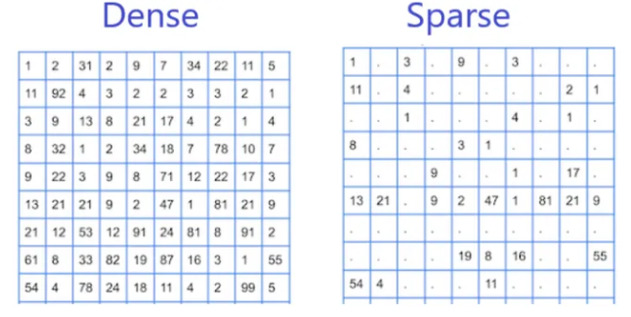
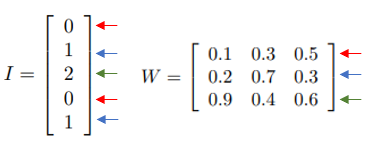
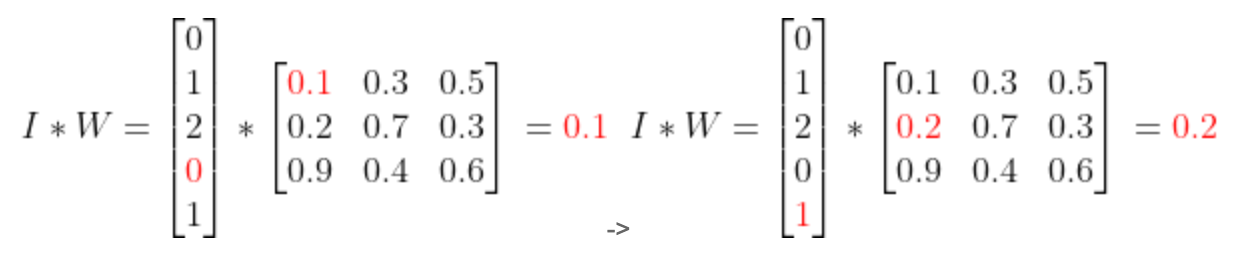
                        <![CDATA[<h1 id="稀疏特征和密集特征">稀疏特征和密集特征</h1><p>稀疏特征和密集特征是机器学习和深度学习中常见的两种特征类型，它们有不同的存储方式和处理方法。</p><p>在机器学习中，特征是指对象、人或现象的可测量和可量化的属性或特征。特征可以大致分为两类：稀疏特征和密集特征。</p><p><img src="https://blog.zs-fighting.cn/upload/2024/01/image-c30cdac773af4c439cf919a9fdf5af20.png" alt="image.png" /></p><p><strong>稀疏特征（Sparse Feature）</strong> 指的是特征值大部分为0的特征，例如文本数据中的词频、one-hot向量等。对于稀疏特征，我们通常使用稀疏矩阵（Sparse Matrix）来存储，只存储非0的元素和它们的索引，可以大大节省存储空间和计算资源。在深度学习中，我们也可以使用Embedding层来对稀疏特征进行编码，将高维稀疏向量映射为低维稠密向量，以便进行神经网络的训练和推理。</p><p><strong>密集特征（Dense Feature）</strong> 指的是特征值大部分为非0的特征，例如图像数据中的像素值、音频数据中的频谱、时间序列数据中的数值等。对于密集特征，我们通常使用密集矩阵（Dense Matrix）来存储，每个元素都有一个实数值。在深度学习中，我们通常使用全连接层（Dense层）来对密集特征进行编码，将输入特征向量映射为输出特征向量，以便进行神经网络的训练和推理。</p><p><strong>区别</strong></p><p>稀疏特征和密集特征之间的区别在于它们的值在数据集中的分布。稀疏特征具有很少的非零值，而密集特征具有许多非零值，这种分布差异对机器学习算法有影响，因为与密集特征相比，算法在稀疏特征上的表现可能不同。</p><p>需要注意的是，稀疏特征和密集特征并不是互相独立的，实际的数据集通常包含多种类型的特征，其中一些特征可能是稀疏的，一些特征可能是密集的，甚至还可能包含序列、图像、音频等多种类型的数据。在处理这些数据时，我们需要根据不同的特征类型选择合适的存储方式和处理方法，以便提高模型的效率和准确率。</p><p><strong>算法选择</strong></p><p>现在我们知道了给定数据集的特征类型，如果数据集包含稀疏特征或数据集包含密集特征，我们应该使用哪种算法？</p><p>一些算法更适合稀疏数据，而另一些算法更适合密集数据。</p><ul><li>对于稀疏数据，流行的算法包括逻辑回归、支持向量机 (SVM) 和决策树。</li><li>对于密集数据，流行的算法包括神经网络，例如前馈网络和卷积神经网络。</li></ul><p>但需要注意的是，算法的选择不仅仅取决于数据的稀疏性或密度，还应考虑数据集的大小、特征类型、问题的复杂性等其他因素 ，一定要尝试不同的算法并比较它们在给定问题上的性能。</p><h1 id="nn神经网络中embedding的dense和sparse是什么意思">NN[神经网络]中embedding的dense和sparse是什么意思？</h1><p>dense 表示稠密，在embedding中的dense时：</p><p>假设我们有这样一个句子： “北京是北京”，我们将其数值化表示为：</p><p><img src="https://blog.zs-fighting.cn/upload/2024/01/image-2f01f1d19e344b8cbd8cf0751c6a5ff5.png" alt="image.png" /></p><p>dense embedding，需要你讲它转换成onehot表示：</p><p><img src="https://blog.zs-fighting.cn/upload/2024/01/image-51b538c67fc842849a7be07d5d034a3e.png" alt="image.png" /></p><p>假设embedding对输出size=3,也就是hidden层的size=3*3;</p><p>eg:</p><p><img src="https://blog.zs-fighting.cn/upload/2024/01/image-e96713468273419891c4d7e60b379468.png" alt="image.png" />　　</p><p>那么dense layer的计算过程就是一个矩阵相乘：</p><p><img src="https://blog.zs-fighting.cn/upload/2024/01/image-1631017c55df480db42c3d2c729923cf.png" alt="image.png" /></p><p><img src="https://blog.zs-fighting.cn/upload/2024/01/image-6a1b63024373463e8420008ee220d66d.png" alt="image.png" /></p><p><img src="https://blog.zs-fighting.cn/upload/2024/01/image-ea13702741fd41db8780b5afa948c4f5.png" alt="image.png" /></p><p><img src="https://blog.zs-fighting.cn/upload/2024/01/image-2334a84118204c1e97f0b086e08fb7a4.png" alt="image.png" /></p><p>整个流程展开来看就是：</p><p><img src="https://blog.zs-fighting.cn/upload/2024/01/image-e8ca3251575140eba93598736ca26baf.png" alt="image.png" /></p><p>你会看到这个过程：</p><ol><li>计算量非常巨大 ,这个回想一下矩阵乘法的复杂度就知道O((N<em>M)</em>(M*M)),</li><li>而且对于输入来说，转换的矩阵也很巨大(就是vocabulary有多大，这个列就有多大，你想想当vocabulary=500w时，这个输入input的表示矩阵大不大).</li></ol><p>那么有没有方法，优化一下这两个问题（计算量大，输入尺寸也大）呢？</p><p>sparse ： 表示稀疏，在embedding中的dense时：</p><p>同样假设我们有这样一个句子： “北京是北京”，我们将其数值化表示为：</p><p><img src="https://blog.zs-fighting.cn/upload/2024/01/image-ac5c392c1bf848588e21a1accb089f82.png" alt="image.png" /></p><p>sparse embedding，不需要你转换乘onehot编码格式：</p><p>那么，它是如何计算的呢？</p><p>假设embedding对输出size=3,也就是hidden层的size=3*3;</p><p>eg:</p><p><img src="https://blog.zs-fighting.cn/upload/2024/01/image-a13d96fdf8fa439eb8f0d62874dd7152.png" alt="image.png" />　　　</p><p>那么sparse layer的计算过程的“矩阵相乘”（相当于一个查表的过程，所以有lookup_table这个表述）：</p><p><img src="https://blog.zs-fighting.cn/upload/2024/01/image-a9afbf1369ce49e8b16bcc5f035628a3.png" alt="image.png" /></p><p>这个计算过程为：</p><p><img src="https://blog.zs-fighting.cn/upload/2024/01/image-ad542a423cde49ad862a368a76412923.png" alt="image.png" /></p><p><img src="https://blog.zs-fighting.cn/upload/2024/01/image-2f18d33f75884ea0bfbe75f6ca0dd832.png" alt="image.png" /></p><p>最终得到：</p><p><img src="https://blog.zs-fighting.cn/upload/2024/01/image-8ddcb3612f414a9fbd63e4e28f0a2500.png" alt="image.png" /></p><p>你会看到，dense和sparse结果都一样，但是这个计算量变成列O(（N<em>1)</em>（M*M）) 减少列一个量级. 而且输入input的vec也极大的缩小了，毕竟存储的是index嘛.</p><p>那么会到我们开始的问题，NN[神经网络]中embedding的dense和sparse是什么意思？</p><p>结合上面的例子的计算过程，dense embedding 就是要求输入必须为onehot,sparse embedding 不需要.</p><p>那么在扩大一点，NN[神经网络]中的dense和sparse是什么意思？</p><p>dense和sparse描述的是该层hidden layer和前后层的网络连接情况，如果hidden layer 和前一层以及后一层参数连接多，我们就说他是dense layer,比如全连接层(fc),相反，如果连接数比较少，我们说它是sparse layer。</p>]]>
                </content>
            </entry>
            <entry>
                <title><![CDATA[Python 使用记录]]></title>
                <link rel="alternate" type="text/html" href="https://blog.zs-fighting.cn/archives/python" />
                <id>tag:https://blog.zs-fighting.cn,2023-10-05:python</id>
                <published>2023-10-05T16:00:28+08:00</published>
                <updated>2025-07-28T02:21:51+08:00</updated>
                <author>
                    <name>张顺</name>
                    <uri>https://blog.zs-fighting.cn</uri>
                </author>
                <content type="html">
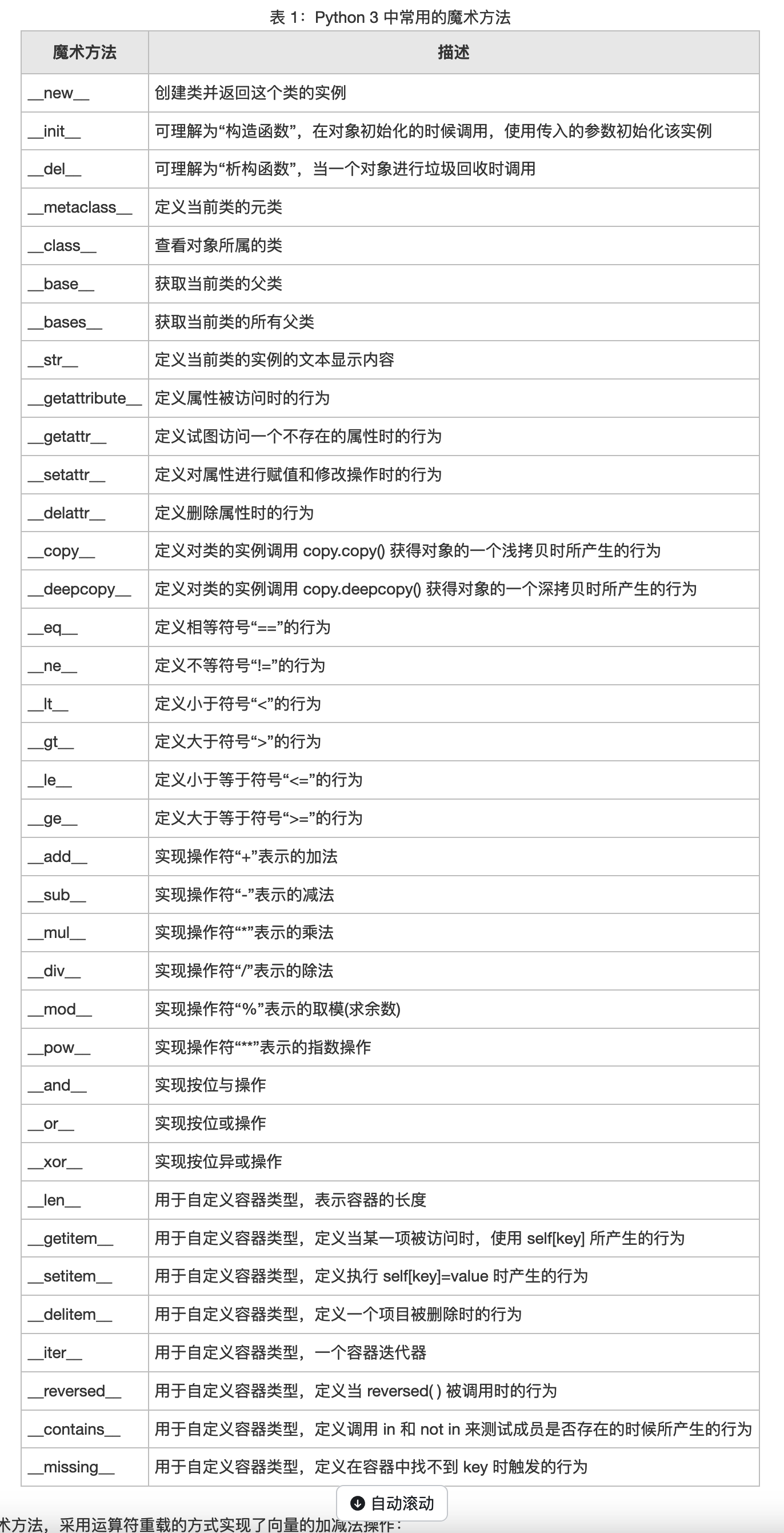
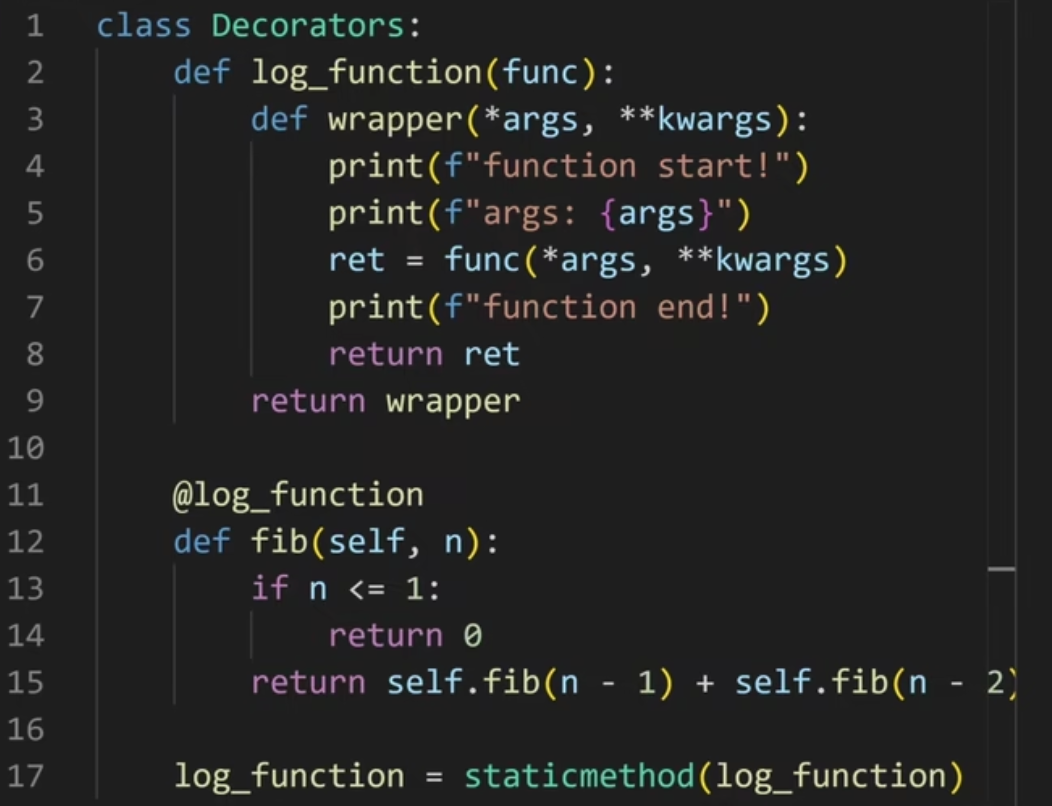
                        <![CDATA[<p><strong>Python</strong></p><h3 id="装饰器">装饰器</h3><pre><code class="language-python">from typing import Anyimport time'''函数装饰器'''def timeit(f):    def wapper(*args, **kwargs):        start_time = time.time()        ret = f(*args, **kwargs)        print(time.time() - start_time)        return ret    return wapper@timeitdef my_func(x):    time.sleep(x)@timeitdef orther(x, y):    return x * y# # my_func = timeit(my_func)myfunc(3)# orther = timeit(orther)print(orther(2, 3))'''类装饰器__call__方法是python魔法方法的一种，它的作用是将类的实例化对象变成可调用对象，类似于像函数一样被调用。'''class Timer:    def __init__(self, func) -&gt; None:        self.func = func    def __call__(self, *args: Any, **kwargs: Any) -&gt; Any:        start_time = time.time()        ret = self.func(*args, **kwargs)        print(f'Time: {time.time() - start_time}')        return ret'''带参数的类装饰器'''class Timer:    def __init__(self, prefix) -&gt; None:        self.prefix = prefix    def __call__(self, func):        def wapper(*args, **kwargs):            start_time = time.time()            ret = func(*args, **kwargs)            print(f'{self.prefix}{time.time() - start_time}')            return ret        return wapper@Timer@Timer(prefix=&quot;current_time: &quot;)def add(x, y):    return x + y# 不带参数的类装饰器, 等价于add = Timer(add)# 带参数的类装饰器, 等价于add = Timer(prefix=&quot;current_time: &quot;)(add)print(add(2, 3))</code></pre><h3 id="pythonic">Pythonic</h3><pre><code class="language-python"># if 后面的执行条件是可以简写的，只要条件 是非零数值、非空字符串、非空 list 等，就判断为 True，否则为 False。if a:    print('a 为非空')if b is None:    pass    # 字符串拼接print(f'Wow {name}! you have {subscribers} subscribers!') # dict get key# 拿不到key默认就是Nonedict.get('fault_task_id')# 列表生成式num = [i for i in range(10)]# 类型断言a = []if isinstance(a, list):    pass# with# forfor i in range(1, 10):    # 从1开始遍历    print(i)# 列表a = [1, 2, 3]b = [4, 5, 6]for index, value in enumerate(a):    # 1. 遍历索引以及value    passfor av, bv in zip(a,b):    # 2. 遍历两个列表    passa = [i for i in range(10)]    # 3. 简洁操作列表    # 字典d = {&quot;a&quot;:1, &quot;b&quot;:2}t = {&quot;a&quot;:1, &quot;c&quot;:3}for k in d:    # 1. 遍历key    passfor k, v in d.items():    # 2. 遍历key, value    passmerge_dict = {**d, **t}    # 3. 合并字典 # joinmy_list = ['Hello', 'my', 'friends']my_str = &quot; &quot;.join(my_list)print(my_str) # 优雅你的判断语句x = -6y = -x if x&lt;0 else x# Be consistent in return statements. Either all return statements in a function should return an expression, or none of them should. If any return statement returns an expression, any return statements where no value is returned should explicitly state this as return None, and an explicit return statement should be present at the end of the function (if reachable)# Wrong:def foo(x):    if x &gt;= 0:        return math.sqrt(x)def bar(x):    if x &lt; 0:        return    return math.sqrt(x)    # Correct:def foo(x):    if x &gt;= 0:        return math.sqrt(x)    else:        return Nonedef bar(x):    if x &lt; 0:        return None    return math.sqrt(x)# 多条件内容判断至少一个成立math,English,computer =90,59,88if any([math&lt;60,English&lt;60,computer&lt;60]):    print('not pass')# filterdef func(a):    return a % 2 != 0print(filter(func, range(10)))for i in filter(func, range(10)):    print(i)'''&lt;filter object at 0x7f1f4840a198&gt;13579'''# 元组比列表占用的内存要小很多# rasik</code></pre><h3 id="类的魔术方法">类的魔术方法</h3><p><img src="https://blog.zs-fighting.cn/upload/2023/10/image-337c856236a34537a75667d9274f0578.png" alt="image.png" /></p><pre><code class="language-python">'''1. __new__(少): 从class建立object的过程2. __init__: 有了object后, 给object初始化的过程ex:obj = __new__(ClassA)__init__(obj)dir(obj): 列出对象可调用的所有属性20. __getitem__: 使用方括号[]读取值的时候ex:class A:    def __init__(self, data) -&gt; None:        self._data = data    def __getitem__(self, key):        return self._data[key]a = A([1, 2])print(a[1])21. __setitem__: 使用[]设置值的时候14. __getattr__: 只有在读取一个不存在的属性时会调用ex:class A:    def __getattr__(self, attr):        print(f'{attr} not exsit')        raise AttributeError15. __getattribute__(少): 只要读取属性, 都会调用16. __setattr__: 在设置属性的时候会调用ex:class A:    def __init__(self, data) -&gt; None:        self._data = data    def __getitem__(self, key):        return self._data[key]    def __setitem__(self, key, value):        self._data[key] = valuea = A([1, 2])a[1] = &quot;Any&quot;print(a[1])17. __delattr__(少): 尝试删除对象属性的时候调用18. __len__(少): 内置函数len调用的时候, 会调用对象的__len__函数3. __del__(少): 当这个对象被释放的时候, 要干点什么4. __repr__(少): 返回这个object的字符串表示, 一般为注释, 详细版5. __str__: 返回这个object的字符串表示, 一般为注释, 简易版6. __format__(少)7. __bytes__(少)8. __eq__(少): 比较函数, 等于9. __ne__(少): 比较函数, 不等于10. __gt__(少)11. __lt__(少)12. __ge__(少)13. __le__(少)'''</code></pre><h3 id="super使用场景">super使用场景</h3><pre><code class="language-python">'''Python中的super()函数是一个非常有用的工具，它可以用来调用父类的方法和属性。下面是一些使用场景的例子'''# 在子类中调用父类的构造方法。在子类中，如果您想继承父类的构造方法，但又想添加自己的额外操作，# 您可以使用super()函数来调用父类的构造方法，并执行您自己的操作。例如：class SubClass(SuperClass):    def __init__(self, arg1, arg2, arg3):        super().__init__(arg1, arg2)        self.arg3 = arg3# 在这个例子中，子类SubClass继承了父类SuperClass的构造方法，并在自己的构造方法中添加了一个额外的参数arg3。# 在子类中调用父类的方法。如果您想在子类中调用父类的方法，您可以使用super()函数来实现。例如：class SubClass(SuperClass):    def some_method(self, arg):        super().some_method(arg)        # do some other stuff here# 在这个例子中，子类SubClass继承了父类SuperClass的方法some_method()，并在自己的方法中添加了一些其他的操作。# 在多重继承中，使用super()函数来调用正确的父类方法。在多重继承的情况下，子类可能继承了多个父类，# 这时使用super()函数可以帮助您调用正确的父类方法。例如：class SubClass(SuperClass1, SuperClass2):    def some_method(self, arg):        super(SuperClass1, self).some_method(arg)        super(SuperClass2, self).some_method(arg)# 在这个例子中，子类SubClass继承了两个父类SuperClass1和SuperClass2，并在自己的方法中使用super()函数分别调用这两个父类的方法。</code></pre><h3 id="如何在class内部定义一个装饰器">如何在class内部定义一个装饰器？</h3><p>@classmethod 装饰的类方法，也可以是 @staticmethod 装饰的静态方法</p><p>@classmethod : 因为持有cls参数，可以来调用类的属性，类的方法，实例化对象等，避免硬编码。</p><p>@staicmethod : 相当于定义了一个局部域函数为该类专门服务，没什么其它用处吧。</p><p><img src="https://blog.zs-fighting.cn/upload/2023/10/image-2c751acf7a47408d8d3a661f6895bcaf.png" alt="image.png" /></p><pre><code class="language-python">class A(object):    def m1(self, n):        print(&quot;self:&quot;, self)        @classmethod    def m2(cls, n):        print(&quot;cls:&quot;, cls)            @staticmethod    def m3(n):        pass</code></pre><h3 id="迭代器todo">迭代器(TODO)</h3><h3 id="生成器todo">生成器(TODO)</h3><h3 id="字节码与虚拟机">字节码与虚拟机</h3><p><img src="https://blog.zs-fighting.cn/upload/2023/10/image-df3d05a1157442a48404d67fd918d2b8.png" alt="image.png" /></p><pre><code class="language-python"># 在Python代码执行时，Python解释器首先将源代码解析成抽象语法树，然后将其编译成Python字节码，# 最后执行字节码。 Python字节码是一种基于堆栈的指令集，其中每个指令都会对堆栈进行操作。# # Python 代码在底层究竟是如何工作的1. 刚开始运行 python时, 会建立一个新的 frame.2. 在这个 frame的环境下, 会一条一条执行 bytecode.3. 每一条 bytecode在 c语言里有相应的代码去执行他.4. 在每一个 frame里面, pyhton 会维护一个 stack(栈).5. bytecode 会跟 stack(栈)进行交互, 进行结算, 拿到结果返回, 继续循环.</code></pre><p><a href="https://docs.python.org/zh-cn/3/library/dis.html">python字节码介绍</a></p><h3 id="codeobjecttodo">CodeObject(TODO)</h3><h3 id="frametodo">Frame(TODO)</h3>]]>
                </content>
            </entry>
            <entry>
                <title><![CDATA[SLI SLO SLA]]></title>
                <link rel="alternate" type="text/html" href="https://blog.zs-fighting.cn/archives/slislosla" />
                <id>tag:https://blog.zs-fighting.cn,2023-03-14:slislosla</id>
                <published>2023-03-14T11:33:12+08:00</published>
                <updated>2025-07-28T02:21:26+08:00</updated>
                <author>
                    <name>张顺</name>
                    <uri>https://blog.zs-fighting.cn</uri>
                </author>
                <content type="html">
                        <![CDATA[<h3 id="前言">前言</h3><p>SLO和SLA是大家常见的两个名词：服务等级目标和服务等级协议。</p><p>云计算时代，各大云服务提供商都发布有自己服务的SLA条款，比如Amazon的EC2和S3服务都有相应的SLA条款。这些大公司的SLA看上去如此的高达上，一般是怎么定义出来的呢？本文就尝试从技术角度解剖一下SLA的制定过程。</p><p>说SLA不能不提SLO，这个是众所周知的，但是还有一个概念知道的人就不多了，那就是SLI（Service Level Indicator），定义一个可执行的SLA，好的SLO和SLI是必不可少的。</p><p>再有就是SLI/SLO/SLA都是和服务联系在一起的，脱离了服务这三个概念就没有什么意义了。</p><h3 id="service">Service</h3><p>什么是服务？</p><p>简单说就是一切提供给客户的有用功能都可以称为服务。</p><p>服务一般会由服务提供者提供，提供这个有用功能的组织被称为服务提供者，通常是人加上软件，软件的运行需要计算资源，为了能对外提供有用的功能软件可能会有对其他软件系统的依赖。</p><p>客户是使用服务提供者提供的服务的人或公司。</p><h3 id="sli">SLI</h3><p>SLI是经过仔细定义的测量指标，它根据不同系统特点确定要测量什么，SLI的确定是一个非常复杂的过程。</p><p>SLI的确定需要回答以下几个问题：</p><ol><li><p>要测量的指标是什么？</p></li><li><p>测量时的系统状态？</p></li><li><p>如何汇总处理测量的指标？</p></li><li><p>测量指标能否准确描述服务质量？</p></li><li><p>测量指标的可靠度(trustworthy)？</p></li></ol><p><strong>1.常见的测量指标有以下几个方面：</strong></p><p><strong>性能</strong></p><ul><li><p>响应时间(latency)</p></li><li><p>吞吐量(throughput)</p></li><li><p>请求量(qps)</p></li><li><p>实效性(freshness)</p></li><li><p>可用性</p></li><li><p>运行时间(uptime)</p></li><li><p>故障时间/频率</p></li><li><p>可靠性</p></li></ul><p><strong>质量</strong></p><ul><li><p>准确性(accuracy)</p></li><li><p>正确性(correctness)</p></li><li><p>完整性(completeness)</p></li><li><p>覆盖率(coverage)</p></li><li><p>相关性(relevance)</p></li></ul><p><strong>内部指标</strong></p><ul><li><p>队列长度(queue length)</p></li><li><p>内存占用(RAM usage)</p></li></ul><p><strong>因素人</strong></p><ul><li><p>响应时间(time to response)</p></li><li><p>修复时间(time to fix)</p></li><li><p>修复率(fraction fixed)</p></li></ul><p>下面通过一个例子来说明一下：hotmail的downtime SLI</p><ul><li><p>错误率(error rate)计算的是服务返回给用户的error总数</p></li><li><p>如果错误率大于X%，就算是服务down了，开始计算downtime</p></li><li><p>如果错误率持续超过Y分钟，这个downtime就会被计算在内</p></li><li><p>间断性的小于Y分钟的downtime是不被计算在内的。</p></li></ul><p><strong>2.测量时的系统状态，在什么情况下测量会严重影响测量的结果</strong></p><ul><li><p>测量异常(badly-formed)请求，还是失败(fail)请求还是超时请求(timeout)</p></li><li><p>测量时的系统负载（是否最大负载）</p></li><li><p>测量的发起位置，服务器端还是客户端</p></li><li><p>测量的时间窗口（仅工作日、还是一周7天、是否包括计划内的维护时间段）</p></li></ul><p><strong>3.如何汇总处理测量的指标？</strong></p><ul><li><p>计算的时间区间是什么：是一个滚动时间窗口，还是简单的按照月份计算</p></li><li><p>使用平均值还是百分位值，比如：某服务X的ticket处理响应时间SLI的</p></li><li><p>测量指标：统计所有成功解决请求，从用户创建ticket到问题被解决的时间</p></li><li><p>怎么测量：用ticket自带的时间戳，统计所有用户创建的ticket</p></li><li><p>什么情况下的测量：只包括工作时间，不包含法定假日</p></li><li><p>用于SLI的数据指标：以一周为滑动窗口，95%分位的解决时间</p></li></ul><p><strong>4. 测量指标能否准确描述服务质量？</strong></p><ul><li><p>性能：时效性、是否有偏差</p></li><li><p>准确性：精度、覆盖率、数据稳定性</p></li><li><p>完整性：数据丢失、无效数据、异常(outlier)数据</p></li></ul><p><strong>5. 测量指标的可靠度</strong></p><ul><li><p>是否服务提供者和客户都认可</p></li><li><p>是否可被独立验证，比如三方机构</p></li><li><p>客户端还是服务器端测量，取样间隔</p></li><li><p>错误请求是如何计算的</p></li></ul><h3 id="slo">SLO</h3><p>SLO(服务等级目标)指定了服务所提供功能的一种期望状态。SLO里面应该包含什么呢？所有能够描述服务应该提供什么样功能的信息。</p><p>服务提供者用它来指定系统的预期状态；开发人员编写代码来实现；客户依赖于SLO进行商业判断。SLO里没有提到，如果目标达不到会怎么样。</p><p>SLO是用SLI来描述的，一般描述为：</p><p>比如以下SLO：</p><ul><li><p>每分钟平均qps &gt; 100k/s</p></li><li><p>99% 访问延迟 &lt; 500ms</p></li><li><p>99% 每分钟带宽 &gt; 200MB/s</p></li></ul><p>设置SLO时的几个最佳实践：</p><ul><li><p>指定计算的时间窗口</p></li><li><p>使用一致的时间窗口(XX小时滚动窗口、季度滚动窗口)</p></li><li><p>要有一个免责条款，比如：95%的时间要能够达到SLO</p></li></ul><p>如果Service是第一次设置SLO，可以遵循以下原则</p><ul><li><p>测量系统当前状态</p><ul><li><p>设置预期(expectations)，而不是保证(guarantees)</p></li><li><p>初期的SLO不适合作为服务质量的强化工具</p></li></ul></li><li><p>改进SLO</p><ul><li>设置更低的响应时间、更改的吞吐量等</li></ul></li><li><p>保持一定的安全缓冲</p><ul><li>内部用的SLO要高于对外宣称的SLO</li></ul></li><li><p>不要超额完成</p><ul><li>定期的downtime来使SLO不超额完成</li></ul></li></ul><p>设置SLO时的目标依赖于系统的不同状态(conditions)，根据不同状态设置不同的SLO：总SLO = service1.SLO1 weight1 + service2.SLO2 weight2 + …</p><p>为什么要有SLO，设置SLO的好处是什么呢？</p><ul><li><p>对于客户而言，是可预期的服务质量，可以简化客户端的系统设计</p></li><li><p>对于服务提供者而言</p><ul><li><p>可预期的服务质量</p></li><li><p>更好的取舍成本/收益</p></li><li><p>更好的风险控制(当资源受限的时候)</p></li><li><p>故障时更快的反应，采取正确措施</p></li></ul></li></ul><p>SLO设好了，怎么保证能够达到目标呢？</p><p>需要一个控制系统来：</p><ul><li><p>监控/测量SLIs</p></li><li><p>对比检测到的SLIs值是否达到目标</p></li><li><p>如果需要，修证目标或者修正系统以满足目标需要</p></li><li><p>实施目标的修改或者系统的修改</p></li></ul><p>该控制系统需要重复的执行以上动作，以形成一个标准的反馈环路，不断的衡量和改进SLO/服务本身。</p><p>我们讨论了目标以及目标是怎么测量的，还讨论了控制机制来达到设置的目标，但是如果因为某些原因，设置的目标达不到该怎么办呢？</p><p>也许是因为大量的新增负载；也许是因为底层依赖不能达到标称的SLO而影响上次服务的SLO。这就需要SLA出场了。</p><h3 id="sla">SLA</h3><p>SLA是一个涉及2方的合约，双方必须都要同意并遵守这个合约。当需要对外提供服务时，SLA是非常重要的一个服务质量信号，需要产品和法务部门的同时介入。</p><p>SLA用一个简单的公式来描述就是： SLA = SLO + 后果</p><ul><li><p>SLO不能满足的一系列动作，可以是部分不能达到</p><ul><li>比如：达到响应时间SLO+未达到可用性SLO</li></ul></li><li><p>对动作的具体实施</p><ul><li>需要一个通用的货币来奖励/惩罚，比如：钱</li></ul></li></ul><p>SLA是一个很好的工具，可以用来帮助合理配置资源。一个有明确SLA的服务最理想的运行状态是：增加额外资源来改进系统所带来的收益小于把该资源投给其他服务所带来的收益。</p><p>一个简单的例子就是某服务可用性从99.9%提高到99.99%所需要的资源和带来的收益之比，是决定该服务是否应该提供4个9的重要依据。</p>]]>
                </content>
            </entry>
            <entry>
                <title><![CDATA[tcp_tw_recycle net.ipv4.tcp_timestamps引发的坑]]></title>
                <link rel="alternate" type="text/html" href="https://blog.zs-fighting.cn/archives/tcptwrecyclenetipv4tcptimestamps引发的坑" />
                <id>tag:https://blog.zs-fighting.cn,2023-02-28:tcptwrecyclenetipv4tcptimestamps引发的坑</id>
                <published>2023-02-28T22:17:06+08:00</published>
                <updated>2023-02-28T22:19:38+08:00</updated>
                <author>
                    <name>张顺</name>
                    <uri>https://blog.zs-fighting.cn</uri>
                </author>
                <content type="html">
                        <![CDATA[<p>在NAT环境下，遇到因为tcp_tw_recycle=1和net.ipv4.tcp_timestamps=1引起 Nginx upstream timed out 后，一直没在遇见，今天在朋友的阿里云环境下又重新再一次出现；因此在这炒一次冷饭，让运维新手或者刚上云的朋友大概了解一下，避免再一次采坑。</p><p>故障情况：</p><p>阿里云账号A的A机房，内网里面部署两台Nginx，通过网络出口（NAT），代理用户访问到阿里云账号B的B机房服务。A机房的Nginx出现：upstream timed out 。</p><p>故障的诱因是：net.ipv4.tcp_timestamps=1</p><p>抓包图：</p><p><img src="https://blog.zs-fighting.cn/upload/2023/02/image-f0eb4f133422455fb94743f0f2b4a8eb.png" alt="image.png" /></p><p>注意，这个选项生效的前提是，报文的发出方必须在TCP头部的可选项中增加时间戳字段，否则这个设置是不生效的。</p><p>直接上当年的笔记：</p><p>先看看TCP IP 对tw的一些解析：<br />RFC 1323里有这样的定义：</p><blockquote><p>TCP Extensions for High PerformanceVim<br />An additional mechanism could be added to the TCP, a per-host<br />cache of the last timestamp received from any connection.<br />This value could then be used in the PAWS mechanism to reject<br />old duplicate segments from earlier incarnations of the<br />connection, if the timestamp clock can be guaranteed to have<br />ticked at least once since the old connection was open.  This<br />would require that the TIME-WAIT delay plus the RTT together<br />must be at least one tick of the sender's timestamp clock.<br />Such an extension is not part of the proposal of this RFC.</p></blockquote><p>大概的中文意思就是：TCP协议中有一种机制，缓存了每个主机（即ip）过来的连接最新的timestamp值。这个缓存的值可以用于PAWS（Protect Against Wrapped Sequence numbers，是一个简单的防止重复报文的机制）中，来丢弃当前连接中可能的旧的重复报文。而Linux实现这个机制的方法就是同时启用net.ipv4.tcp_timestamps和net.ipv4.tcp_tw_recycle 这两个选项。</p><p>这种机制在 客户端-服务器 一对一的时候，没有任何问题，但是当服务器在负载均衡器后面时，由于负载均衡器不会修改包内部的timestamp值，而互联网上的机器又不可能保持时间的一致性，再加上负载均衡是会重复多次使用同一个tcp端口向内部服务器发起连接的，就会导致什么情况呢：</p><p>负载均衡通过某个端口向内部的某台服务器发起连接，源地址为负载均衡的内部地址——同一假如恰巧先后两次连接源端口相同，这台服务器先后收到两个包，第一个包的timestamp被服务器保存着，第二个包又来了，一对比，发现第二个包的timestamp比第一个还老——客户端时间不一致。服务器基于PAWS，判断第二个包是重复报文，丢弃之。</p><p>反映出来的情况就是在服务器上抓包，发现有SYN包，但服务器就是不回ACK包，因为SYN包已经被丢弃了。为了验证这一结果，可以执行netstat -s | grep timestamp 命令，看输出里面passive connections rejected by timestamp 一项的数字变化。</p><p>在tcp_ipv4.c中，在接收SYN之前，如果符合如下两个条件，需要检查peer是不是proven，即per-host PAWS检查：</p><p>收到的报文有TCP option timestamp时间戳<br />本机开启了内核参数net.ipv4.tcp_tw_recycle</p><pre><code class="language-c">linux kernel v3.10 net/ipv4/tcp_ipv4.c 1540行C/* VJ's idea. We save last timestamp seen * from the destination in peer table, when entering * state TIME-WAIT, and check against it before * accepting new connection request. * * If &quot;isn&quot; is not zero, this request hit alive * timewait bucket, so that all the necessary checks * are made in the function processing timewait state. */if (tmp_opt.saw_tstamp &amp;&amp;    tcp_death_row.sysctl_tw_recycle &amp;&amp;    (dst = inet_csk_route_req(sk, &amp;fl4, req)) != NULL &amp;&amp;    fl4.daddr == saddr) {if (!tcp_peer_is_proven(req, dst, true)) {NET_INC_STATS_BH(sock_net(sk), LINUX_MIB_PAWSPASSIVEREJECTED);goto drop_and_release;}}</code></pre><p>解决办法：</p><p>tcp_tw_recycle=0 或（和）net.ipv4.tcp_timestamps=0同时从4.10内核开始，官方修改了时间戳的生成机制，所以导致 tcp_tw_recycle 和新时间戳机制工作在一起不那么友好，同时 tcp_tw_recycle 帮助也不那么的大。</p><p>此处的时间戳并不是我们通常意义上面的绝对时间，而是一个相对时间。很多情况下，我们是没法保证时间戳单调递增的，比如业务服务器之前部署了NAT，LVS等情况。相信很多小伙伴上班的公司大概率实用实用各种公有云，而各种公有云的 LVS 网关都是 FullNAT 。所以可能导致在高并发的情况下，莫名其妙的 TCP 建联不是那么顺畅或者丢连接。</p><p>而这也是很多优化文章中并没有提及的一点，大部分文章都是简单的推荐将net.ipv4.tcp_tw_recycle设置为1，却忽略了该选项的局限性，最终造成严重的后果(比如我们之前就遇到过部署在nat后端的业务网站有的用户访问没有问题，但有的用户就是打不开网页)。</p>]]>
                </content>
            </entry>
            <entry>
                <title><![CDATA[操作系统:   内存管理]]></title>
                <link rel="alternate" type="text/html" href="https://blog.zs-fighting.cn/archives/memorymanagent" />
                <id>tag:https://blog.zs-fighting.cn,2022-10-19:memorymanagent</id>
                <published>2022-10-19T14:23:44+08:00</published>
                <updated>2022-10-19T15:19:19+08:00</updated>
                <author>
                    <name>张顺</name>
                    <uri>https://blog.zs-fighting.cn</uri>
                </author>
                <content type="html">
                        <![CDATA[<h2 id="学习视频王道操作系统">学习视频：<a href="https://www.bilibili.com/video/BV1YE411D7nH">王道操作系统</a></h2><h2 id="1-什么是内存进程的基本原理深入指令理解其过程">1. 什么是内存？进程的基本原理，深入指令理解其过程</h2><p>思维导图</p><p><img src="https://blog.zs-fighting.cn/upload/2022/10/image-eb748cacd9054d86911f741b07dc0f7d.png" alt="image.png" /></p><p><strong>链接:</strong><br /><a href="https://blog.zs-fighting.cn/upload/2022/10/3.1_1_%E5%86%85%E5%AD%98%E7%9A%84%E5%9F%BA%E7%A1%80%E7%9F%A5%E8%AF%86-eafc1f203b5143eab793e20d8dfc598e.pdf">内存的基础知识</a></p><h2 id="2-内存管理管些什么">2. 内存管理管些什么？</h2><p>思维导图</p><p><img src="https://blog.zs-fighting.cn/upload/2022/10/image-fd50b0eb67b64218833ca7bc6d2fc90e.png" alt="image.png" /></p><p><strong>链接:</strong><br /><a href="https://blog.zs-fighting.cn/upload/2022/10/3.1_2_%E5%86%85%E5%AD%98%E7%AE%A1%E7%90%86%E7%9A%84%E6%A6%82%E5%BF%B5-85e86698c33e492d9789d0eca07bc444.pdf">内存管理的概念</a></p><h2 id="3-覆盖技术与交换技术的思想">3. 覆盖技术与交换技术的思想</h2><p>思维导图</p><p><img src="https://blog.zs-fighting.cn/upload/2022/10/image-d958b005568845f6918508120b268df3.png" alt="image.png" /></p><p><img src="https://blog.zs-fighting.cn/upload/2022/10/image-0437df0fde5a4dfab50bda253152337f.png" alt="image.png" /></p><p><strong>链接:</strong><br /><a href="https://blog.zs-fighting.cn/upload/2022/10/3.1_3_%E8%A6%86%E7%9B%96%E4%B8%8E%E4%BA%A4%E6%8D%A2-f2b88c7a55db4dbcb51d712f6ce0e7a2.pdf">内存覆盖与交换</a></p><h2 id="4-内存的分配与回收">4. 内存的分配与回收</h2><p>思维导图</p><p><img src="https://blog.zs-fighting.cn/upload/2022/10/image-4c34571ed8b1469782dcc8b113541493.png" alt="image.png" /></p><p><img src="https://blog.zs-fighting.cn/upload/2022/10/image-c11a8edeffea462bb74a2648c06dcfd0.png" alt="image.png" /></p><p><strong>链接:</strong><br /><a href="https://blog.zs-fighting.cn/upload/2022/10/3.1_4_%E8%BF%9E%E7%BB%AD%E5%88%86%E9%85%8D%E7%AE%A1%E7%90%86%E6%96%B9%E5%BC%8F-a3d8951d14844587bec954eec875f182.pdf">内存的分配与回收</a></p><h2 id="5-动态分区分配的四种算法首次适应算法最佳适应算法最坏适应算法临近适应算法">5. 动态分区分配的四种算法（首次适应算法、最佳适应算法、最坏适应算法、临近适应算法）</h2><p>思维导图</p><p><img src="https://blog.zs-fighting.cn/upload/2022/10/image-7a480056a0a249a1a1708f2485e82cec.png" alt="image.png" /></p><p><strong>链接:</strong><br /><a href="https://blog.zs-fighting.cn/upload/2022/10/3.1_5_%E5%8A%A8%E6%80%81%E5%88%86%E5%8C%BA%E5%88%86%E9%85%8D%E7%AE%97%E6%B3%95-0cfcbd13b91a441f950981aa9194ca08.pdf">内存动态分区分配算法</a></p><h2 id="6-分页存储页号页偏移量等">6. 分页存储（页号、页偏移量等）</h2><p>思维导图</p><p><img src="https://blog.zs-fighting.cn/upload/2022/10/image-6e76019c8b864b10acc6ada2ab022efb.png" alt="image.png" /></p><p><img src="https://blog.zs-fighting.cn/upload/2022/10/image-bb4fda91f7a64aa890aec7c9dd742448.png" alt="image.png" /></p><p><strong>链接:</strong><br /><a href="https://blog.zs-fighting.cn/upload/2022/10/3.1_6_%E5%9F%BA%E6%9C%AC%E5%88%86%E9%A1%B5%E5%AD%98%E5%82%A8%E7%AE%A1%E7%90%86%E7%9A%84%E5%9F%BA%E6%9C%AC%E6%A6%82%E5%BF%B5-ee51afaee2de45f092ab2bbf1466ce8e.pdf">基本分页存储管理的基本概念</a></p><h2 id="7-快表的地址变换结构">7. 快表的地址变换结构</h2><p>思维导图</p><p><img src="https://blog.zs-fighting.cn/upload/2022/10/image-99166bec004e43b8ab1bf583c86b87ce.png" alt="image.png" /></p><p><img src="https://blog.zs-fighting.cn/upload/2022/10/image-25a1442f96984cceaa300bec4d366e6f.png" alt="image.png" /></p><p><strong>链接:</strong><br /><a href="https://blog.zs-fighting.cn/upload/2022/10/3.1_8_%E5%85%B7%E6%9C%89%E5%BF%AB%E8%A1%A8%E7%9A%84%E5%9C%B0%E5%9D%80%E5%8F%98%E6%8D%A2%E6%9C%BA%E6%9E%84-53d5fd6b9eac4e039eea086cbc464797.pdf">具有快表的地址变换机构</a></p><h2 id="8-二级页表的原理和地址结构">8. 二级页表的原理和地址结构</h2><p>思维导图</p><p><img src="https://blog.zs-fighting.cn/upload/2022/10/image-9a8f3a3a36f145caa10d22910cf23d01.png" alt="image.png" /></p><p><strong>链接:</strong><br /><a href="https://blog.zs-fighting.cn/upload/2022/10/3.1_9_%E4%B8%A4%E7%BA%A7%E9%A1%B5%E8%A1%A8-8b380e5c21ee47798f959903e5c5c13c.pdf">两级页表</a></p><h2 id="9-基本分段存储管理段表地址变换信息共享">9. 基本分段存储管理（段表、地址变换、信息共享）</h2><p>思维导图</p><p><img src="https://blog.zs-fighting.cn/upload/2022/10/image-dc92a892a04c4de0b4df7892c0e51106.png" alt="image.png" /></p><p><img src="https://blog.zs-fighting.cn/upload/2022/10/image-074ba24f185e42fd9cafe3d1598c85b9.png" alt="image.png" /></p><p><strong>链接:</strong><br /><a href="https://blog.zs-fighting.cn/upload/2022/10/3.1_10_%E5%9F%BA%E6%9C%AC%E5%88%86%E6%AE%B5%E5%AD%98%E5%82%A8%E7%AE%A1%E7%90%86%E6%96%B9%E5%BC%8F-d46a551ce66142e18bf8e9ba4b0c4138.pdf">基本分段存储管理方式</a></p><h2 id="10-补充">10. 补充</h2><p><a href="https://blog.zs-fighting.cn/upload/2022/10/3.2_1_%E8%99%9A%E6%8B%9F%E5%86%85%E5%AD%98%E7%9A%84%E5%9F%BA%E6%9C%AC%E6%A6%82%E5%BF%B5-8e8cc9d65bd74ffb8ae1683d85f1e35c.pdf">虚拟内存的基本概念</a></p><p><a href="https://blog.zs-fighting.cn/upload/2022/10/3.2_2_%E8%AF%B7%E6%B1%82%E5%88%86%E9%A1%B5%E7%AE%A1%E7%90%86%E6%96%B9%E5%BC%8F-26672048e13543a098a96222433269df.pdf">请求分页管理方式</a></p><p><a href="https://blog.zs-fighting.cn/upload/2022/10/3.2_3_%E9%A1%B5%E9%9D%A2%E7%BD%AE%E6%8D%A2%E7%AE%97%E6%B3%95-c71c58645a5b46c29c031e4afeeb8781.pdf">页面置换算法</a></p><p><a href="https://blog.zs-fighting.cn/upload/2022/10/3.2_4_%E9%A1%B5%E9%9D%A2%E5%88%86%E9%85%8D%E7%AD%96%E7%95%A5-1e93ca0a5df640668af5055f08c9dda9.pdf">页面分配策略</a></p>]]>
                </content>
            </entry>
            <entry>
                <title><![CDATA[云原生训练营：基于istio的流量管理]]></title>
                <link rel="alternate" type="text/html" href="https://blog.zs-fighting.cn/archives/servicemesh" />
                <id>tag:https://blog.zs-fighting.cn,2022-08-16:servicemesh</id>
                <published>2022-08-16T20:14:08+08:00</published>
                <updated>2022-08-27T10:25:54+08:00</updated>
                <author>
                    <name>张顺</name>
                    <uri>https://blog.zs-fighting.cn</uri>
                </author>
                <content type="html">
                        <![CDATA[<h1 id="基础概念">基础概念</h1><p>服务网格(Service Mesh)通常用于应用程序的微服务网络以及应用之间的交互.</p><p>它的需求包括服务发现、负载均衡、故障恢复、指标收集和监控以及更加复杂的运维需求.</p><p><img src="https://blog.zs-fighting.cn/upload/2022/08/image-e47dd7aff69946c6a58a67b15dc659d4.png" alt="image.png" /></p><p>istio是Service Mesh的一种实现,istio包括<code>控制平面</code>、<code>数据平面</code>.</p><p>每个Pod 中包含2个 Container.一个是业务Container,一个是Envoy.所有进出Pod 的流量,都会由经过 Envoy 处理.</p><p>istio的各种功能,就是在Envoy 中实现.</p><p>istiod 进程中有各种informer, 会监听K8s 对象,把监听到的变更进行聚合,生成 Envoy配置文件, 然后下发到每个 Envoy中生效.</p><p><strong>常用对象介绍:</strong></p><ul><li><p><strong>VirtualService</strong>: 可以理解为更高级的K8s Service对象,具备配置路由、流量管理、故障处理、故障注入等功能.</p></li><li><p><strong>DestinationRule</strong>: VirtualService路由生效后,配置应用与请求的策略集.通常定义子集、负载均衡策略、断路器等,供 VirtualService使用.</p></li><li><p><strong>Gateway</strong>: 对外暴露的入口,南北流量走Gateway.</p></li><li><p><strong>ServiceEntry</strong>: 通常用于在istio 服务网格之外的服务,加入到Envoy cluster中.</p></li></ul><p><strong>istio架构</strong></p><p><img src="https://blog.zs-fighting.cn/upload/2022/08/image-8a858aa06d5b4d1cbed384ab68b7a904.png" alt="image.png" /></p><h1 id="xds">xDS</h1><ul><li><strong>xDS是一类发现服务的总称，包含LDS， RDS， CDS， EDS， SDS， HDS， ADS。</strong></li><li><strong>Envoy通过xDS API可以动态获取Listener（监听器），Route（路由）， Cluster（集群）， Endpoint（集群成员）以及Secret（证书）配置， Health(健康检查)， Aggregated(一致性)。</strong></li></ul><p><strong>发现模型如下:</strong></p><p><img src="https://blog.zs-fighting.cn/upload/2022/08/image-24fdc67a21074e789abf6e28e860f645.png" alt="image.png" /></p><p><strong>Listener Discovery Service(LDS)</strong></p><blockquote><p>简单理解，Listener是Envoy打开的一个监听端口，用于接收来自Downstream（客户端）连接。Envoy可以支持复数个Listener。多个Listener之间几乎所有的配置都是隔离的。Listener配置中核心包括监听地址、Filter链等。</p></blockquote><p><strong>Route Discovery Service(RDS)</strong></p><blockquote><p>Listener可以接收来自下游的连接，Cluster可以将流量发送给具体的上游服务，而Router则决定Listener在接收到下游连接和数据之后，应该将数据交给哪一个Cluster处理.它定义了数据分发的规则.Router中最核心配置包含匹配规则和目标Cluster，此外，也可能包含重试、分流、限流等等.</p></blockquote><p><strong>Cluster Discovery Service(CDS)</strong></p><blockquote><p>在Envoy中，每个Upstream上游服务都被抽象成一个Cluster.Cluster包含该服务的连接池、超时时间、endpoints地址、端口、类型（类型决定了Envoy获取该Cluster具体可以访问的endpoint方法）等等.</p></blockquote><p><strong>Endpoint Discovery Service(EDS)</strong></p><blockquote><p>Envoy 通过 EDS API 可以更加智能地动态获取上游 Endpoint.在 Envoy 中用来获取集群成员.集群成员在 Envoy 的术语中被称为“终端”.</p></blockquote><p><strong>Secret Discovery Service(SDS)</strong></p><blockquote><p>Secret 发现服务，用于在运行时动态获取 TLS 证书.在使用 SDS 后，集中式的 SDS 服务器将证书分发给所有的 Envoy 实例.</p></blockquote><p><strong>Health Discovery Service(HDS,使用较少)</strong></p><blockquote><p>支持管理服务器对其管理的 Envoy 实例进行高效的端点健康发现.发起主动健康检查,单个 Envoy 实例通常会收到 HDS 指令，以检查所有端点的子集（subset）.</p></blockquote><p><strong>Aggregated Discover Service(ADS)</strong></p><blockquote><p>Envoy 的设计是最终一致的,将 xDS 所有的协议都聚合到一起，即上文提到的 CDS、EDS、LDS 和 RDS 等.可以通过单一的 gRPC 服务流支持所有的资源类型，借助于有序的配置分发，从而解决资源更新顺序的问题,CDS-&gt;EDS-&gt;LDS-&gt;RDS。</p></blockquote><p>envoy配置如下:</p><p><img src="https://blog.zs-fighting.cn/upload/2022/08/image-a5230949b1ff4279a04948a70d03d5a7.png" alt="image.png" /></p><p><strong>DiscoveryRequest/DiscoveryResponse:</strong></p><p><img src="https://blog.zs-fighting.cn/upload/2022/08/image-ec90dab03ead435286a7c7d4d182fee4.png" alt="image.png" /></p><p><a href="https://github.com/envoyproxy/envoy/blob/release/v1.22/api/envoy/api/v2/discovery.proto">https://github.com/envoyproxy/envoy/blob/release/v1.22/api/envoy/api/v2/discovery.proto</a></p><h1 id="流量管理">流量管理</h1><p>🌊</p><p><strong>istio的流量劫持机制</strong></p><p><code>istio Init Container</code>会修改 Pod 的Iptables,达到流量劫持的效果.</p><p>以下命令可以观察:</p><pre><code class="language-shell"># 查看Pod Iptables规则nsenter -t $Pid -n iptables-save# 查看listener配置istioctl pc listener -nsidecar toolbox-68f79dd5f8-9mr5g -ojson# 查看route配置istioctl pc route -nsidecar toolbox-68f79dd5f8-9mr5g --name 80 -ojson# 查看cluster、endpointistioctl pc cluster -nsidecar toolbox-68f79dd5f8-9mr5g -ojsonistioctl pc endpoint -nsidecar toolbox-68f79dd5f8-9mr5g -ojson</code></pre><ul><li><p><strong>使用默认的REDIRECT模式来重定向流量,将所有出战流量都重定向到Envoy代理,转发到Envoy的15001端口.</strong></p></li><li><p><strong>Envoy 0.0.0.0:15001上的监听器接受进出Pod的所有流量,然后将请求移交给虚拟监听器.</strong></p></li><li><p><strong>每一个虚拟监听器对应一个listener,里面包含对应的router、cluster、endpoint.是通过xDS协议watch K8s Api获取的.</strong></p></li><li><p><strong>Envoy使用 istio-proxy 用户身份运行, UID为1337,所有从Envoy出去的流量都会直接 return.</strong></p></li></ul><p>如下图:</p><p><img src="https://blog.zs-fighting.cn/upload/2022/08/image-f67caf28e11045408fdf31cdbd49fb97.png" alt="image.png" /></p><h1 id="istio组件交互">istio组件交互</h1><p>🧱</p><ul><li>K8s informers watch 对象的变化,然后将变更的对象推送到全局唯一的 pushChannel.</li><li>每隔一段时间会运行Debobuce方法,合并请求和构建基于PushQueue的连接 (conn作为队列元素).</li><li>XDSServer.doSendPush 并将env放入所有基于客户端的推送通道,每个sidecar 对应一个Connection.</li><li>ADSServer建立与对等体的连接，从pushChannel中出列元素，通过cds → eds → lds → rds → sds (由PushOrder定义) 生成Envoy配置并发送到Envoy.</li></ul><p><img src="https://blog.zs-fighting.cn/upload/2022/08/image-702132409e5a41ebb646b755be77258d.png" alt="image.png" /></p><h1 id="需要注意的问题">需要注意的问题</h1><p>⚠️</p><ul><li><p><strong>Envoy在匹配路由规则时,会按照 VirtualService 中的顺序进行匹配,列表中第一规则具有最高优先级.通常把 / 匹配放到最下方,也可以通过匹配Request header或K8s label来避免.</strong></p></li><li><p>如果服务注册发现使用etcd的话,是无法匹配Envoy规则的,因为请求的是Pod ip,无法匹配domain.</p></li><li><p><strong>tracing的时候,依赖HTTP header,需要应用程序把当前的HTTP header原封不动带上,继续调用下游,Envoy 才能收到并上报给 jaeger,形成链路追踪.依赖的HTTP header如下:</strong></p><ul><li>x-request-id</li><li>x-b3-traceid</li><li>x-b3-spanid</li><li>x-b3-parentspanid</li><li>x-b3-sampled</li><li>x-b3-flags</li><li>x-ot-span-context</li></ul></li><li><p>配置一致性检查,要做一定的监控,确保所有Envoy都收到配置.<code>istioctl ps</code>查看同步状态.</p></li><li><p>K8s Endpoint的健康检查,istio完全依赖K8s 的检查机制.</p></li><li><p><strong>记得为客户端添加超时时间,快速失败,避免客户端傻等.</strong><br /><img src="https://blog.zs-fighting.cn/upload/2022/08/image-2fe8694957bc43e4a30efe9e1172ac5d.png" alt="image.png" /></p></li><li><p><strong>记得加默认的断路器规则,通过限流保护后端程序.</strong><br /><img src="https://blog.zs-fighting.cn/upload/2022/08/image-f0782296cf1641539dfcd9b7549958f7.png" alt="image.png" /></p></li></ul><h1 id="扩展">扩展</h1><p><strong>Service Mesh涉及的网络栈</strong></p><p><img src="https://blog.zs-fighting.cn/upload/2022/08/image-5435d9a8108e40169de6d37b319468f0.png" alt="image.png" /></p><p><strong>Cilium 数据平面加速</strong></p><p>通过<code>eBPF</code>技术,不在走内核协议栈,减少kernel处理数据包的开销,提高了性能.</p><p>业界使用的效果:百度提升20%,腾讯提升5-10%.具体提升见仁见智,如果数据包很大,提升明显.</p><p><img src="https://blog.zs-fighting.cn/upload/2022/08/image-3b30ab9494894314b9cd6ee558ecd824.png" alt="image.png" /></p>]]>
                </content>
            </entry>
            <entry>
                <title><![CDATA[Linux系统下程序异常如何优雅的退出]]></title>
                <link rel="alternate" type="text/html" href="https://blog.zs-fighting.cn/archives/application-abort" />
                <id>tag:https://blog.zs-fighting.cn,2022-08-08:application-abort</id>
                <published>2022-08-08T10:30:33+08:00</published>
                <updated>2022-08-21T00:19:36+08:00</updated>
                <author>
                    <name>张顺</name>
                    <uri>https://blog.zs-fighting.cn</uri>
                </author>
                <content type="html">
                        <![CDATA[<blockquote><p>在Linux下当我们想强制结束一个程序的时候，我们通常会给它发送一个信号然后该进程捕捉到信号，再然后该进程执行一定操作最终被终止。</p></blockquote><blockquote><p>信号是UNIX和Linux系统响应某些条件而产生的一个事件，接收到该信号的进程会相应地采取一些行动。</p></blockquote><p><img src="https://blog.zs-fighting.cn/upload/2022/08/image-adbb468a23b346b4bb059a3343c57400.png" alt="image.png" /></p><table><thead><tr><th style="text-align:left">信号</th><th style="text-align:left">值</th><th style="text-align:left">动作</th><th style="text-align:left">说明</th></tr></thead><tbody><tr><td style="text-align:left">SIGHUP</td><td style="text-align:left">1</td><td style="text-align:left">Term</td><td style="text-align:left">终端控制进程结束(终端连接断开)</td></tr><tr><td style="text-align:left">SIGINT</td><td style="text-align:left">2</td><td style="text-align:left">Term</td><td style="text-align:left">用户发送INTR字符(Ctrl+C)触发</td></tr><tr><td style="text-align:left">SIGQUIT</td><td style="text-align:left">3</td><td style="text-align:left">Core</td><td style="text-align:left">用户发送QUIT字符(Ctrl+/)触发</td></tr><tr><td style="text-align:left">SIGILL</td><td style="text-align:left">4</td><td style="text-align:left">Core</td><td style="text-align:left">非法指令(程序错误、试图执行数据段、栈溢出等)</td></tr><tr><td style="text-align:left">SIGABRT</td><td style="text-align:left">6</td><td style="text-align:left">Core</td><td style="text-align:left">调用abort函数触发</td></tr><tr><td style="text-align:left">SIGFPE</td><td style="text-align:left">8</td><td style="text-align:left">Core</td><td style="text-align:left">算术运行错误(浮点运算错误、除数为零等)</td></tr><tr><td style="text-align:left">SIGKILL</td><td style="text-align:left">9</td><td style="text-align:left">Term</td><td style="text-align:left">无条件结束程序(不能被捕获、阻塞或忽略)</td></tr><tr><td style="text-align:left">SIGSEGV</td><td style="text-align:left">11</td><td style="text-align:left">Core</td><td style="text-align:left">无效内存引用(试图访问不属于自己的内存空间、对只读内存空间进行写操作)</td></tr><tr><td style="text-align:left">SIGPIPE</td><td style="text-align:left">13</td><td style="text-align:left">Term</td><td style="text-align:left">消息管道损坏(FIFO/Socket通信时，管道未打开而进行写操作)</td></tr><tr><td style="text-align:left">SIGALRM</td><td style="text-align:left">14</td><td style="text-align:left">Term</td><td style="text-align:left">时钟定时信号</td></tr><tr><td style="text-align:left">SIGTERM</td><td style="text-align:left">15</td><td style="text-align:left">Term</td><td style="text-align:left">结束程序(可以被捕获、阻塞或忽略)</td></tr><tr><td style="text-align:left">SIGUSR1</td><td style="text-align:left">30,10,16</td><td style="text-align:left">Term</td><td style="text-align:left">用户保留</td></tr><tr><td style="text-align:left">SIGUSR2</td><td style="text-align:left">31,12,17</td><td style="text-align:left">Term</td><td style="text-align:left">用户保留</td></tr><tr><td style="text-align:left">SIGCHLD</td><td style="text-align:left">20,17,18</td><td style="text-align:left">Ign</td><td style="text-align:left">子进程结束(由父进程接收)</td></tr><tr><td style="text-align:left">SIGCONT</td><td style="text-align:left">19,18,25</td><td style="text-align:left">Cont</td><td style="text-align:left">继续执行已经停止的进程(不能被阻塞)</td></tr><tr><td style="text-align:left">SIGSTOP</td><td style="text-align:left">17,19,23</td><td style="text-align:left">Stop</td><td style="text-align:left">停止进程(不能被捕获、阻塞或忽略)</td></tr><tr><td style="text-align:left">SIGTSTP</td><td style="text-align:left">18,20,24</td><td style="text-align:left">Stop</td><td style="text-align:left">停止进程(可以被捕获、阻塞或忽略)</td></tr><tr><td style="text-align:left">SIGTTIN</td><td style="text-align:left">21,21,26</td><td style="text-align:left">Stop</td><td style="text-align:left">后台程序从终端中读取数据时触发</td></tr><tr><td style="text-align:left">SIGTTOU</td><td style="text-align:left">22,22,27</td><td style="text-align:left">Stop</td><td style="text-align:left">后台程序向终端中写数据时触发</td></tr></tbody></table><p><strong>kill pid 与 kill -9 pid的区别</strong></p><p>kill pid的作用是向进程号为pid的进程发送SIGTERM（这是kill默认发送的信号），该信号是一个结束进程的信号且可以被应用程序捕获。若应用程序没有捕获并响应该信号的逻辑代码，则该信号的默认动作是kill掉进程。这是终止指定进程的推荐做法。</p><p>kill -9 pid 则是向进程号为pid的进程发送 SIGKILL（该信号的编号为9），从本文上面的说明可知，SIGKILL既不能被应用程序捕获，也不能被阻塞或忽略，其动作是立即结束指定进程。通俗地说，应用程序根本无法“感知”SIGKILL信号，它在完全无准备的情况下，就被收到SIGKILL信号的操作系统给干掉了，显然，在这种“暴力”情况下，应用程序完全没有释放当前占用资源的机会。事实上，SIGKILL信号是直接发给init进程的，它收到该信号后，负责终止pid指定的进程。在某些情况下（如进程已经hang死，无法响应正常信号），就可以使用 kill -9 来结束进程。</p><p><strong>应用程序如何优雅退出?</strong></p><p>Linux Server端的应用程序经常会长时间运行，在运行过程中，可能申请了很多系统资源，也可能保存了很多状态，在这些场景下，我们希望进程在退出前，可以释放资源或将当前状态dump到磁盘上或打印一些重要的日志，也就是希望进程优雅退出（exit gracefully）。</p><p><strong>监听所有信号</strong></p><pre><code class="language-go">package mainimport (&quot;fmt&quot;&quot;os&quot;&quot;os/signal&quot;)// 监听全部信号func main() {c := make(chan os.Signal)// 监听所有信号signal.Notify(c)fmt.Println(&quot;启动了程序&quot;)s := &lt;-cfmt.Println(&quot;收到信号:&quot;, s)}</code></pre><p><strong>优雅退出</strong></p><pre><code class="language-go">package mainimport (&quot;fmt&quot;&quot;os&quot;&quot;os/signal&quot;&quot;syscall&quot;&quot;time&quot;)// 优雅退出go守护进程func main() {c := make(chan os.Signal)// 监听信号signal.Notify(c, syscall.SIGHUP, syscall.SIGINT, syscall.SIGTERM, syscall.SIGQUIT, syscall.SIGUSR1, syscall.SIGUSR2)go func() {for s := range c {switch s {case syscall.SIGHUP, syscall.SIGINT, syscall.SIGTERM:fmt.Println(&quot;退出:&quot;, s)ExitFunc()case syscall.SIGUSR1:fmt.Println(&quot;usr1&quot;, s)case syscall.SIGUSR2:fmt.Println(&quot;usr2&quot;, s)default:fmt.Println(&quot;其他信号:&quot;, s)}}}()fmt.Println(&quot;启动了程序&quot;)sum := 0for {sum++fmt.Println(&quot;休眠了:&quot;, sum, &quot;秒&quot;)time.Sleep(1 * time.Second)}}func ExitFunc() {fmt.Println(&quot;开始退出...&quot;)fmt.Println(&quot;执行清理...&quot;)fmt.Println(&quot;结束退出...&quot;)os.Exit(0)}</code></pre>]]>
                </content>
            </entry>
            <entry>
                <title><![CDATA[K8s API扩展-Aggregated APIServer]]></title>
                <link rel="alternate" type="text/html" href="https://blog.zs-fighting.cn/archives/k8sapi扩展-aggregatedapiserver" />
                <id>tag:https://blog.zs-fighting.cn,2022-08-07:k8sapi扩展-aggregatedapiserver</id>
                <published>2022-08-07T14:47:07+08:00</published>
                <updated>2022-08-07T15:45:41+08:00</updated>
                <author>
                    <name>张顺</name>
                    <uri>https://blog.zs-fighting.cn</uri>
                </author>
                <content type="html">
                        <![CDATA[<h1 id="aggregated-apiserveraa">Aggregated APIServer(AA)</h1><p><img src="https://blog.zs-fighting.cn/upload/2022/08/image-359e1d8eac574ad2a23d4252aa1f4708.png" alt="image.png" /></p><h2 id="kubernetes-api-聚合层">Kubernetes API 聚合层.</h2><p>使用聚合层（Aggregation Layer），用户可以通过附加的 API 扩展 Kubernetes， 而不局限于 Kubernetes 核心 API 提供的功能。 这里的附加 API 可以是现成的解决方案，比如 <a href="https://github.com/kubernetes-sigs/metrics-server">metrics server</a>， 或者你自己开发的 API。</p><p>聚合层在 kube-apiserver 进程内运行。在扩展资源注册之前，聚合层不做任何事情。 要注册 API，你可以添加一个 APIService 对象，用它来 “申领” Kubernetes API 中的 URL 路径。 自此以后，聚合层将把发给该 API 路径的所有内容（例如 /apis/myextension.mycompany.io/v1/…） 转发到已注册的 APIService。</p><p>APIService 的最常见实现方式是在集群中某 Pod 内运行 <strong>扩展 API 服务器</strong>。</p><h2 id="k8s-api三种类型">K8s API三种类型</h2><p>kube-apiserver 其实包含三种 APIServer：</p><ul><li><p>AggregatorServer：负责处理 apiregistration.k8s.io 组下的 APIService 资源请求，同时将来自用户的请求拦截转发给 Aggregated APIServer(AA)；</p></li><li><p>KubeAPIServer：负责对请求的一些通用处理，包括：认证、鉴权以及各个内建资源(pod, deployment，service)的 REST 服务等；</p></li><li><p>ApiExtensionsServer：负责 CustomResourceDefinition（CRD）apiResources 以及 apiVersions 的注册，同时处理 CRD 以及相应 CustomResource（CR）的REST请求(如果对应 CR 不能被处理的话则会返回404)，也是 apiserver Delegation 的最后一环；</p></li></ul><h2 id="选择-crds-还是-aggregated-apiserver">选择 CRDs 还是 Aggregated APIServer？</h2><p>除了聚合 API，官方还提供了另一种方式以实现对标准 kubernetes API 接口的扩展：CRD（Custom Resource Definition ），能达到与聚合 API 基本一样的功能，而且更加易用，开发成本更小，但相较而言聚合 API 则更为灵活。针对这两种扩展方式如何选择，官方也提供了相应的参考。</p><p>通常，如果存在以下情况，CRD 可能更合适：</p><ul><li><p>定制资源的字段不多；</p></li><li><p>你在组织内部使用该资源或者在一个小规模的开源项目中使用该资源，而不是在商业产品中使用；</p></li><li><p>聚合 API 可提供更多的高级 API 特性，也可对其他特性进行定制；例如，对存储层进行定制、对 protobuf 协议支持、对 logs、patch 等操作支持。</p></li></ul><p>两种方式的核心区别是定义 api-resource 的方式不同。在 Aggregated APIServer 方式中，api-resource 是通过代码向 API 注册资源类型，而 Custom Resource 是直接通过 yaml 文件向 API 注册资源类型。</p><p>CRD 是让 kube-apiserver 认识更多的对象类别（Kind），Aggregated APIServer 是构建自己的 APIServer 服务。虽然 CRD 更简单，但是缺少更多的灵活性，更详细的 CRDs 与 Aggregated API 的对比可参考<a href="https://kubernetes.io/zh/docs/concepts/extend-kubernetes/api-extension/custom-resources/#compare-ease-of-use">官方文档</a>。</p><h2 id="metrics-server">Metrics Server</h2><p>Metrics-server 是 K8s监控体系中的核心组件之一,它负责从kubelet 收集资源指标, 然后对这些指标监控数据进行聚合(依赖kube-aggregator), 并在K8s Apiserver中通过Metrics API(/apis/metrics.k8s.io/)公开暴露它们, 但是Metrics-server 只存储最新的指标数据.</p><p><img src="https://blog.zs-fighting.cn/upload/2022/08/image-afa4dc5d57d74be197da7e3f18e5b924.png" alt="image.png" /></p><p><strong>kubectl具体执行过程</strong></p><p>GET <a href="https://kubemaster.cluster:6443/apis/metrics.k8s.io/v1beta1/nodes/k8smaster01-application.ali">https://kubemaster.cluster:6443/apis/metrics.k8s.io/v1beta1/nodes/k8smaster01-application.ali</a></p><pre><code class="language-shell">[root@k8smaster01-application ~]# kubectl top node k8smaster01-application.ali -v 9I0807 15:42:25.647138   13405 loader.go:359] Config loaded from file /root/.kube/configI0807 15:42:25.648877   13405 round_trippers.go:419] curl -k -v -XGET  -H &quot;Accept: application/json, */*&quot; -H &quot;User-Agent: kubectl/v1.14.7 (linux/amd64) kubernetes/8fca2ec&quot; 'https://kubemaster.cluster:6443/api?timeout=32s'I0807 15:42:25.692029   13405 round_trippers.go:438] GET https://kubemaster.cluster:6443/api?timeout=32s 200 OK in 43 millisecondsI0807 15:42:25.692053   13405 round_trippers.go:444] Response Headers:I0807 15:42:25.692060   13405 round_trippers.go:447]     Content-Length: 136I0807 15:42:25.692064   13405 round_trippers.go:447]     Date: Sun, 07 Aug 2022 07:42:25 GMTI0807 15:42:25.692069   13405 round_trippers.go:447]     Audit-Id: 9d4ed495-fb82-4cc5-bdc8-fff4e5a0eb6bI0807 15:42:25.692073   13405 round_trippers.go:447]     Content-Type: application/jsonI0807 15:42:25.692104   13405 request.go:942] Response Body: {&quot;kind&quot;:&quot;APIVersions&quot;,&quot;versions&quot;:[&quot;v1&quot;],&quot;serverAddressByClientCIDRs&quot;:[{&quot;clientCIDR&quot;:&quot;0.0.0.0/0&quot;,&quot;serverAddress&quot;:&quot;172.26.25.137:6443&quot;}]}I0807 15:42:25.692363   13405 round_trippers.go:419] curl -k -v -XGET  -H &quot;Accept: application/json, */*&quot; -H &quot;User-Agent: kubectl/v1.14.7 (linux/amd64) kubernetes/8fca2ec&quot; 'https://kubemaster.cluster:6443/apis?timeout=32s'I0807 15:42:25.714723   13405 round_trippers.go:438] GET https://kubemaster.cluster:6443/apis?timeout=32s 200 OK in 22 millisecondsI0807 15:42:25.714745   13405 round_trippers.go:444] Response Headers:I0807 15:42:25.714751   13405 round_trippers.go:447]     Audit-Id: a7dd4e83-e5d0-421b-b5b5-0f4de6fe3909I0807 15:42:25.714756   13405 round_trippers.go:447]     Content-Type: application/jsonI0807 15:42:25.714761   13405 round_trippers.go:447]     Date: Sun, 07 Aug 2022 07:42:25 GMTI0807 15:42:25.714845   13405 request.go:942] Response Body: {&quot;kind&quot;:&quot;APIGroupList&quot;,&quot;apiVersion&quot;:&quot;v1&quot;,&quot;groups&quot;:[{&quot;name&quot;:&quot;apiregistration.k8s.io&quot;,&quot;versions&quot;:[{&quot;groupVersion&quot;:&quot;apiregistration.k8s.io/v1&quot;,&quot;version&quot;:&quot;v1&quot;},{&quot;groupVersion&quot;:&quot;apiregistration.k8s.io/v1beta1&quot;,&quot;version&quot;:&quot;v1beta1&quot;}],&quot;preferredVersion&quot;:{&quot;groupVersion&quot;:&quot;apiregistration.k8s.io/v1&quot;,&quot;version&quot;:&quot;v1&quot;}},{&quot;name&quot;:&quot;extensions&quot;,&quot;versions&quot;:[{&quot;groupVersion&quot;:&quot;extensions/v1beta1&quot;,&quot;version&quot;:&quot;v1beta1&quot;}],&quot;preferredVersion&quot;:{&quot;groupVersion&quot;:&quot;extensions/v1beta1&quot;,&quot;version&quot;:&quot;v1beta1&quot;}},{&quot;name&quot;:&quot;apps&quot;,&quot;versions&quot;:[{&quot;groupVersion&quot;:&quot;apps/v1&quot;,&quot;version&quot;:&quot;v1&quot;},{&quot;groupVersion&quot;:&quot;apps/v1beta2&quot;,&quot;version&quot;:&quot;v1beta2&quot;},{&quot;groupVersion&quot;:&quot;apps/v1beta1&quot;,&quot;version&quot;:&quot;v1beta1&quot;}],&quot;preferredVersion&quot;:{&quot;groupVersion&quot;:&quot;apps/v1&quot;,&quot;version&quot;:&quot;v1&quot;}},{&quot;name&quot;:&quot;events.k8s.io&quot;,&quot;versions&quot;:[{&quot;groupVersion&quot;:&quot;events.k8s.io/v1beta1&quot;,&quot;version&quot;:&quot;v1beta1&quot;}],&quot;preferredVersion&quot;:{&quot;groupVersion&quot;:&quot;events.k8s.io/v1beta1&quot;,&quot;version&quot;:&quot;v1beta1&quot;}},{&quot;name&quot;:&quot;authentication.k8s.io&quot;,&quot;versions&quot;:[{&quot;groupVersion&quot;:&quot;authentication.k8s.io/v1&quot;,&quot;version&quot;:&quot;v1&quot;},{&quot;groupVersion&quot;:&quot;authentication.k8s.io/v1beta1&quot;,&quot;version&quot;:&quot;v1beta1&quot;}],&quot;preferredVersion&quot;:{&quot;groupVersion&quot;:&quot;authentication.k8s.io/v1&quot;,&quot;version&quot;:&quot;v1&quot;}},{&quot;name&quot;:&quot;authorization.k8s.io&quot;,&quot;versions&quot;:[{&quot;groupVersion&quot;:&quot;authorization.k8s.io/v1&quot;,&quot;version&quot;:&quot;v1&quot;},{&quot;groupVersion&quot;:&quot;authorization.k8s.io/v1beta1&quot;,&quot;version&quot;:&quot;v1beta1&quot;}],&quot;preferredVersion&quot;:{&quot;groupVersion&quot;:&quot;authorization.k8s.io/v1&quot;,&quot;version&quot;:&quot;v1&quot;}},{&quot;name&quot;:&quot;autoscaling&quot;,&quot;versions&quot;:[{&quot;groupVersion&quot;:&quot;autoscaling/v1&quot;,&quot;version&quot;:&quot;v1&quot;},{&quot;groupVersion&quot;:&quot;autoscaling/v2beta1&quot;,&quot;version&quot;:&quot;v2beta1&quot;},{&quot;groupVersion&quot;:&quot;autoscaling/v2beta2&quot;,&quot;version&quot;:&quot;v2beta2&quot;}],&quot;preferredVersion&quot;:{&quot;groupVersion&quot;:&quot;autoscaling/v1&quot;,&quot;version&quot;:&quot;v1&quot;}},{&quot;name&quot;:&quot;batch&quot;,&quot;versions&quot;:[{&quot;groupVersion&quot;:&quot;batch/v1&quot;,&quot;version&quot;:&quot;v1&quot;},{&quot;groupVersion&quot;:&quot;batch/v1beta1&quot;,&quot;version&quot;:&quot;v1beta1&quot;}],&quot;preferredVersion&quot;:{&quot;groupVersion&quot;:&quot;batch/v1&quot;,&quot;version&quot;:&quot;v1&quot;}},{&quot;name&quot;:&quot;certificates.k8s.io&quot;,&quot;versions&quot;:[{&quot;groupVersion&quot;:&quot;certificates.k8s.io/v1beta1&quot;,&quot;version&quot;:&quot;v1beta1&quot;}],&quot;preferredVersion&quot;:{&quot;groupVersion&quot;:&quot;certificates.k8s.io/v1beta1&quot;,&quot;version&quot;:&quot;v1beta1&quot;}},{&quot;name&quot;:&quot;networking.k8s.io&quot;,&quot;versions&quot;:[{&quot;groupVersion&quot;:&quot;networking.k8s.io/v1&quot;,&quot;version&quot;:&quot;v1&quot;},{&quot;groupVersion&quot;:&quot;networking.k8s.io/v1beta1&quot;,&quot;version&quot;:&quot;v1beta1&quot;}],&quot;preferredVersion&quot;:{&quot;groupVersion&quot;:&quot;networking.k8s.io/v1&quot;,&quot;version&quot;:&quot;v1&quot;}},{&quot;name&quot;:&quot;policy&quot;,&quot;versions&quot;:[{&quot;groupVersion&quot;:&quot;policy/v1beta1&quot;,&quot;version&quot;:&quot;v1beta1&quot;}],&quot;preferredVersion&quot;:{&quot;groupVersion&quot;:&quot;policy/v1beta1&quot;,&quot;version&quot;:&quot;v1beta1&quot;}},{&quot;name&quot;:&quot;rbac.authorization.k8s.io&quot;,&quot;versions&quot;:[{&quot;groupVersion&quot;:&quot;rbac.authorization.k8s.io/v1&quot;,&quot;version&quot;:&quot;v1&quot;},{&quot;groupVersion&quot;:&quot;rbac.authorization.k8s.io/v1beta1&quot;,&quot;version&quot;:&quot;v1beta1&quot;}],&quot;preferredVersion&quot;:{&quot;groupVersion&quot;:&quot;rbac.authorization.k8s.io/v1&quot;,&quot;version&quot;:&quot;v1&quot;}},{&quot;name&quot;:&quot;storage.k8s.io&quot;,&quot;versions&quot;:[{&quot;groupVersion&quot;:&quot;storage.k8s.io/v1&quot;,&quot;version&quot;:&quot;v1&quot;},{&quot;groupVersion&quot;:&quot;storage.k8s.io/v1beta1&quot;,&quot;version&quot;:&quot;v1beta1&quot;}],&quot;preferredVersion&quot;:{&quot;groupVersion&quot;:&quot;storage.k8s.io/v1&quot;,&quot;version&quot;:&quot;v1&quot;}},{&quot;name&quot;:&quot;admissionregistration.k8s.io&quot;,&quot;versions&quot;:[{&quot;groupVersion&quot;:&quot;admissionregistration.k8s.io/v1beta1&quot;,&quot;version&quot;:&quot;v1beta1&quot;}],&quot;preferredVersion&quot;:{&quot;groupVersion&quot;:&quot;admissionregistration.k8s.io/v1beta1&quot;,&quot;version&quot;:&quot;v1beta1&quot;}},{&quot;name&quot;:&quot;apiextensions.k8s.io&quot;,&quot;versions&quot;:[{&quot;groupVersion&quot;:&quot;apiextensions.k8s.io/v1beta1&quot;,&quot;version&quot;:&quot;v1beta1&quot;}],&quot;preferredVersion&quot;:{&quot;groupVersion&quot;:&quot;apiextensions.k8s.io/v1beta1&quot;,&quot;version&quot;:&quot;v1beta1&quot;}},{&quot;name&quot;:&quot;scheduling.k8s.io&quot;,&quot;versions&quot;:[{&quot;groupVersion&quot;:&quot;scheduling.k8s.io/v1&quot;,&quot;version&quot;:&quot;v1&quot;},{&quot;groupVersion&quot;:&quot;scheduling.k8s.io/v1beta1&quot;,&quot;version&quot;:&quot;v1beta1&quot;}],&quot;preferredVersion&quot;:{&quot;groupVersion&quot;:&quot;scheduling.k8s.io/v1&quot;,&quot;version&quot;:&quot;v1&quot;}},{&quot;name&quot;:&quot;coordination.k8s.io&quot;,&quot;versions&quot;:[{&quot;groupVersion&quot;:&quot;coordination.k8s.io/v1&quot;,&quot;version&quot;:&quot;v1&quot;},{&quot;groupVersion&quot;:&quot;coordination.k8s.io/v1beta1&quot;,&quot;version&quot;:&quot;v1beta1&quot;}],&quot;preferredVersion&quot;:{&quot;groupVersion&quot;:&quot;coordination.k8s.io/v1&quot;,&quot;version&quot;:&quot;v1&quot;}},{&quot;name&quot;:&quot;node.k8s.io&quot;,&quot;versions&quot;:[{&quot;groupVersion&quot;:&quot;node.k8s.io/v1beta1&quot;,&quot;version&quot;:&quot;v1beta1&quot;}],&quot;preferredVersion&quot;:{&quot;groupVersion&quot;:&quot;node.k8s.io/v1beta1&quot;,&quot;version&quot;:&quot;v1beta1&quot;}},{&quot;name&quot;:&quot;argoproj.io&quot;,&quot;versions&quot;:[{&quot;groupVersion&quot;:&quot;argoproj.io/v1alpha1&quot;,&quot;version&quot;:&quot;v1alpha1&quot;}],&quot;preferredVersion&quot;:{&quot;groupVersion&quot;:&quot;argoproj.io/v1alpha1&quot;,&quot;version&quot;:&quot;v1alpha1&quot;}},{&quot;name&quot;:&quot;authentication.istio.io&quot;,&quot;versions&quot;:[{&quot;groupVersion&quot;:&quot;authentication.istio.io/v1alpha1&quot;,&quot;version&quot;:&quot;v1alpha1&quot;}],&quot;preferredVersion&quot;:{&quot;groupVersion&quot;:&quot;authentication.istio.io/v1alpha1&quot;,&quot;version&quot;:&quot;v1alpha1&quot;}},{&quot;name&quot;:&quot;rbac.istio.io&quot;,&quot;versions&quot;:[{&quot;groupVersion&quot;:&quot;rbac.istio.io/v1alpha1&quot;,&quot;version&quot;:&quot;v1alpha1&quot;}],&quot;preferredVersion&quot;:{&quot;groupVersion&quot;:&quot;rbac.istio.io/v1alpha1&quot;,&quot;version&quot;:&quot;v1alpha1&quot;}},{&quot;name&quot;:&quot;traefik.containo.us&quot;,&quot;versions&quot;:[{&quot;groupVersion&quot;:&quot;traefik.containo.us/v1alpha1&quot;,&quot;version&quot;:&quot;v1alpha1&quot;}],&quot;preferredVersion&quot;:{&quot;groupVersion&quot;:&quot;traefik.containo.us/v1alpha1&quot;,&quot;version&quot;:&quot;v1alpha1&quot;}},{&quot;name&quot;:&quot;config.istio.io&quot;,&quot;versions&quot;:[{&quot;groupVersion&quot;:&quot;config.istio.io/v1alpha2&quot;,&quot;version&quot;:&quot;v1alpha2&quot;}],&quot;preferredVersion&quot;:{&quot;groupVersion&quot;:&quot;config.istio.io/v1alpha2&quot;,&quot;version&quot;:&quot;v1alpha2&quot;}},{&quot;name&quot;:&quot;networking.istio.io&quot;,&quot;versions&quot;:[{&quot;groupVersion&quot;:&quot;networking.istio.io/v1alpha3&quot;,&quot;version&quot;:&quot;v1alpha3&quot;}],&quot;preferredVersion&quot;:{&quot;groupVersion&quot;:&quot;networking.istio.io/v1alpha3&quot;,&quot;version&quot;:&quot;v1alpha3&quot;}},{&quot;name&quot;:&quot;security.istio.io&quot;,&quot;versions&quot;:[{&quot;groupVersion&quot;:&quot;security.istio.io/v1beta1&quot;,&quot;version&quot;:&quot;v1beta1&quot;}],&quot;preferredVersion&quot;:{&quot;groupVersion&quot;:&quot;security.istio.io/v1beta1&quot;,&quot;version&quot;:&quot;v1beta1&quot;}},{&quot;name&quot;:&quot;metrics.k8s.io&quot;,&quot;versions&quot;:[{&quot;groupVersion&quot;:&quot;metrics.k8s.io/v1beta1&quot;,&quot;version&quot;:&quot;v1beta1&quot;}],&quot;preferredVersion&quot;:{&quot;groupVersion&quot;:&quot;metrics.k8s.io/v1beta1&quot;,&quot;version&quot;:&quot;v1beta1&quot;}}]}I0807 15:42:25.715357   13405 round_trippers.go:419] curl -k -v -XGET  -H &quot;Accept: application/json, */*&quot; -H &quot;User-Agent: kubectl/v1.14.7 (linux/amd64) kubernetes/8fca2ec&quot; 'https://kubemaster.cluster:6443/apis/metrics.k8s.io/v1beta1/nodes/k8smaster01-application.ali'I0807 15:42:25.734775   13405 round_trippers.go:438] GET https://kubemaster.cluster:6443/apis/metrics.k8s.io/v1beta1/nodes/k8smaster01-application.ali 200 OK in 19 millisecondsI0807 15:42:25.734797   13405 round_trippers.go:444] Response Headers:I0807 15:42:25.734802   13405 round_trippers.go:447]     Audit-Id: 2a891333-1141-415b-995e-e2c5d02fe2feI0807 15:42:25.734807   13405 round_trippers.go:447]     Content-Type: application/jsonI0807 15:42:25.734811   13405 round_trippers.go:447]     Date: Sun, 07 Aug 2022 07:42:25 GMTI0807 15:42:25.734815   13405 round_trippers.go:447]     Content-Length: 331I0807 15:42:25.734841   13405 request.go:942] Response Body: {&quot;kind&quot;:&quot;NodeMetrics&quot;,&quot;apiVersion&quot;:&quot;metrics.k8s.io/v1beta1&quot;,&quot;metadata&quot;:{&quot;name&quot;:&quot;k8smaster01-application.ali&quot;,&quot;selfLink&quot;:&quot;/apis/metrics.k8s.io/v1beta1/nodes/k8smaster01-application.ali&quot;,&quot;creationTimestamp&quot;:&quot;2022-08-07T07:42:25Z&quot;},&quot;timestamp&quot;:&quot;2022-08-07T07:41:33Z&quot;,&quot;window&quot;:&quot;30s&quot;,&quot;usage&quot;:{&quot;cpu&quot;:&quot;1102333605n&quot;,&quot;memory&quot;:&quot;9202624Ki&quot;}}I0807 15:42:25.748983   13405 round_trippers.go:419] curl -k -v -XGET  -H &quot;Accept: application/json, */*&quot; -H &quot;User-Agent: kubectl/v1.14.7 (linux/amd64) kubernetes/8fca2ec&quot; 'https://kubemaster.cluster:6443/api/v1/nodes/k8smaster01-application.ali'I0807 15:42:25.997639   13405 round_trippers.go:438] GET https://kubemaster.cluster:6443/api/v1/nodes/k8smaster01-application.ali 200 OK in 248 millisecondsI0807 15:42:25.997662   13405 round_trippers.go:444] Response Headers:I0807 15:42:25.997667   13405 round_trippers.go:447]     Audit-Id: 3af02c5e-69a6-4816-9359-dfabce9d6f9aI0807 15:42:25.997672   13405 round_trippers.go:447]     Content-Type: application/jsonI0807 15:42:25.997677   13405 round_trippers.go:447]     Date: Sun, 07 Aug 2022 07:42:25 GMTI0807 15:42:25.997759   13405 request.go:942] Response Body: {&quot;kind&quot;:&quot;Node&quot;,&quot;apiVersion&quot;:&quot;v1&quot;,&quot;metadata&quot;:{&quot;name&quot;:&quot;k8smaster01-application.ali&quot;,&quot;selfLink&quot;:&quot;/api/v1/nodes/k8smaster01-application.ali&quot;,&quot;uid&quot;:&quot;2fa8762d-013c-11ea-81ab-00163e06bb08&quot;,&quot;resourceVersion&quot;:&quot;1164983866&quot;,&quot;creationTimestamp&quot;:&quot;2019-11-07T08:54:19Z&quot;,&quot;labels&quot;:{&quot;beta.kubernetes.io/arch&quot;:&quot;amd64&quot;,&quot;beta.kubernetes.io/os&quot;:&quot;linux&quot;,&quot;k8s_cluster&quot;:&quot;aliyun-bj-online-01&quot;,&quot;kubernetes.io/arch&quot;:&quot;amd64&quot;,&quot;kubernetes.io/hostname&quot;:&quot;k8smaster01-application.ali&quot;,&quot;kubernetes.io/os&quot;:&quot;linux&quot;,&quot;node-role.kubernetes.io/master&quot;:&quot;&quot;},&quot;annotations&quot;:{&quot;flannel.alpha.coreos.com/backend-data&quot;:&quot;{\&quot;VtepMAC\&quot;:\&quot;22:c3:2f:2a:d8:bf\&quot;}&quot;,&quot;flannel.alpha.coreos.com/backend-type&quot;:&quot;vxlan&quot;,&quot;flannel.alpha.coreos.com/kube-subnet-manager&quot;:&quot;true&quot;,&quot;flannel.alpha.coreos.com/public-ip&quot;:&quot;172.26.25.137&quot;,&quot;kubeadm.alpha.kubernetes.io/cri-socket&quot;:&quot;/var/run/dockershim.sock&quot;,&quot;node.alpha.kubernetes.io/ttl&quot;:&quot;15&quot;,&quot;volumes.kubernetes.io/controller-managed-attach-detach&quot;:&quot;true&quot;}},&quot;spec&quot;:{&quot;podCIDR&quot;:&quot;10.64.0.0/24&quot;,&quot;taints&quot;:[{&quot;key&quot;:&quot;node-role.kubernetes.io/master&quot;,&quot;effect&quot;:&quot;NoSchedule&quot;}]},&quot;status&quot;:{&quot;capacity&quot;:{&quot;cpu&quot;:&quot;4&quot;,&quot;ephemeral-storage&quot;:&quot;103080204Ki&quot;,&quot;hugepages-1Gi&quot;:&quot;0&quot;,&quot;hugepages-2Mi&quot;:&quot;0&quot;,&quot;memory&quot;:&quot;16155100Ki&quot;,&quot;pods&quot;:&quot;110&quot;},&quot;allocatable&quot;:{&quot;cpu&quot;:&quot;4&quot;,&quot;ephemeral-storage&quot;:&quot;94998715850&quot;,&quot;hugepages-1Gi&quot;:&quot;0&quot;,&quot;hugepages-2Mi&quot;:&quot;0&quot;,&quot;memory&quot;:&quot;16052700Ki&quot;,&quot;pods&quot;:&quot;110&quot;},&quot;conditions&quot;:[{&quot;type&quot;:&quot;MemoryPressure&quot;,&quot;status&quot;:&quot;False&quot;,&quot;lastHeartbeatTime&quot;:&quot;2022-08-07T07:41:38Z&quot;,&quot;lastTransitionTime&quot;:&quot;2019-11-07T08:54:17Z&quot;,&quot;reason&quot;:&quot;KubeletHasSufficientMemory&quot;,&quot;message&quot;:&quot;kubelet has sufficient memory available&quot;},{&quot;type&quot;:&quot;DiskPressure&quot;,&quot;status&quot;:&quot;False&quot;,&quot;lastHeartbeatTime&quot;:&quot;2022-08-07T07:41:38Z&quot;,&quot;lastTransitionTime&quot;:&quot;2020-08-13T03:40:38Z&quot;,&quot;reason&quot;:&quot;KubeletHasNoDiskPressure&quot;,&quot;message&quot;:&quot;kubelet has no disk pressure&quot;},{&quot;type&quot;:&quot;PIDPressure&quot;,&quot;status&quot;:&quot;False&quot;,&quot;lastHeartbeatTime&quot;:&quot;2022-08-07T07:41:38Z&quot;,&quot;lastTransitionTime&quot;:&quot;2019-11-07T08:54:17Z&quot;,&quot;reason&quot;:&quot;KubeletHasSufficientPID&quot;,&quot;message&quot;:&quot;kubelet has sufficient PID available&quot;},{&quot;type&quot;:&quot;Ready&quot;,&quot;status&quot;:&quot;True&quot;,&quot;lastHeartbeatTime&quot;:&quot;2022-08-07T07:41:38Z&quot;,&quot;lastTransitionTime&quot;:&quot;2021-06-09T08:24:53Z&quot;,&quot;reason&quot;:&quot;KubeletReady&quot;,&quot;message&quot;:&quot;kubelet is posting ready status&quot;}],&quot;addresses&quot;:[{&quot;type&quot;:&quot;InternalIP&quot;,&quot;address&quot;:&quot;172.26.25.137&quot;},{&quot;type&quot;:&quot;Hostname&quot;,&quot;address&quot;:&quot;k8smaster01-application.ali&quot;}],&quot;daemonEndpoints&quot;:{&quot;kubeletEndpoint&quot;:{&quot;Port&quot;:10250}},&quot;nodeInfo&quot;:{&quot;machineID&quot;:&quot;f0f31005fb5a436d88e3c6cbf54e25aa&quot;,&quot;systemUUID&quot;:&quot;10CB0DA3-8BCC-4245-9CF3-9062B4D3BEC8&quot;,&quot;bootID&quot;:&quot;6621ee1d-534e-4c53-a44f-f32248abdf56&quot;,&quot;kernelVersion&quot;:&quot;4.14.1-1.el7.elrepo.x86_64&quot;,&quot;osImage&quot;:&quot;CentOS Linux 7 (Core)&quot;,&quot;containerRuntimeVersion&quot;:&quot;docker://19.3.4&quot;,&quot;kubeletVersion&quot;:&quot;v1.14.7&quot;,&quot;kubeProxyVersion&quot;:&quot;v1.14.7&quot;,&quot;operatingSystem&quot;:&quot;linux&quot;,&quot;architecture&quot;:&quot;amd64&quot;},&quot;images&quot;:[{&quot;names&quot;:[&quot;harbor.hualala.com/ci/baseservice/shop-base-service@sha256:9c7b5bcacfd76f89a7ad418e7cd25fe5ca50c10cc43d7ba5d227c2b190e6293f&quot;,&quot;registry2.hualala.com/shop-base-service@sha256:9c7b5bcacfd76f89a7ad418e7cd25fe5ca50c10cc43d7ba5d227c2b190e6293f&quot;,&quot;harbor.hualala.com/ci/baseservice/shop-base-service:bb5b969.235&quot;,&quot;harbor.hualala.com/ci/baseservice/shop-base-service:bb5b969.235sh&quot;,&quot;registry2.hualala.com/shop-base-service:bb5b969.235&quot;],&quot;sizeBytes&quot;:1085599691},{&quot;names&quot;:[&quot;harbor.hualala.com/base/node@sha256:e56cbff0a409c97873fd0249adefa3bec7161e4bf486f01ff058b4734ab9b199&quot;,&quot;harbor.hualala.com/base/node:10.20.1&quot;],&quot;sizeBytes&quot;:911604404},{&quot;names&quot;:[&quot;harbor.hualala.com/ci/baseservice/shop-base-service@sha256:591be1fe00f0b01b5a6aca845f46727071dee55f7b9ad72c0af3629a7dd718cc&quot;],&quot;sizeBytes&quot;:551545966},{&quot;names&quot;:[&quot;harbor.hualala.com/base/node@sha256:06e9fd7a363e2f7d9253b91831d2d4f056429ab51551be1ba19ad78858e36907&quot;,&quot;harbor.hualala.com/base/node:16.13.2&quot;],&quot;sizeBytes&quot;:547886955},{&quot;names&quot;:[&quot;harbor.hualala.com/base/node@sha256:0fa09c4055e707878f8459c1976cb056f2369462d317d2710abc0d64c91f9001&quot;,&quot;harbor.hualala.com/base/node:8.15.1&quot;],&quot;sizeBytes&quot;:514263667},{&quot;names&quot;:[&quot;harbor.hualala.com/ci/filebeat/filebeat@sha256:a20270d0b4f07b083758f67bb39c775289fbb8f88c57257137f6e4216e0a7e12&quot;,&quot;harbor.hualala.com/ci/filebeat/filebeat:7.11.2&quot;],&quot;sizeBytes&quot;:464611372},{&quot;names&quot;:[&quot;registry.cn-hangzhou.aliyuncs.com/google_containers/etcd@sha256:7872edc2929aa009ddcfeae6ff9a55b779890f46f5720fb3f01d3559c659db1b&quot;,&quot;registry.cn-hangzhou.aliyuncs.com/google_containers/etcd:3.4.2&quot;],&quot;sizeBytes&quot;:281880100},{&quot;names&quot;:[&quot;registry.aliyuncs.com/google_containers/kube-apiserver@sha256:a098084d3e65fe42acf886ae2a3c46a91cf60f74ea0d934b3cb9989b725faf3a&quot;,&quot;registry.aliyuncs.com/google_containers/kube-apiserver:v1.14.7&quot;],&quot;sizeBytes&quot;:209478462},{&quot;names&quot;:[&quot;registry.aliyuncs.com/google_containers/kube-controller-manager@sha256:38c38df63ba9e765709a5d8737f59ac37ea56a311e7cd941c6215ce0667401f9&quot;,&quot;registry.aliyuncs.com/google_containers/kube-controller-manager:v1.14.7&quot;],&quot;sizeBytes&quot;:157503518},{&quot;names&quot;:[&quot;harbor.hualala.com/ci/ocean/crab@sha256:565892d866cb737edef80c5abf984ba932241c23afe02013302a00fc757bbfc7&quot;,&quot;harbor.hualala.com/ci/ocean/crab:f1229da.66&quot;],&quot;sizeBytes&quot;:124654529},{&quot;names&quot;:[&quot;registry.aliyuncs.com/google_containers/kube-proxy@sha256:6e09cc1d370b296cf19771f3112794cbf4bd59188f7cb4d37b3983d657b3bd2f&quot;,&quot;registry.aliyuncs.com/google_containers/kube-proxy:v1.14.7&quot;],&quot;sizeBytes&quot;:82106236},{&quot;names&quot;:[&quot;registry.aliyuncs.com/google_containers/kube-scheduler@sha256:2e7dd61ef77805ea7af69697ca1a7727b1d5803c02e83f3463edb724029e120a&quot;,&quot;registry.aliyuncs.com/google_containers/kube-scheduler:v1.14.7&quot;],&quot;sizeBytes&quot;:81579742},{&quot;names&quot;:[&quot;registry.cn-shanghai.aliyuncs.com/gcr-k8s/flannel@sha256:25e23320b5965ec8d5063ecf9f5a154372f6c230334dd11d76a0290184e789be&quot;,&quot;registry.cn-shanghai.aliyuncs.com/gcr-k8s/flannel:v0.10.0-amd64&quot;],&quot;sizeBytes&quot;:44598861},{&quot;names&quot;:[&quot;registry.cn-beijing.aliyuncs.com/bj-aliyun/check@sha256:44ae2c9bc689e62d27c61e3484aa19731d993dc37ff4fb9a672c9d74632eb79a&quot;,&quot;registry.cn-beijing.aliyuncs.com/bj-aliyun/check:v1.0&quot;],&quot;sizeBytes&quot;:17997252},{&quot;names&quot;:[&quot;registry2.hualala.com/apm@sha256:a0c2357e3aed55be6195187756ca5900ca570f0675b027bb198efd1604435bae&quot;,&quot;registry2.hualala.com/apm:052101&quot;],&quot;sizeBytes&quot;:14270047},{&quot;names&quot;:[&quot;registry.aliyuncs.com/google_containers/pause@sha256:759c3f0f6493093a9043cc813092290af69029699ade0e3dbe024e968fcb7cca&quot;,&quot;registry.aliyuncs.com/google_containers/pause:3.1&quot;],&quot;sizeBytes&quot;:742472}]}}NAME                          CPU(cores)   CPU%   MEMORY(bytes)   MEMORY%k8smaster01-application.ali   1103m        27%    8986Mi          57%[root@k8smaster01-application ~]#</code></pre>]]>
                </content>
            </entry>
            <entry>
                <title><![CDATA[云原生训练营：etcd]]></title>
                <link rel="alternate" type="text/html" href="https://blog.zs-fighting.cn/archives/etcd" />
                <id>tag:https://blog.zs-fighting.cn,2022-06-24:etcd</id>
                <published>2022-06-24T00:53:28+08:00</published>
                <updated>2022-08-21T00:20:20+08:00</updated>
                <author>
                    <name>张顺</name>
                    <uri>https://blog.zs-fighting.cn</uri>
                </author>
                <content type="html">
                        <![CDATA[<h1 id="etcd安装">etcd安装</h1><p><a href="http://www.kailing.pub/raft/index.html">raft动图演示</a></p><h2 id="存储流程">存储流程</h2><p><img src="https://blog.zs-fighting.cn/upload/2022/07/image-251ecc8ed41f470fa7bfebc62533d976.png" alt="image.png" /></p><h2 id="生成证书">生成证书</h2><pre><code class="language-bash">wget https://pkg.cfssl.org/R1.2/cfssl_linux-amd64wget https://pkg.cfssl.org/R1.2/cfssljson_linux-amd64wget https://pkg.cfssl.org/R1.2/cfssl-certinfo_linux-amd64chmod +x cfssl_linux-amd64 cfssljson_linux-amd64 cfssl-certinfo_linux-amd64cp cfssl_linux-amd64 /usr/local/bin/cfsslcp cfssljson_linux-amd64 /usr/local/bin/cfssljsoncp cfssl-certinfo_linux-amd64 /usr/bin/cfssl-certinfo    # 生成ca证书,一般与kubernetes共用ca证书,不需要额外生成mkdir -p ~/TLS/{etcd,k8s}cd ~/TLS/etcdcat &gt; /root/TLS/etcd/ca-config.json &lt;&lt; EOF{  &quot;signing&quot;: {    &quot;default&quot;: {      &quot;expiry&quot;: &quot;87600h&quot;    },    &quot;profiles&quot;: {      &quot;kubernetes&quot;: {        &quot;expiry&quot;: &quot;87600h&quot;,        &quot;usages&quot;: [          &quot;signing&quot;,          &quot;key encipherment&quot;,          &quot;server auth&quot;,          &quot;client auth&quot;        ]      }    }  }}EOFcat &gt; /root/TLS/etcd/ca-csr.json &lt;&lt; EOF{  &quot;CN&quot;: &quot;kubernetes&quot;,  &quot;key&quot;: {    &quot;algo&quot;: &quot;rsa&quot;,    &quot;size&quot;: 2048  },  &quot;names&quot;: [    {      &quot;C&quot;: &quot;CN&quot;,      &quot;L&quot;: &quot;Beijing&quot;,      &quot;ST&quot;: &quot;Beijing&quot;,      &quot;O&quot;: &quot;k8s&quot;,      &quot;OU&quot;: &quot;system&quot;    }  ]}EOF# 生成ca.pem和ca-key.pem文件cfssl gencert -initca ca-csr.json |cfssljson -bare ca -# 生成etcd证书cat &gt; /root/TLS/etcd/server-csr.json &lt;&lt; EOF{  &quot;CN&quot;: &quot;etcd&quot;,  &quot;hosts&quot;: [    &quot;192.168.124.26&quot;,    &quot;192.168.124.27&quot;,    &quot;192.168.124.28&quot;,    &quot;192.168.124.29&quot;,    &quot;192.168.124.30&quot;,    &quot;192.168.124.31&quot;  ],  &quot;key&quot;: {    &quot;algo&quot;: &quot;rsa&quot;,    &quot;size&quot;: 2048  },  &quot;names&quot;: [    {      &quot;C&quot;: &quot;CN&quot;,      &quot;L&quot;: &quot;BeiJing&quot;,      &quot;ST&quot;: &quot;BeiJing&quot;,      &quot;O&quot;: &quot;k8s&quot;,      &quot;OU&quot;: &quot;system&quot;    }  ]}EOF# 生成证书文件cfssl gencert -ca=ca.pem -ca-key=ca-key.pem -config=ca-config.json -profile=kubernetes server-csr.json | cfssljson -bare server</code></pre><h2 id="部署etcd">部署etcd</h2><pre><code class="language-bash">ETCD_VER=v3.4.17DOWNLOAD_URL=https://github.com/etcd-io/etcd/releases/downloadmkdir -p /home/etcd/{data,ssl,config,bin}curl -L ${DOWNLOAD_URL}/${ETCD_VER}/etcd-${ETCD_VER}-linux-amd64.tar.gz -o /tmp/etcd-${ETCD_VER}-linux-amd64.tar.gztar xzvf /tmp/etcd-${ETCD_VER}-linux-amd64.tar.gz -C /home/etcd/bin --strip-components=1# 将ca-key.pem、ca.pem、server.pem、server-key.pem放到/home/etcd/ssl下# 创建etcd配置文件cat &gt; /home/etcd/config/etcd.yml &lt;&lt; EOFname: 'etcd-01'data-dir: '/home/etcd/data/default.etcd'# 本节点与其他节点进行数据交换(选举，数据同步)的监听地址listen-peer-urls: 'https://1.1.1.1:2380'# 监听地址，响应客户端请求listen-client-urls: 'https://1.1.1.1:2379'# 通知其他节点与本节点进行数据交换（选举，同步）的地址initial-advertise-peer-urls: 'https://1.1.1.1:2380'# 用于通知其他ETCD节点，客户端接入本节点的监听地址advertise-client-urls: 'https://1.1.1.1:2379'# 如果键空间的任何成员的后端数据库超过了空间配额，etcd发起集群范围的警告，让集群进入维护模式，仅接收键的读取和删除。quota-backend-bytes: 8589934592# 历史压缩，保持3小时key的历史记录auto-compaction-retention: &quot;3&quot;initial-cluster: 'etcd-01=https://1.1.1.1:2380,etcd-02=https://2.2.2.2:2380,etcd-03=https://3.3.3.3:2380'# 集群tokeninitial-cluster-token: 'etcd-demo-cluster'# 初始集群状态（new/existing），如果此选项设置为existing，etcd将尝试加入现有集群。initial-cluster-state: 'new'# 证书相关client-transport-security:  cert-file: '/home/etcd/ssl/server.pem'  key-file: '/home/etcd/ssl/server-key.pem'  client-cert-auth: true  trusted-ca-file: '/home/etcd/ssl/ca.pem'peer-transport-security:  cert-file: '/home/etcd/ssl/server.pem'  key-file: '/home/etcd/ssl/server-key.pem'  client-cert-auth: true  trusted-ca-file: '/home/etcd/ssl/ca.pem'# 日志格式logger: zapEOF# 创建system管理etcdcat &gt; /usr/lib/systemd/system/etcd.service &lt;&lt; EOF[Unit]Description=Etcd ServerAfter=network.targetAfter=network-online.targetWants=network-online.target[Service]Type=notifyExecStart=/home/etcd/bin/etcd --config-file=/home/etcd/config/etcd.ymlRestart=on-failureLimitNOFILE=65536[Install]WantedBy=multi-user.targetEOF# 启动并设置开机启动systemctl daemon-reloadsystemctl start etcd &amp;&amp; systemctl status etcdsystemctl enable etcd</code></pre><h1 id="etcdctl">etcdctl</h1><pre><code class="language-bash">证书相关参数: etcdctl  --endpoints=$ENDPOINTS --cert=$certPath --cacert=$cacertPat --key=$keyPath查看集群信息: etcdctl --endpoints=$ENDPOINTS endpoint status -wtable查看集群状态: etcdctl --endpoints=$ENDPOINTS endpoint health -wtable查看成员状态: etcdctl --endpoints=$ENDPOINTS member list -wtable查看告警信息: etcdctl --endpoints=$ENDPOINTS alarm listget: etcdctl --endpoints=$ENDPOINTS get /a     etcdctl --endpoints=$ENDPOINTS get /a -wjson     etcdctl --endpoints=$ENDPOINTS get --prefix / --keys-only     etcdctl --endpoints=$ENDPOINTS get /a --rev=0 获取指定revision的值create: etcdctl --endpoints=$ENDPOINTS put foo &quot;Hello World!&quot;delete: etcdctl --endpoints=$ENDPOINTS del keywatch: etcdctl --endpoints=$ENDPOINTS watch stock1       etcdctl --endpoints=$ENDPOINTS watch stock --prefix# 备份etcdctl --endpoints=$ENDPOINTS snapshot save my.dbetcdctl --endpoints=$ENDPOINTS snapshot status my.db -wtable# 恢复etcdctl snapshot restore backup.db \  --name etcd-02 \  --data-dir=/home/etcd/data/default.etcd \  --initial-cluster &quot;etcd-01=https://172.20.101.35:2380,etcd-02=https://172.20.141.201:2380,etcd-03=https://172.20.107.41:2380&quot; \  --initial-cluster-token etcd-demo-cluster \  --initial-advertise-peer-urls https://172.20.141.201:2380member: etcdctl --endpoints=$ENDPOINTS member remove ${MEMBER_ID}        etcdctl --endpoints=$ENDPOINTS member add ${ETCD_NAME} --peer-urls=http://${ETCD_IP}:2380        # Next, start the new member with --initial-cluster-state existing flag        # 启动新节点时，指定 --initial-cluster-state 为existing</code></pre><h1 id="故障与恢复">故障与恢复</h1><h2 id="单台节点故障">单台节点故障</h2><ol><li><strong>将故障节点从集群中踢出</strong></li></ol><pre><code class="language-bash">1. 获取节点IDetcdctl  --endpoints=$ENDPOINTS --cert=$certPath --cacert=$cacertPat --key=$keyPath member list -wtable2. 踢出节点etcdctl  --endpoints=$ENDPOINTS --cert=$certPath --cacert=$cacertPat --key=$keyPath member remove $memberID</code></pre><ol><li><strong>新建节点，添加到集群中</strong></li></ol><pre><code class="language-bash">1. 新部署etcd节点2. 添加节点etcdctl  --endpoints=$ENDPOINTS --cert=$certPath --cacert=$cacertPat --key=$keyPath member add ${ETCD_NAME} --peer-urls=http://${ETCD_IP}:23803. 修改配置文件 initial-cluster-state 为 existing初始集群状态（new/existing），如果此选项设置为existing，etcd将尝试加入现有集群。4. 启动新节点systemctl start etcd</code></pre><p><strong>如果出现以下报错:</strong></p><pre><code class="language-bash">Jun 23 23:37:09 k8s-nacos-0001.dohko etcd[64335]: {&quot;level&quot;:&quot;warn&quot;,&quot;ts&quot;:&quot;2022-06-23T23:37:09.475+0800&quot;,&quot;caller&quot;:&quot;etcdserver/server.go:1095&quot;,&quot;msg&quot;:&quot;server error&quot;,&quot;error&quot;:&quot;the member has been permanently removed from the cluster&quot;}Jun 23 23:37:09 k8s-nacos-0001.dohko etcd[64335]: {&quot;level&quot;:&quot;warn&quot;,&quot;ts&quot;:&quot;2022-06-23T23:37:09.475+0800&quot;,&quot;caller&quot;:&quot;etcdserver/server.go:1096&quot;,&quot;msg&quot;:&quot;data-dir used by this member must be removed&quot;}</code></pre><blockquote><p>证明该etcd节点还存在旧集群的元数据，无法新加到集群中。 需要将数据目录删除，然后重新启动。</p></blockquote><h2 id="超过半数节点故障">超过半数节点故障</h2><ol><li><strong>当前集群以不可用，需要把可用节点先单机运行</strong></li></ol><pre><code class="language-bash">etcd --name etcd-01 \ --initial-advertise-peer-urls http://192.168.244.13:2380 \--data-dir /home/etcd/data/default.etcd \--listen-peer-urls http://192.168.244.13:2380 \--listen-client-urls http://192.168.244.13:2379,http://127.0.0.1:2379 \--advertise-client-urls http://192.168.244.13:2379 \--initial-cluster-token etcd-cluster \--initial-cluster etcd-01=http://192.168.244.13:2380 \--initial-cluster-state=new \--force-new-cluster &gt;&gt; /tmp/etcd.log 2&gt;&amp;1 &amp;</code></pre><blockquote><p>注意用到了 --force-new-cluster 参数，这个参数会重置集群ID和集群的所有成员信息。以单节点集群启动后，可以正常提供访问了。</p></blockquote><ol><li><strong>添加节点到集群</strong></li></ol><pre><code class="language-bash">1. 将故障节点的原有数据删除2. 添加节点etcdctl  --endpoints=$ENDPOINTS --cert=$certPath --cacert=$cacertPat --key=$keyPath member add ${ETCD_NAME} --peer-urls=http://${ETCD_IP}:23803. 修改配置文件 initial-cluster-state 为 existing![etcd.png](https://blog.zs-fighting.cn/upload/2022/06/etcd-fb11fe708595405195a83efb9ea52e9d.png)初始集群状态（new/existing），如果此选项设置为existing，etcd将尝试加入现有集群。4. 启动新节点systemctl start etcd</code></pre><h2 id="整个集群故障">整个集群故障</h2>]]>
                </content>
            </entry>
            <entry>
                <title><![CDATA[Go 开发 Prometheus Exporter]]></title>
                <link rel="alternate" type="text/html" href="https://blog.zs-fighting.cn/archives/shi-yong-gokai-fa-prometheusexporter" />
                <id>tag:https://blog.zs-fighting.cn,2022-06-09:shi-yong-gokai-fa-prometheusexporter</id>
                <published>2022-06-09T16:33:31+08:00</published>
                <updated>2022-06-09T18:00:00+08:00</updated>
                <author>
                    <name>张顺</name>
                    <uri>https://blog.zs-fighting.cn</uri>
                </author>
                <content type="html">
                        <![CDATA[<h3 id="0x00-四类指标介绍">0x00 四类指标介绍</h3><p>Prometheus定义了4种不同的指标类型：Counter(计数器)，Gauge(仪表盘)，Histogram(直方图)，Summary(摘要)。</p><p>这四类指标的特征为：</p><ul><li><p><code>Counter</code>：只增不减（除非系统发生重启，或者用户进程有异常）的计数器。常见的监控指标如http_requests_total, node_cpu都是Counter类型的监控指标。一般推荐在定义为Counter的指标末尾加上_total作为后缀。</p></li><li><p><code>Gauge</code>：可增可减的仪表盘。Gauge类型的指标侧重于反应系统当前的状态。因此此类指标的数据可增可减。常见的例如node_memory_MemAvailable_bytes(可用内存)。</p></li><li><p><code>Histogram</code>：分析数据分布的直方图。显示数据的区间分布。例如统计请求耗时在0-10ms的请求数量和10ms-20ms的请求数量分布。</p></li><li><p><code>Summary</code>: 分析数据分布的摘要。显示数据的中位数，9分数等。</p></li></ul><h3 id="0x01-build-your-own-exportor">0x01 Build Your Own Exportor</h3><p>官方文档 <a href="https://prometheus.io/docs/instrumenting/writing_exporters/">WRITING EXPORTERS</a> 介绍了编写 Exportor 的一些注意点。Prometheus 的 client 库提供了实现自定义 Exportor 的<a href="https://github.com/prometheus/client_golang/blob/main/prometheus/collector.go#L27">接口</a>，Collector 接口定义了两个方法 Describe 和 Collect，实现这两个方法就可以暴露自定义的数据：</p><p><strong>collector.go</strong></p><pre><code class="language-golang">package collectorimport (    &quot;github.com/prometheus/client_golang/prometheus&quot;)//var (    FlowRegistry = prometheus.NewRegistry()    //判断自定义collector是否实现了collector这个接口的所有方法    _ prometheus.Collector = (*FlowCollector)(nil))var testvalue = 0type FlowCollector struct {    flowStatusDesc *prometheus.Desc}// 通过NewFlowCollector方法创建结构体及对应的指标信息func NewFlowCollector() *FlowCollector {    return &amp;FlowCollector{        // func NewDesc(fqName, help string, variableLabels []string, constLabels Labels) *Desc        flowStatusDesc: prometheus.NewDesc(&quot;azkaban_flows_status&quot;,            &quot;Azkaban flows status&quot;,            []string{&quot;project_id&quot;, &quot;flow_id&quot;, &quot;submit_user&quot;, &quot;status&quot;},            prometheus.Labels{&quot;app&quot;: &quot;azkaban&quot;},        ),    }}// 采集器必须实现prometheus.Collector接口，也必须实现Describe和Collect方法。func (a *FlowCollector) Describe(ch chan&lt;- *prometheus.Desc) {    ch &lt;- a.flowStatusDesc}// go client Colletor只会在每次响应Prometheus请求的时候才收集数据// Collect方法是核心，它会抓取你需要的所有数据，根据需求对其进行分析，然后将指标发送回客户端库。// 用于传递所有可能指标的定义描述符 // 可以在程序运行期间添加新的描述，收集新的指标信息 func (a *FlowCollector) Collect(ch chan&lt;- prometheus.Metric) {    testvalue++    // func MustNewConstMetric(desc *Desc, valueType ValueType, value float64, labelValues ...string) Metric    ch &lt;- prometheus.MustNewConstMetric(a.flowStatusDesc,        prometheus.CounterValue,        float64(testvalue),        &quot;projectId&quot;, &quot;flowId&quot;, &quot;submitUser&quot;, &quot;failed&quot;,    )}func init()  {    FlowRegistry.MustRegister(NewFlowCollector())}</code></pre><p><strong>main.go</strong></p><pre><code class="language-golang">package mainimport (    &quot;azkaban_exporter/collector&quot;    &quot;net/http&quot;    &quot;log&quot;    &quot;github.com/prometheus/client_golang/prometheus/promhttp&quot;)func main() {    http.HandleFunc(&quot;/&quot;, func(w http.ResponseWriter, r *http.Request) {      w.Write([]byte(`&lt;html&gt;         &lt;head&gt;&lt;title&gt;azkaban_exporter&lt;/title&gt;&lt;/head&gt;         &lt;body&gt;         &lt;h1&gt;&lt;a style=&quot;text-decoration:none&quot; href=''&gt;azkaban_exporter&lt;/a&gt;&lt;/h1&gt;         &lt;p&gt;&lt;a href='/metrics'&gt;Metrics&lt;/a&gt;&lt;/p&gt;         &lt;h2&gt;Build&lt;/h2&gt;         &lt;pre&gt;v0.0.1&lt;/pre&gt;         &lt;/body&gt;         &lt;/html&gt;`))    })    http.Handle(&quot;/metrics&quot;, promhttp.HandlerFor(collector.FlowRegistry,        promhttp.HandlerOpts{ErrorHandling: promhttp.ContinueOnError}),    )    log.Fatal(http.ListenAndServe(&quot;:9101&quot;, nil))}</code></pre>]]>
                </content>
            </entry>
            <entry>
                <title><![CDATA[Containerd 入门实战]]></title>
                <link rel="alternate" type="text/html" href="https://blog.zs-fighting.cn/archives/containerd-introduce" />
                <id>tag:https://blog.zs-fighting.cn,2022-04-25:containerd-introduce</id>
                <published>2022-04-25T20:27:04+08:00</published>
                <updated>2022-08-21T00:21:14+08:00</updated>
                <author>
                    <name>张顺</name>
                    <uri>https://blog.zs-fighting.cn</uri>
                </author>
                <content type="html">
                        <![CDATA[<h3 id="containerd-package">containerd package</h3><p><img src="https://blog.zs-fighting.cn/upload/2022/04/containerd%E6%9E%B6%E6%9E%84-36e665c9146445ad817f2d534d65500b.png" alt="containerd架构.png" /></p><pre><code class="language-golang">// containerd Service// 创建containerd clientfunc New(address string, opts ...ClientOpt) (*Client, error)// 拉取镜像，并创建Image对象func (c *Client) Pull(ctx context.Context, ref string, opts ...RemoteOpt) (_ Image, retErr error)// 创建containerfunc (c *Client) NewContainer(ctx context.Context, id string, opts ...NewContainerOpts) (Container, error)// 获取已存在container的元数据func (c *Client) LoadContainer(ctx context.Context, id string) (Container, error)------------------------------------------------------------------------------container Service// Container is a metadata object for container resources and task creationtype Container interface {// ID identifies the containerID() string// 返回底层容器记录类型Info(context.Context, ...InfoOpts) (containers.Container, error)// 删除容器Delete(context.Context, ...DeleteOpts) error// 基础容器元数据创建taskNewTask(context.Context, cio.Creator, ...NewTaskOpts) (Task, error)// 返回 OCI 运行时规范Spec(context.Context) (*oci.Spec, error)// 返回容器的当前任务// 如果传递了 cio.Attach 选项，客户端将重新连接到 IO 以进行运行任务// 客户端必须确保只有一个阅读器连接到任务并使用任务fifos的输出Task(context.Context, cio.Attach) (Task, error)// 返回容器所基于的镜像Image(context.Context) (Image, error)// 返回容器上设置的标签Labels(context.Context) (map[string]string, error)// 为容器设置提供的标签并返回最终的标签集SetLabels(context.Context, map[string]string) (map[string]string, error)// 返回容器上设置的扩展Extensions(context.Context) (map[string]prototypes.Any, error)// 更新容器Update(context.Context, ...UpdateContainerOpts) error// 创建当前容器的检查点镜像Checkpoint(context.Context, string, ...CheckpointOpts) (Image, error)}------------------------------------------------------------------------------namespaces Service// 设置namespacefunc WithNamespace(ctx context.Context, namespace string) context.Context------------------------------------------------------------------------------task Service// Task is the executable object within containerdtype Task interface {Process// 暂停任务的执行Pause(context.Context) error// 恢复任务的执行Resume(context.Context) error// 在任务中创建一个新进程Exec(context.Context, string, *specs.Process, cio.Creator) (Process, error)// 返回任务内系统特定进程 PID 的列表Pids(context.Context) ([]ProcessInfo, error)// 将任务的运行时和内存信息序列化成一个可以从远程资源推送和拉取的 OCI 索引Checkpoint(context.Context, ...CheckpointTaskOpts) (Image, error)// 使用更新的设置修改执行任务Update(context.Context, ...UpdateTaskOpts) error// 加载先前创建的执行进程LoadProcess(context.Context, string, cio.Attach) (Process, error)// 返回运行时特定指标的任务指标Metrics(context.Context) (*types.Metric, error)// 返回任务的当前 OCI 规范Spec(context.Context) (*oci.Spec, error)}</code></pre><h3 id="示例">示例</h3><p><strong>可以做成K8S登陆终端</strong></p><pre><code class="language-golang">package mainimport (&quot;context&quot;&quot;fmt&quot;&quot;io&quot;&quot;log&quot;&quot;syscall&quot;&quot;github.com/containerd/containerd&quot;&quot;github.com/containerd/containerd/cio&quot;&quot;github.com/containerd/containerd/namespaces&quot;&quot;github.com/containerd/containerd/oci&quot;&quot;github.com/google/uuid&quot;&quot;github.com/opencontainers/runtime-spec/specs-go&quot;)var (_dockerNamespace     = &quot;moby&quot;_containerdNamespace = &quot;k8s.io&quot;_image               = &quot;docker.io/library/busybox:latest&quot;_containerdEndpoint  = &quot;/run/containerd/containerd.sock&quot;_containerId         = &quot;9d238888faff3ebf3e55f33cd98848902c7594a9fc6aab4f62bfbd9e5c8929b6&quot;_defaultCommand      = []string{&quot;sh&quot;, &quot;-l&quot;}_containerUuid       = fmt.Sprintf(&quot;container-demo-&quot; + uuid.New().String()))func main() {ctx := namespaces.WithNamespace(context.Background(), _dockerNamespace)stdin, stdout := io.Pipe()// 1、获取正在运行container的pid以及mount信息client, _ := containerd.New(_containerdEndpoint)container, _ := client.LoadContainer(ctx, _containerId)task, _ := container.Task(ctx, nil)pids, _ := task.Pids(ctx)pid := int64(pids[0].Pid)log.Printf(&quot;get containerID: %s,pid: %d\n&quot;, _containerId, pid)image, _ := client.Pull(ctx, _image, containerd.WithPullUnpack)// 2、生成默认的OCI标准var ops []oci.SpecOpts// 生成 oci 标准的 image 回调函数ops = append(ops, oci.WithImageConfig(image))// 生成 oci 标准的 特权 回调函数ops = append(ops, oci.WithPrivileged)// 生成 oci 标准 tty 回调函数ops = append(ops, oci.WithTTY)// 生成 oci 标准的 command 回调函数ops = append(ops, oci.WithProcessArgs(_defaultCommand...))// 生成 oci 标准的 数据卷挂载 结构 回调函数//ops = append(ops, nil)// 3、把正在运行container的Namespace加到OCI标准中ops = append(ops, oci.WithLinuxNamespace(specs.LinuxNamespace{Type: specs.UTSNamespace,Path: fmt.Sprintf(&quot;/proc/%v/ns/uts&quot;, pid),}))ops = append(ops, oci.WithLinuxNamespace(specs.LinuxNamespace{Type: specs.NetworkNamespace,Path: fmt.Sprintf(&quot;/proc/%v/ns/net&quot;, pid),}))ops = append(ops, oci.WithLinuxNamespace(specs.LinuxNamespace{Type: specs.PIDNamespace,Path: fmt.Sprintf(&quot;/proc/%v/ns/pid&quot;, pid),}))//ops = append(ops, oci.WithLinuxNamespace(specs.LinuxNamespace{//Type: specs.CgroupNamespace,//Path: fmt.Sprintf(&quot;/proc/%v/ns/uts&quot;, pid),//}))//ops = append(ops, oci.WithLinuxNamespace(specs.LinuxNamespace{//Type: specs.UserNamespace,//Path: fmt.Sprintf(&quot;/proc/%v/ns/user&quot;, pid),//}))//ops = append(ops, oci.WithLinuxNamespace(specs.LinuxNamespace{//Type: specs.MountNamespace,//Path: fmt.Sprintf(&quot;/proc/%v/ns/mnt&quot;, pid),//}))// 4、根据OCI标准生成container元数据，运行task// 初始化 containernewContainer, _ := client.NewContainer(ctx,_containerUuid,containerd.WithNewSnapshot(_containerUuid, image),containerd.WithNewSpec(ops...))defer func() {newContainer.Delete(ctx, containerd.WithSnapshotCleanup)}()log.Printf(&quot;new container is successful %s&quot;, newContainer.ID())// 设置 cio 标准的 streamsstreamIO := cio.WithStreams(stdin, stdout, stdout)// 初始化 containerd tasknewTask, err := newContainer.NewTask(ctx, cio.NewCreator(streamIO, cio.WithTerminal))defer func() {newTask.Kill(ctx, syscall.SIGTERM|syscall.SIGKILL)newTask.Delete(ctx, containerd.WithProcessKill)}()if newTask == nil || err != nil {log.Printf(&quot;new container task is failed %s: %v\n&quot;, _containerId, err)}log.Printf(&quot;new container task is successful %s&quot;, newTask.ID())exitStatusCh, _ := newTask.Wait(ctx)newTask.Start(ctx)status := &lt;-exitStatusChcode, _, _ := status.Result()log.Printf(&quot;task exited with status %d\n&quot;, code)}</code></pre><h3 id="ctr-教程">ctr 教程</h3><pre><code class="language-shell">NAME:   ctr -         __  _____/ /______ / ___/ __/ ___// /__/ /_/ /\___/\__/_/containerd CLIUSAGE:   ctr [global options] command [command options] [arguments...]VERSION:   1.4.12DESCRIPTION:   ctr is an unsupported debug and administrative client for interactingwith the containerd daemon. Because it is unsupported, the commands,options, and operations are not guaranteed to be backward compatible orstable from release to release of the containerd project.COMMANDS:   plugins, plugin            provides information about containerd plugins   version                    print the client and server versions   containers, c, container   manage containers   content                    manage content   events, event              display containerd events   images, image, i           manage images   leases                     manage leases   namespaces, namespace, ns  manage namespaces   pprof                      provide golang pprof outputs for containerd   run                        run a container   snapshots, snapshot        manage snapshots   tasks, t, task             manage tasks   install                    install a new package   oci                        OCI tools   shim                       interact with a shim directly   help, h                    Shows a list of commands or help for one commandGLOBAL OPTIONS:   --debug                      enable debug output in logs   --address value, -a value    address for containerd's GRPC server (default: &quot;/run/containerd/containerd.sock&quot;) [$CONTAINERD_ADDRESS]   --timeout value              total timeout for ctr commands (default: 0s)   --connect-timeout value      timeout for connecting to containerd (default: 0s)   --namespace value, -n value  namespace to use with commands (default: &quot;default&quot;) [$CONTAINERD_NAMESPACE]   --help, -h                   show help   --version, -v                print the version</code></pre><h4 id="镜像操作">镜像操作</h4><pre><code class="language-shell">ctr image lsctr image pull docker.io/library/nginx:alpinectr image tag docker.io/library/nginx:alpine harbor.k8s.local/course/nginx:alpinectr image rm harbor.k8s.local/course/nginx:alpine// 将镜像挂载到主机目录ctr image mount docker.io/library/nginx:alpine /mnt// 将镜像从主机目录上卸载ctr image unmount /mnt// 导出ctr image export nginx.tar.gz docker.io/library/nginx:alpine// 导入ctr image import nginx.tar.gz</code></pre><h4 id="容器操作">容器操作</h4><pre><code class="language-shell">ctr container ls// 类似于 docker inspect 功能ctr container info nginxctr container rm nginx</code></pre><h4 id="任务操作">任务操作</h4><p><strong>上面我们通过 container create 命令创建的容器，并没有处于运行状态，只是一个静态的容器。一个 container 对象只是包含了运行一个容器所需的资源及相关配置数据，表示 namespaces、rootfs 和容器的配置都已经初始化成功了，只是用户进程还没有启动。</strong></p><p><strong>一个容器真正运行起来是由 Task 任务实现的，Task 可以为容器设置网卡，还可以配置工具来对容器进行监控等。</strong></p><pre><code class="language-shell">ctr task ls// 使用 exec 命令进入容器进行操作ctr task exec --exec-id 0 -t nginx sh// 暂停容器ctr task pause nginx// 恢复容器ctr task resume nginxctr task kill nginxctr task rm nginxctr task metrics nginx</code></pre>]]>
                </content>
            </entry>
            <entry>
                <title><![CDATA[Go 进程通信]]></title>
                <link rel="alternate" type="text/html" href="https://blog.zs-fighting.cn/archives/golang-process-communication" />
                <id>tag:https://blog.zs-fighting.cn,2022-04-16:golang-process-communication</id>
                <published>2022-04-16T20:46:27+08:00</published>
                <updated>2022-04-17T11:24:46+08:00</updated>
                <author>
                    <name>张顺</name>
                    <uri>https://blog.zs-fighting.cn</uri>
                </author>
                <content type="html">
                        <![CDATA[<h2 id="介绍">介绍</h2><p>采用管道的通信方式，在Go程序中运行 <code>子进程</code> 并实现通信。✉️</p><p>按照通用的规则，可以解耦程序，实现插件化。</p><p>字节开源的安全项目 <code>Elkeid</code> 就是使用的这种方式实现插件化。</p><p><a href="https://github.com/bytedance/Elkeid/blob/main/agent/plugin/plugin_linux.go#L43">https://github.com/bytedance/Elkeid/blob/main/agent/plugin/plugin_linux.go#L43</a></p><p>进程间的通信方式参考下面文章：</p><p><a href="https://www.jianshu.com/p/c1015f5ffa74">进程间通信IPC (InterProcess Communication)</a></p><p><a href="https://blog.csdn.net/skyroben/article/details/71513385">进程间的通信方式——pipe（管道）</a></p><p><a href="https://colobu.com/2020/12/27/go-with-os-exec/">go os/exec 简明教程</a></p><h2 id="示例">示例</h2><p><strong>pstree</strong></p><pre><code class="language-shell">➜  testProject pstree 29475       -+= 29475 zhangshun ./server \--- 29476 zhangshun /Users/zhangshun/hll/gitlab/testProject/test/pipe/client/plugin</code></pre><p><strong>parent</strong></p><pre><code class="language-golang">func main() {workDir := &quot;/Users/zhangshun/hll/gitlab/testProject/test/pipe/client&quot;execPath := path.Join(workDir, &quot;plugin&quot;)cmd := exec.Command(execPath)// 创建两个管道，实现全双工parentReader, childWriter, err := os.Pipe()if err != nil {panic(err)}childReader, parentWriter, err := os.Pipe()if err != nil {panic(err)}// 创建子进程的标准错误文件errFile, err := os.OpenFile(execPath+&quot;.stderr&quot;, os.O_CREATE|os.O_APPEND|os.O_RDWR, 0o644)defer errFile.Close()if err != nil {panic(err)}cmd.Dir = workDircmd.Stderr = errFile    // 将父进程打开的文件传给子进程    // 除了标准输入输出0,1,2三个文件外，还可以将父进程的文件传给子进程cmd.ExtraFiles = append(cmd.ExtraFiles, childReader, childWriter)cmd.Start()wg := &amp;sync.WaitGroup{}wg.Add(3)// 等待子进程结束go func() {defer wg.Done()cmd.Wait()parentReader.Close()parentWriter.Close()}()// 读取子进程go func() {defer wg.Done()reader := bufio.NewReader(parentReader)buf := make([]byte, 1024)for {n, err := reader.Read(buf)if err != nil {fmt.Println(err)}fmt.Print(string(buf[:n]))}}()// 写入子进程go func() {defer wg.Done()writer := bufio.NewWriterSize(parentWriter, 1024*256)for p := 0; p &lt; 10; p++ {content := []byte(fmt.Sprintf(&quot;parent write data: %d\n&quot;, p))_, err := writer.Write(content)if err != nil {fmt.Println(err)}err = writer.Flush()if err != nil {fmt.Println(err)}time.Sleep(time.Second * 1)}}()wg.Wait()}</code></pre><p><strong>child</strong></p><pre><code class="language-golang">func main() {    // 实例化父进程传过来的fd    // 除了标准输入输出0,1,2三个文件外，还可以将父进程的文件传给子进程reader := bufio.NewReaderSize(os.NewFile(3, &quot;pipe&quot;), 1024*128)writer := bufio.NewWriterSize(os.NewFile(4, &quot;pipe&quot;), 1024*128)// 把父进程的输入写到文件中logFile, err := os.OpenFile(&quot;plugin.log&quot;, os.O_CREATE|os.O_APPEND|os.O_RDWR, 0o644)defer logFile.Close()if err != nil {panic(err)}logWriter := bufio.NewWriterSize(logFile, 2)wg := &amp;sync.WaitGroup{}wg.Add(2)// 读取父进程go func() {defer wg.Done()buf := make([]byte, 1024)for {n, err := reader.Read(buf)if err != nil &amp;&amp; err != io.EOF {break}logWriter.Write(buf[:n])logWriter.Flush()}}()// 写入父进程go func() {defer wg.Done()for i := 0; i &lt; 10; i++ {content := []byte(fmt.Sprintf(&quot;child write data: %d\n&quot;, i))writer.Write(content)writer.Flush()time.Sleep(time.Second * 1)}}()wg.Wait()}</code></pre><h2 id="cmd-对象">cmd 对象</h2><pre><code class="language-golang">type Cmd struct {      Path         string　　　// 运行命令的路径，绝对路径或者相对路径      Args         []string　 // 命令参数      Env          []string   // 进程环境，如果环境为空，则使用当前进程的环境      Dir          string　　　// 指定command的工作目录，如果dir为空，则comman在调用进程所在当前目录中运行      Stdin        io.Reader　// 标准输入，如果stdin是nil的话，进程从null device中读取（os.DevNull），stdin也可以时一个    // 文件，否则的话则在运行过程中再开一个goroutine去/读取标准输入      Stdout       io.Writer  // 标准输出      Stderr       io.Writer　// 错误输出，如果这两个（Stdout和Stderr）为空的话，则command运行时将响应的文件描述符连接到    // os.DevNull      ExtraFiles   []*os.File // 除了标准输入输出0,1,2三个文件外，还可以将父进程的文件传给子进程，打开的文件描述符切片，可为进程添加fd，比如 socket     SysProcAttr  *syscall.SysProcAttr // 系统的进程属性    Process      *os.Process    // Process是底层进程，只启动一次，就是 os.StartProcess 返回的进程对象    ProcessState *os.ProcessState　　// ProcessState包含一个退出进程的信息，当进程调用Wait或者Run时便会产生该信息．  } </code></pre>]]>
                </content>
            </entry>
            <entry>
                <title><![CDATA[Go 读写文件]]></title>
                <link rel="alternate" type="text/html" href="https://blog.zs-fighting.cn/archives/go-io-ioutil-bufio" />
                <id>tag:https://blog.zs-fighting.cn,2022-04-15:go-io-ioutil-bufio</id>
                <published>2022-04-15T10:52:08+08:00</published>
                <updated>2022-04-16T22:15:09+08:00</updated>
                <author>
                    <name>张顺</name>
                    <uri>https://blog.zs-fighting.cn</uri>
                </author>
                <content type="html">
                        <![CDATA[<h2 id="介绍">介绍</h2><hr /><pre><code class="language-golang">// os.File// 文件操作// func Open(name string) (file *File, err error)// Open打开一个文件用于读取。O_RDONLY模式。// func OpenFile(name string, flag int, perm FileMode) (file *File, err error)// OpenFile是文件打开函数。指定打开模式。const (    O_RDONLY int = syscall.O_RDONLY // 只读模式打开文件    O_WRONLY int = syscall.O_WRONLY // 只写模式打开文件    O_RDWR   int = syscall.O_RDWR   // 读写模式打开文件    O_APPEND int = syscall.O_APPEND // 写操作时将数据附加到文件尾部    O_CREATE int = syscall.O_CREAT  // 如果不存在将创建一个新文件    O_EXCL   int = syscall.O_EXCL   // 和O_CREATE配合使用，文件必须不存在    O_SYNC   int = syscall.O_SYNC   // 打开文件用于同步I/O    O_TRUNC  int = syscall.O_TRUNC  // 如果可能，打开时清空文件)// func NewFile(fd uintptr, name string) *File// NewFile使用给出的Unix文件描述符和名称创建一个文件。// func Pipe() (r *File, w *File, err error)// Pipe返回一对关联的文件对象。从r的读取将返回写入w的数据。// io// 属于底层接口定义库，其作用是是定义一些基本接口和一些基本常量。// 常见的接口有Reader、Writer等。一般用这个库只是为了调用它的一些常量，比如io.EOF。// bufio// io库上再封装一层，加上了缓存功能。// 读写缓存，减少io操作的次数。// func NewReader(rd io.Reader) *Reader// 使用默认缓冲区大小。defaultBufSize = 4096// func NewReaderSize(rd io.Reader, size int) *Reader// 使用自定义缓冲区大小// func NewWriter(w io.Writer) *Writer// 使用默认缓冲区大小。defaultBufSize = 4096// func NewWriterSize(w io.Writer, size int) *Writer// 使用自定义缓冲区大小// func (b *Reader) Read(p []byte) (n int, err error)// Read 从 b 中读出数据到 p 中，返回读出的字节数和遇到的错误。// 如果缓存不为空，则只能读出缓存中的数据，不会从底层 io.Reader中提取数据。// 如果缓存为空，则：// 1、len(p) &gt;= 缓存大小，则跳过缓存，直接从底层 io.Reader 中读出到 p 中。// 2、len(p) &lt; 缓存大小，则先将数据从底层 io.Reader 中读取到缓存中，再从缓存读取到 p 中。// func (b *Reader) ReadString(delim byte) (string, error)// func (b *Reader) ReadBytes(delim byte) ([]byte, error)// func (b *Writer) Write(p []byte) (nn int, err error)// 当写入内容小于缓冲区(buf)的可用大小时,内容写入缓存区(buf)；// 当缓冲区(buf)空间不够时，一次性将缓冲区(buf)内容写入文件,并清空缓存区(buf)；// 当写入内容大于缓冲区(buf)空间时，将内容直接写入文件；// func (b *Writer) WriteByte(c byte) error// func (b *Writer) WriteString(s string) (int, error)// func (b *Writer) Flush() error// ioutil// 主要作用是作为一个工具包，里面有一些比较实用的函数。// 唯一需要注意的是它们都是一次性读取和一次性写入，所以当读取的时候注意文件不能过大。// func ReadAll(r io.Reader) ([]byte, error)// func ReadFile(filename string) ([]byte, error)// func WriteFile(filename string, data []byte, perm fs.FileMode) error</code></pre><h2 id="读取文件">读取文件</h2><hr /><ul><li>全部读取</li><li>按字节数读取</li><li>按行读取</li></ul><p><strong>1. 全部读取</strong></p><pre><code class="language-golang">func readAll1() {   file, err := os.Open(&quot;a.txt&quot;)   if err != nil {      panic(err)   }   defer file.Close()   content, err := ioutil.ReadAll(file)   fmt.Println(string(content))}func readAll2() {   content ,err :=ioutil.ReadFile(&quot;a.txt&quot;)   if err !=nil {      panic(err)   }   fmt.Println(string(content))}</code></pre><p><strong>2. 按字节读取文件</strong></p><pre><code class="language-golang">func readByte() {   file, err := os.Open(&quot;a.txt&quot;)   if err != nil {      panic(err)   }   defer file.Close()   // 使用默认缓存,defaultBufSize = 4096   reader := bufio.NewReader(file)   // 使用自定义缓存   reader := bufio.NewReaderSize(file, 1024*128)   chunks := make([]byte, 0)   buf := make([]byte, 1024)   for {      n, err := reader.Read(buf)      // 读取报错      if err != nil &amp;&amp; err != io.EOF {         panic(err)      }      fmt.Println(string(buf[:n]))      // 读取完毕      if 0 == n || err == io.EOF {         break      }      chunks = append(chunks, buf[:n]...)   }   fmt.Println(string(chunks))}</code></pre><p><strong>3. 按行读取</strong></p><pre><code class="language-golang">func readLine() {   file, err := os.Open(&quot;a.txt&quot;)   if err != nil {      fmt.Println(&quot;Open file error!&quot;, err)      return   }   defer file.Close()   // 使用默认缓存,defaultBufSize = 4096   reader := bufio.NewReader(file)   // 使用自定义缓存   reader := bufio.NewReaderSize(file, 1024*128)   for {      line, err := reader.ReadString('\n')      // 读取报错      if err != nil &amp;&amp; err != io.EOF {         panic(err)      }      fmt.Println(line)      // 读取完毕      if err == io.EOF { fmt.Println(&quot;read finished&quot;)         break      }   }}</code></pre><h2 id="写入文件">写入文件</h2><hr /><p><strong>1. ioutil.WriteFile</strong></p><pre><code class="language-golang">func writeByIoutil() {   content := []byte(&quot;测试1\n测试2\n&quot;)   err := ioutil.WriteFile(&quot;test.txt&quot;, content, 0644)   if err != nil {      panic(err)   }}</code></pre><p>这种方式每次都会覆盖 test.txt内容，如果test.txt文件不存在会创建。</p><p><strong>2. bufio</strong></p><pre><code class="language-golang">func writeByBufio() {   file, err := os.OpenFile(&quot;a.txt&quot;,os.O_RDWR|os.O_CREATE|os.O_APPEND, 0o644)   if err != nil {      fmt.Println(&quot;Open file error!&quot;, err)      return   }   defer file.Close()    writer := bufio.NewWriterSize(file, 1024*128)   content := []byte(time.Now().String() + &quot;\n&quot;)   n, err := writer.Write(content)   if err != nil {      fmt.Println(err)   }   fmt.Printf(&quot;写入 %d 个字节n&quot;, n)   // 将缓存中的所有数据写入底层的 io.Writer 对象中   // 不主动刷新的话，缓存满了也会刷新到 io.Writer 对象中   writer.Flush()}</code></pre><h2 id="bufio-缓存">bufio 缓存</h2><hr /><p><img src="https://blog.zs-fighting.cn/upload/2022/04/image-b66caf2fb7f0493381abb9956a7cef65.png" alt="image.png" /></p>]]>
                </content>
            </entry>
            <entry>
                <title><![CDATA[Go 编写Makefile]]></title>
                <link rel="alternate" type="text/html" href="https://blog.zs-fighting.cn/archives/go-makefile" />
                <id>tag:https://blog.zs-fighting.cn,2022-04-13:go-makefile</id>
                <published>2022-04-13T10:50:12+08:00</published>
                <updated>2022-04-16T21:36:04+08:00</updated>
                <author>
                    <name>张顺</name>
                    <uri>https://blog.zs-fighting.cn</uri>
                </author>
                <content type="html">
                        <![CDATA[<h3 id="格式介绍">格式介绍</h3><pre><code class="language-shell">&lt;target&gt; : &lt;prerequisites&gt;[tab]&lt;commands&gt;</code></pre><ul><li>target: 自定义执行的命令</li><li>prerequisites: 前置条件，执行 target 命令之前执行的命令</li><li>commands: 具体执行的命令</li><li>.PHONY: 伪指令，内置的关键字</li><li>make 不带参数，默认执行第一个target</li><li><code>@</code>: 禁止回声，终端不会打印真实的执行命令</li><li><code>#</code>: 表示注释</li><li><code>${val}</code>: 表示变量</li><li>允许使用 通配符</li></ul><h3 id="规划-makefile-要实现的功能">规划 Makefile 要实现的功能</h3><pre><code class="language-shell">$ make helpUsage: make &lt;TARGETS&gt; &lt;OPTIONS&gt; ...Targets:  # 代码生成类命令  gen                Generate all necessary files, such as error code files.  # 格式化类命令  format             Gofmt (reformat) package sources (exclude vendor dir if existed).  # 静态代码检查  lint               Check syntax and styling of go sources.  # 测试类命令  test               Run unit test.  cover              Run unit test and get test coverage.  # 构建类命令  build              Build source code for host platform.  build.multiarch    Build source code for multiple platforms. See option PLATFORMS.  # Docker镜像打包类命令  image              Build docker images for host arch.  image.multiarch    Build docker images for multiple platforms. See option PLATFORMS.  push               Build docker images for host arch and push images to registry.  push.multiarch     Build docker images for multiple platforms and push images to registry.  # 部署类命令  deploy             Deploy updated components to development env.  # 清理类命令  clean              Remove all files that are created by building.  # 其他命令，不同项目会有区别  release            Release iam  verify-copyright   Verify the boilerplate headers for all files.  ca                 Generate CA files for all iam components.  install            Install iam system with all its components.  swagger            Generate swagger document.  tools              install dependent tools.  # 帮助命令  help               Show this help info.</code></pre><h3 id="示例">示例</h3><pre><code class="language-shell">## help: Show this help info..PHONY: helphelp: Makefile@echo -e &quot;\nUsage: make &lt;TARGETS&gt; ...\n\nTargets:&quot;@sed -n 's/^##//p' $&lt; | column -t -s ':' | sed -e 's/^/ /'</code></pre>]]>
                </content>
            </entry>
</feed>